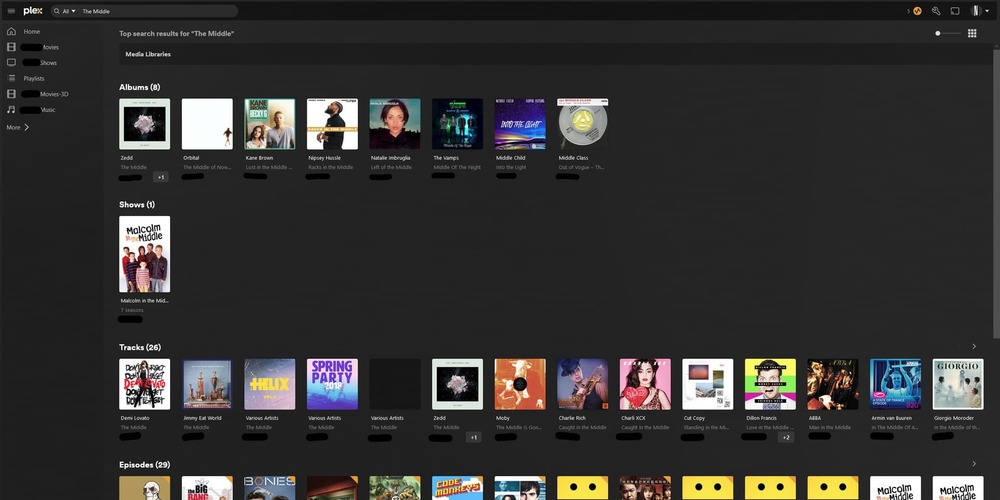
Idea #1 roll back search results to how they worked a year ago. If that is not feasible because it would upset the people that wrote the new search results and think they work great then,
Idea #2 let us search only specific types of files and specific libraries. If I am searching the name of a tv show, it gets burried under 10 results of tv episodes. Sometime I might want to search tv show episode names, but I want to be able to exclude them from the search as well. Or have the View More Results page have better filters than what is there now. I want to filter by Server/Library/Content Type (Not some generic Movies/TV Shows that includes individual tv show episodes in the results)
Yes thanks! took me a few hours to install PlexMediaServer-1.25.6.5577 on a different computer. But heck now thats its up and i have another plex server running, maybe i keep this one just to do searches…
In old plex, the show I am searching for is the 3rd result in Shows. In new plex, the show I am searching for is 18th in Movies & Shows. Behind a bunch of Movies and TV Episodes. It doesnt even show up in Top Results even though its an exact name match.
Also another annoying feature about the new search results is multi select. If you want to select lots of things at once to edit tags, you have to look closely at each item to see which library it is in. If you select items in the single search results panel that come from multiple libraries you lose multi select editing.
First question to whatever UI designer thought this was improvement: Do you even use Plex?
Hi all! Thanks @Sinsid for kicking of the conversation.
A few things here on this thread to comment on.
First - it is possible to limit your searching to only a specific server or set of data. In the main search box at the top of the screen (on web, also can confirm it is the same on Android, don’t have an apple device close to confirm but it should work the same there) you can filter down to a specific server if you want. Search is hard and in our research in working on it we found that different people use it for different reasons and we tried to account for as many use cases as possible in the work there.
Second - it is not possible to revert. The changes are too widespread to gate them in a way that we can offer an easy way to switch back and forth. The goal here was to try and present the best answer to any search query in the first dataset returned, this is also why the results are mixed together as is noted in this thread. We are not walking away from this - there are follow-up efforts to continue iterating on search to make it even better in the future.
As for a few specific comments in here: @Sinsid : Idea #2 let us search only specific types of files and specific libraries.
I answered this in my First comment above for specific servers. As for specific file types, I will add it to our discussion list as this would be something specific for server searches to consider.
@beckfield in the previous Search, TV shows and episodes were separated
Yup, and now they aren’t. I touched on this in my Second item above. Overall the search is much, much better at finding a specific title or person but we aren’t done yet with our efforts to improve things here.
@Sinsid Also another annoying feature about the new search results is multi select.
This is some good feedback. We are actually looking at this from the server side to see how we can improve our server/metadata management features and I think this one belongs over there. The goal would be to have the best experience possible when managing media and metadata for a server.
@GoingGaGa an you escalate and find out how this can be reverted?
This is not something that can be reverted. Search is a pretty complex experience from multiple sources and because of the complexities, it isn’t something we can toggle easily to allow for different experiences.
@McWanke Thanks for whatever you can do to fix it.
The above is an example of search absolutely not working. It would be like if Google put the thing you probably wanted from search on page 4 of their search results.
I just ran into another one. Ghosts. Season 5 just came out and I decided to see if I had the earlier seasons. I was pretty sure I do. Ghosts (The TV show) came up 32nd in the Movies & Shows list… I cant possibly see how that can be considered “working”.
Could you provide a screenshot of your results in a DM? One for Ghosts and for your previous example Wolf. This might shed some light as to why these results are being pushed so low.
Don’t think much explanation is required, as the images pretty much speak for themselves. But if I had to describe it, the new search lacks information density in the single display mode it supports and has no clear visual delineation between media types like episodes, shows, and films.
For example, it is now very challenging to know if I have recorded a specific show as I need to manually go through the library view. In the past I could tell immediately since the row for shows would lack the item I was looking for. Obviously there are many other issues with the downgraded search display, but that is a concrete example I would say is fairly easy to see by viewing the above example screenshots.