I have a plex server with in integrated Intel HD 610 and also a NVidia GPU in my windows 10 Plex server. I threw the GPU in to mine since the PC is on 24/7. The HD 610 is set to primary in the Mobo but plex is using both GPUs for video decode. The Nvidia is at about 20 percent used while the HD 610 sits closer to 10 percent used. Unfortunately if I’m mining the transcode stutters terribly because the Nvidia card is maxed out but plex is still trying to use it.
Any way in windows or in plex to force plex to only use the Intel Quick Sync on the 610 instead of splitting the workload up between the two GPUs?
Thanks
Thanks for the quick reply. It… kinda works. If I choose “power savings” Intel 610 it will still use both. If I selcet “high Performance” Nvidia GPU then it will completely offload the decoding to the Nvidia GPU and not use the G610. Perhaps the Intel HD 610 not powerful enough for trascoding higher res stuff like 4k? It only shows the Decode feature 10-15 percent used and the 3d 10 percent used.
The “let windows decide” option also uses both.
AFAIK, Plex uses only one GPU, then falls back to CPU (software) encoding. However, I no longer run Plex on Windows, so I could be wrong.
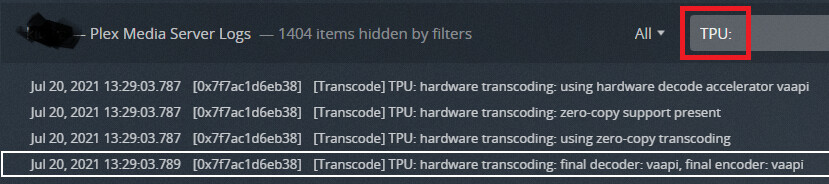
You can verify the GPU used by a) looking in the log files or b) filtering in the console (Settings → Console).
The relevant line contains TPU: and lists the final decoder & encoder. The list of decoder/encoders is in the Tech Specs section of Using Hardware Accelerated Streaming.
Example from PMS on my Synology NAS (Linux) showing Intel Quick Sync used for decoding & encoding:
HD 610 Graphics supports decoding of H.264 (8-bit) and HEVC (8 & 10 bit) up to 4K resolution, and encoding to H.264 8.bit (When transcoding, Plex transcodes all video to H.264 8-bit). According to Wikipedia, it was deployed on Pentium/Celeron/i3 processors.
When hardware transcoding, Plex still uses the CPU to direct stream (remux) the media and, if necessary, to transcode audio. Also, Plex must read/write to a temporary location (usually a SSD or HD).
Basically, there is a lot of data moving around the system when transcoding, especially with 4K video. Adding mining to the mix only exacerbates the situation. It is possible contention for limited system resources (bus/memory bandwidth, etc) results in buffering/stuttering. If the GPU or CPU is forced to wait for data to process, its utilization will be lower than expected.
You may have to pick between mining and running Plex Media Server or run your mining software during hours when Plex usage is minimal. If the issue occurs only when transcoding 4K media, you might move 4K media into separate libraries and not share/play it on devices where it must transcode.
thanks again for your reply. I think you’re right It will be easier just to stop mining whenever I need to transcode something in 4K. The mining thing on the side was just a fun tinkering thing with an old graphics card I had laying around, and I figured why not make a buck or two a day on top of paying for the electricity of my 24/7 plex media server. I also rarely need anything but direct play l, and I can remotely disable mining if I need to. I’ll check out the logs and probably tinker a little bit more for fun, but at the end of the day I’m betting that it’s going to be a lot more trouble than it’s worth to try to sort it all out. It seems more of a windows/hardware issue than a plex one. thanks again.
I never could get this working. I use a 7700k Cpu with Intel HD 630 iGPU. If I completely remove the GTX 1050 2 GB from the PC, the HW transcoding works great, including 4K streams. The moment I put the GTX 1050 in the system the HW transcoding will stutter and surprisingly display a
“your connection to the server is not fast enough…” message. If the 1050 is in the system than no matter what I do Plex attempts to use it as well as the iGPU and it stutters and displays the connection error.
Attempting to play a HEVC 4:2:0 file which according to this chart the 1050 should be able to play.
Discovered a workaround. For some reason Plex Transcoder would attempt to use both integrated and discrete gpu. GTX 1050 was casuing stuttering even though the Quicksync HD 630 is more than capable of running things smoothly.
Crappy solution is to physically remove GTX 1050 from the pc
Alternate fix is to start PMS then go into device manager and disable GTX 1050. PMS will use only the HD 630 and everthing works perfectly. 4k Transcodes ect.
Then go back into device manager and re enable GTX 1050. PMS will continue to use only HD 630 iGPU (perhaps untill restart?) and I can mine/game/whatver on the GTX 1050 while plex continues to transcode with iGPU.
Seems like it should be a simple addition from developers to allow you to select GPU device under the transcoder options and force plex to use it instead of allowing windows to dictate resources. No matter what I tried I could not get windows to assign the iGPU to PMS or the PMS transcoder .exe.
yep already tried this. I assigned Plex Media Server and Plex Transcoder both to use igpu. It didn’t work.