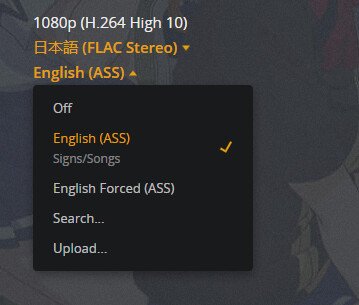
What you’re describing is an odd mix and not how I watch anime - forced subs are for default audio language - so maybe some clarification is needed here.
I watch anime in Japanese but with full subs because I can’t speak Japanese so I need the full sub track. Do you speak Japanese but want English forced subs for text and signs? That’s my assumption based on what you’re describing - and I’m not sure how you manage native English content with that setting (guessing as long as it doesn’t have a Japanese audio track it’ll just play English but you won’t get forced English subs for Orcs or Na’vi) - but it’s not clear and not how most folks watch foreign language content. *Not saying your way is wrong, just different than typical.
With this setting, you’re saying you want native Japanese language and English subs but forced would only trigger for Japanese subs flagged as forced because forced subtitles match the audio language. The forced is to put non-default language audio into default language text.
Split multiple language settings are hard to manage and I’ve seen other similar posts about foreign language content for native speakers of multiple languages. Since “forced” is an aspect of matching to the default audio selection, trying to get forced to automatically trigger for mismatched language tracks just isn’t going to work. In some cases, folks would create other user profiles with different language settings to get different default language options automatically but you can’t get Plex to know you want a language mismatch on purpose.
Three options I can see working for you.
Easiest to me would be if you select the mismatch on purpose in Plex and it will remember that setting. I have to do that for tracks that aren’t flagged correctly or I have an anime that has an English audio track that I want to watch subbed instead of dubbed (most of my anime is single audio track in Japanese). Once you set it, it’ll remember to playback that way.
The medium difficult one would be to get an external English forced subs SRT file and re-label it as JAP and Forced and with Japanese set as your default audio, it’ll pick that subtitle track and display English for signs and text for you (though not pretty if you’re expecting SSA subs).
The harder one would be to remux the files and label the embedded subtitle tracks “wrong”. Flag the English forced subs track (for signs and text) as Japanese. With your audio language set for Japanese it will trigger Plex to pick the Japanese forced subs track and show the English text on screen.
Personally I’d go with just flipping the option in Plex manually because remuxing like that would be annoying to me and will also break those files for anybody else wanting to watch them (and will break it for anybody wanting to watch it in English with proper English forced subs). It’ll take less time for me to go through and flip the options in Plex when I add content to my library than it would to go download or remux with incorrectly flagged tracks.
If it was working for you in the past - what might have changed is if the “forced” option in account settings was set to go off the subtitle preference instead of the audio preference. I could see it, in the past, going off the subtitle preference. Personally, if it did that, I’d see that as an incorrect implementation - broken standard - but would have seemed like a functional feature for folks in your situation.
Edit: Just saw your post about having 30,000 episodes… I can see why this change for your assumed situation (Japanese audio with English subs but only for Japanese onscreen text) would suck and in which case I don’t have much of a suggestion for you because it seems a bug was a helpful feature for you.