Played around with it some and I think I’ve solved it.
Here is what I’ve done so far:
Using shell from webinterface I accessed the plex jail:
iocage console plex
Note: important that plex is not running or it will recreate the folders/files. For some reason when I stop the plex media server from the webinterface the jail is also stopped. Using the command above to access the jail starts the jail AND plex. I basically had to stop the service from within the jail shell.
service plexmediaserver_plexpass stop
Trashed everything in /mnt/iocage/jails/plex/root/usr/local/plexdata-plexpass/Plex Media Server/
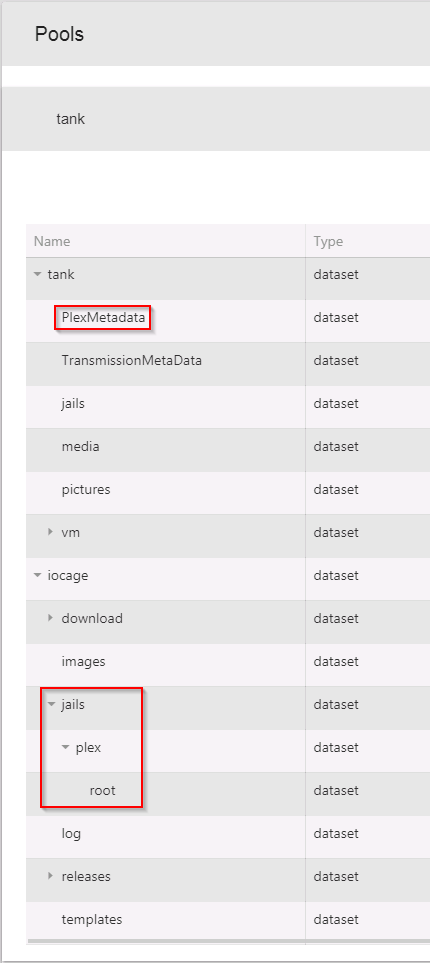
Then I used the webinterface to mount PlexMetadata dataset to the plex jail:
Source: /mnt/tank/PlexMetadata/Library/Application\Support/Plex\ Media\ Server/
Destination: /mnt/iocage/jails/plex/root/usr/local/plexdata-plexpass/Plex\ Media\ Server/

Plex did not start after this and I assumed it had something to do with permissions.
root@freenas:~ # ls -la /mnt/tank/PlexMetadata/Library/Application\ Support/Plex\ Media\ Server/
total 27
drwxrwxr-x+ 13 1000   1000     14 Oct 18 10:17 .
drwxrwxr-x+  3 media  media     3 Mar 27  2017 ..
drwxrwxr-x+  6 1000   1000     16 Oct 18 10:17 Cache
drwxrwxr-x+  3 1000   1000      4 Oct 18 09:47 Codecs
drwxrwxr-x+  3 1000   1000      3 Mar 27  2017 Crash Reports
drwxrwxr-x+  4 1000   1000      4 May 31  2014 Library
drwxrwxr-x+  3 1000   1000     66 Oct 18 10:16 Logs
drwxrwxr-x+  8 1000   1000      8 May 31  2014 Media
drwxrwxr-x+  4 1000   1000      4 Jun  1  2014 Metadata
drwxrwxr-x+  7 1000   1000      7 May 31  2014 Plug-in Support
drwxrwxr-x+  7 1000   1000      7 Oct 10 02:48 Plug-ins
-rwxrwxr-x+  1 1000   1000   1588 Oct 18 10:17 Preferences.xml
drwxrwxr-x+  2 1000   1000      2 May 31  2014 Scanners
drwxrwxr-x+  3 1000   1000      3 Aug 16  2015 Thumbnails
root@freenas:~ # cat /etc/passwd
root:*:0:0:root:/root:/bin/csh
daemon:*:1:1:Owner of many system processes:/root:/usr/sbin/nologin
operator:*:2:5:System &:/:/usr/sbin/nologin
bin:*:3:7:Binaries Commands and Source:/:/usr/sbin/nologin
tty:*:4:65533:Tty Sandbox:/:/usr/sbin/nologin
kmem:*:5:2:KMem Sandbox:/:/usr/sbin/nologin
games:*:7:13:Games pseudo-user:/:/usr/sbin/nologin
news:*:8:8:News Subsystem:/:/usr/sbin/nologin
man:*:9:9:Mister Man Pages:/usr/share/man:/usr/sbin/nologin
sshd:*:22:22:Secure Shell Daemon:/var/empty:/usr/sbin/nologin
smmsp:*:25:25:Sendmail Submission User:/var/spool/clientmqueue:/usr/sbin/nologin
mailnull:*:26:26:Sendmail Default User:/var/spool/mqueue:/usr/sbin/nologin
bind:*:53:53:Bind Sandbox:/:/usr/sbin/nologin
proxy:*:62:62:Packet Filter pseudo-user:/nonexistent:/usr/sbin/nologin
_pflogd:*:64:64:pflogd privsep user:/var/empty:/usr/sbin/nologin
_dhcp:*:65:65:dhcp programs:/var/empty:/usr/sbin/nologin
uucp:*:66:66:UUCP pseudo-user:/var/spool/uucppublic:/usr/local/libexec/uucp/uucico
pop:*:68:6:Post Office Owner:/nonexistent:/usr/sbin/nologin
www:*:80:80:World Wide Web Owner:/nonexistent:/usr/sbin/nologin
nobody:*:65534:65534:Unprivileged user:/nonexistent:/usr/sbin/nologin
avahi:*:200:200:avahi user:/nonexistent:/usr/sbin/nologin
messagebus:*:201:201:messagebus user:/nonexistent:/usr/sbin/nologin
ftp:*:14:14::/nonexistent:/bin/csh
auditdistd:*:78:77:Auditdistd unprivileged user:/var/empty:/usr/sbin/nologin
hast:*:845:845:HAST unprivileged user:/var/empty:/usr/sbin/nologin
ladvd:*:79:78:ladvd user:/var/empty:/usr/sbin/nologin
webdav:*:666:666:WebDAV Anonymous User:/var/empty:/usr/sbin/nologin
media:*:1001:816:media:/mnt/tank:/bin/csh
plex:*:972:972:plex:/nonexistent:/bin/csh
consul:*:469:469:Consul Daemon:/var/tmp/consul:/usr/sbin/nologin
nomad:*:472:472:Nomad Daemon:/var/tmp/nomad:/usr/sbin/nologin
minio:*:473:473:Minio Daemon:/var/tmp/minio:/usr/sbin/nologin
netdata:*:302:302:NetData Daemon:/var/cache/netdata:/usr/sbin/nologin
nslcd:*:389:389:Nslcd Daemon:/var/tmp/nslcd:/usr/sbin/nologin
So, since there are no UID/GID 1000 and since public don’t have write I’m thinking this makes sense. But then again, permissions confuse me. Nevertheless:
chown -R 972:972 /mnt/tank/PlexMetadata/Library/Application\ Support/Plex\ Media\ Server/
Plex starts and I’m able to access the web interface. It’s now using the PlexMetadata dataset.
Now I just need to mount my libraries.
I’m thinking I’ll probably run into some kind of permission based problem down the road… I always do.
Still, Yay!