Server Version#: 1.16.6.1592
Player Version#: N/A
Hi
I’ve read a few posts with the same error but their troubleshooting hasn’t led me to a fix.
Server was working fine one day, turn it on the next and I can’t access the Plex web interface via ip::32400/web as it comes back with ERR_CONNECTION REFUSED in Chrome.
Tried restarting the server, tried looking at the logs but they stopped updating on the 4th at 09:00. I’m sure this was after the access issues but can’t remember.
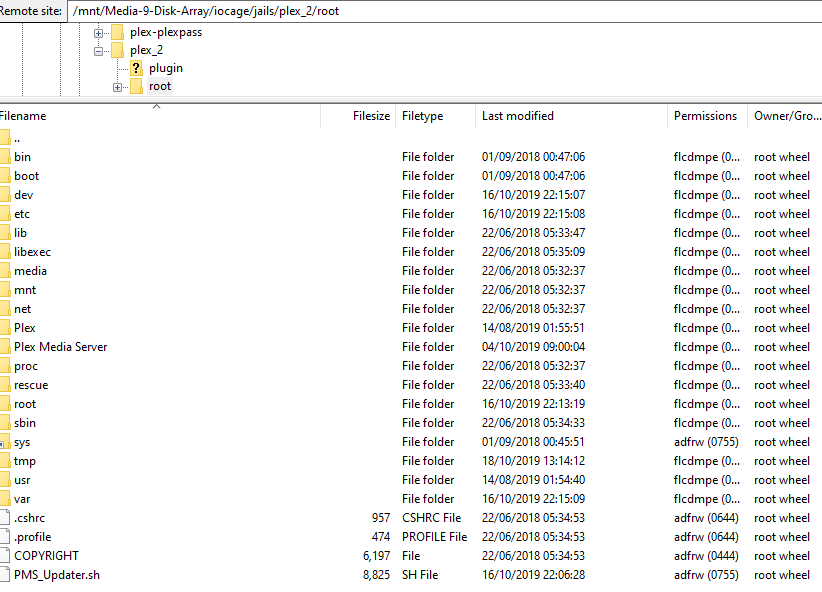
I’ve created a new iocage jail and installed the plex plugin again and this works fine (had issues with “Match” working but followed this vid to sort that.)
I’ve gone into the jail’s shell and ran sockstat -l46 and it returns empty.
Ran netstat -r -n , looks the same as the test Plex Plugin
plex_2 - Original currently not working
plex-plexpass - New and working
Server Output
root@plex_2:~ # ifconfig
lo0: flags=8049<UP,LOOPBACK,RUNNING,MULTICAST> metric 0 mtu 16384
options=600003<RXCSUM,TXCSUM,RXCSUM_IPV6,TXCSUM_IPV6>
inet6 ::1 prefixlen 128
inet6 fe80::1%lo0 prefixlen 64 scopeid 0x1
inet 127.0.0.1 netmask 0xff000000
nd6 options=21<PERFORMNUD,AUTO_LINKLOCAL>
groups: lo
epair0b: flags=8843<UP,BROADCAST,RUNNING,SIMPLEX,MULTICAST> metric 0 mtu 1500
options=8<VLAN_MTU>
ether 02:ff:60:38:24:6c
hwaddr 02:7c:d0:00:08:0b
inet 192.168.35.25 netmask 0xffffff00 broadcast 192.168.35.255
nd6 options=1
media: Ethernet 10Gbase-T (10Gbase-T )
status: active
groups: epair
root@plex_2:~ # netstat -r n
netstat: kvm not available: /dev/mem: No such file or directory
root@plex_2:~ # netstat -r -n
Routing tables
Internet:
Destination Gateway Flags Netif Expire
default 192.168.35.1 UGS epair0b
127.0.0.1 link#1 UH lo0
192.168.35.0/24 link#2 U epair0b
192.168.35.25 link#2 UHS lo0
Internet6:
Destination Gateway Flags NetifExpire
::/96 ::1 UGRS lo0
::1 link#1 UH lo0
::ffff:0.0.0.0/96 ::1 UGRS lo0
fe80::/10 ::1 UGRS lo0
fe80::%lo0/64 link#1 U lo0
fe80::1%lo0 link#1 UHS lo0
ff02::/16 ::1 UGRS lo0
root@plex_2:~ # sockstat -l46
USER COMMAND PID FD PROTO LOCAL ADDRESS FOREIGN ADDRESS
root@plex-plexpass:~ # ifconfig
lo0: flags=8049<UP,LOOPBACK,RUNNING,MULTICAST> metric 0 mtu 16384
options=600003<RXCSUM,TXCSUM,RXCSUM_IPV6,TXCSUM_IPV6>
inet6 ::1 prefixlen 128
inet6 fe80::1%lo0 prefixlen 64 scopeid 0x1
inet 127.0.0.1 netmask 0xff000000
nd6 options=21<PERFORMNUD,AUTO_LINKLOCAL>
groups: lo
epair0b: flags=8843<UP,BROADCAST,RUNNING,SIMPLEX,MULTICAST> metric 0 mtu 1500
options=8<VLAN_MTU>
ether 02:ff:60:30:63:78
hwaddr 02:7c:d0:00:08:0b
inet 192.168.35.2 netmask 0xffffff00 broadcast 192.168.35.255
nd6 options=1
media: Ethernet 10Gbase-T (10Gbase-T )
status: active
groups: epair
root@plex-plexpass:~ # netstat -r -n
Routing tables
Internet:
Destination Gateway Flags Netif Expire
default 192.168.35.1 UGS epair0b
127.0.0.1 link#1 UH lo0
192.168.35.0/24 link#2 U epair0b
192.168.35.2 link#2 UHS lo0
Internet6:
Destination Gateway Flags NetifExpire
::/96 ::1 UGRS lo0
::1 link#1 UH lo0
::ffff:0.0.0.0/96 ::1 UGRS lo0
fe80::/10 ::1 UGRS lo0
fe80::%lo0/64 link#1 U lo0
fe80::1%lo0 link#1 UHS lo0
ff02::/16 ::1 UGRS lo0
root@plex-plexpass:~ # sockstat -l46
USER COMMAND PID FD PROTO LOCAL ADDRESS FOREIGN ADDRESS
plex Plex Scrip 17383 4 tcp4 127.0.0.1:45859 :
plex Plex Scrip 16757 4 tcp4 127.0.0.1:41540 :
plex Plex Scrip 16748 4 tcp4 127.0.0.1:21343 :
plex Plex Tuner 5788 11 tcp4 127.0.0.1:32600 :
plex Plex Tuner 5788 65 udp4 *:45046 :
plex Plex DLNA 5787 12 udp4 *:1900 :
plex Plex DLNA 5787 15 tcp4 *:1587 :
plex Plex DLNA 5787 18 udp4 *:7924 :
plex Plex DLNA 5787 21 udp4 *:2691 :
plex Plex DLNA 5787 24 tcp4 *:32469 :
plex Plex DLNA 5787 27 udp4 *:24709 :
plex Plex DLNA 5787 30 udp4 *:62402 :
plex Plex DLNA 5787 65 udp4 *:45046 :
plex Plex Scrip 5778 8 tcp4 127.0.0.1:52712 :
plex Plex Media 5745 60 tcp4 *:32400 :
plex Plex Media 5745 61 tcp4 127.0.0.1:32401 :
plex Plex Media 5745 73 udp4 *:32414 :
plex Plex Media 5745 74 udp4 *:32410 :
plex Plex Media 5745 75 udp4 *:32412 :
plex Plex Media 5745 76 udp4 *:32413 :
plex Plex Media 5745 77 udp4 192.168.35.2:13287 :
plex Plex Media 5745 78 udp4 192.168.35.2:58641 :
plex Plex Media 5745 79 udp4 *:1901 :
plex Plex Media 5745 80 udp4 192.168.35.2:25004 :