If I go to Settings > Manage Library Access I don’t see a “friend” I expect to see (Name: YourFriend, friend@aol.com)
I select ‘Grant Library Access’ and enter email address of “friend”. Once entered a message indicates, “friend@aol.com is already a friend”.
I have not been successful in finding an article, nor a review of the environment displays where the “friend” is listed. I am able to select her in ‘Activity’ to see if she has been active on the Server, but not reflected in the list on the ‘Manage Library Access’ screen.
I wonder if you might be caught by the same thing that confused me for a few minutes. I just discovered that the Plex Home and Friends have been split into two sections:
If you send a Friend request via “Manage Library Access” to someone who is in your Plex Home, you’ll get the “xxx is already a friend” message.
It took me a few minutes to realize what was going on. It might have come to me a bit sooner, but @tom80H’s screenshot threw me, until I realized that it is a screenshot from a Plex mobile app, rather than Plex Web.
from the URL tom80H posted above (which you can also get to by clicking on your avatar when use menu open) to see full friends list. After selecting the friend, click on this menu which will take you to where you can just check the libraries to give the existing friend access.
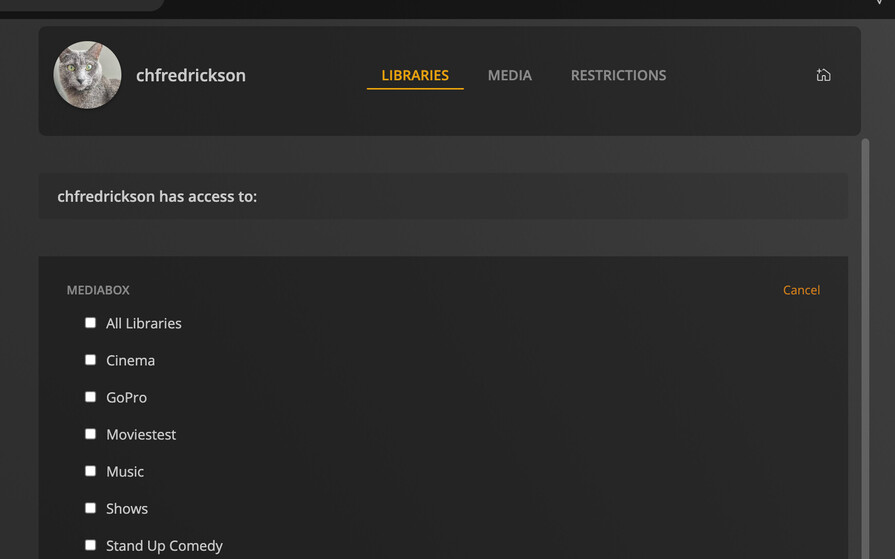
I have a different issue. I had mistakenly removed the libraries I’d given access to a friend, while trying to clean up my list. Now they don’t show up in the Manage Library Access, and this is the screen I get.
If your friend hadn’t set a dedicated user name for themselves, Plex will probably have done that recently – so you’ll probably no longer see their e-mail but their new username. Best contact them and ask them for that username to confirm which of those friends they are.