Is there anything in the future roadmap for Plex being able to natively play H265 without downverting it to H264? I have converted all my library to H265 for size and quality- just wish Plex would get onboard…
Plex natively plays H265 video.
Support depends on the client. For example, except for Safari, web browsers do not support direct playing H265 video.
Other constraints, such as bandwidth limitations, limited subtitle support, etc, may prevent Plex from direct playing any video, including H265.
Pixel 3a XL playing H265 SD & H265 4K HDR video:


4K HDR movies transcode when played on my Amazon Fire HD 10 tablet, as it does not support 10-bit H265 video (H265 SD is supported and direct plays):

Then why does every article online say otherwise? Everything I read says Plex converts every instance of H265 to H264- does on my server to, no matter what I play it on- Roku, XBOX Series X, tablets, iPhones- ect.
Maybe you can share the secret on how to get H265 to play without Plex needing to convert it to H264? Not trying to be rude- just curious. What are the settings within PMS? What settings are needed for the file itself? Safari you say plays without converting, why does it have to convert playing on my iPhone XR?
They are clearly incorrect. Many users play 4K HDR movies using Plex, which is H265/HEVC video.
Let’s grab some additional info and see what is happening.
A set of server log files is a good place to start.
-
Ensure your system is configured for debug level logging. Do not enable verbose logging.
Settings → Server_Name → General + Show Advanced
-
Restart Plex Media Server. Wait 2 - 3 minutes for the server to fully start.
-
Re-create the problem. Play a H265 video using one of the clients where it transcodes. Play for 20 - 30 seconds, then stop playback.
-
Wait two minutes for the server to settle and log everything.
-
Download the server log files (Settings → Troubleshooting), and attach the entire ZIP file to the thread.
-
Also include the XML Info for the media you played. Save the file as a .txt or .log, or zip it. The forum does not support .xml attachments.

EDIT: When you play the video, play it without subtitles. Also, if possible, use a local client, one on the same network as the server (vs remote over the Internet).
Just reducing the number of variables to troubleshoot. Some subtitle formats can cause video transcodes. Also, no worries about bandwidth restrictions for remote clients.
I’ve no special settings on my server or clients.
WRT Safari, according to caniuse.com, Safari supports HEVC/H265 video. However, I cannot personally confirm that it works. My Mac is old enough that H265 video is not supported. Also, it would only work for SDR video. Plex Web does not support HDR video.
Here you go…
One other thing…I have noticed (and found this somewhere online sometime back) that if I unselect “Direct Play” in Video Settings, it will help with juttery H265 files. So I generally keep this unchecked to prevent jutter. However that is only on certain client apps.
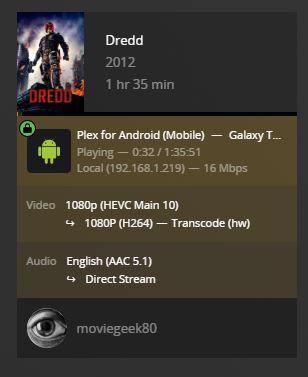
Dredd (2012) XML Info (XML).txt (53.2 KB)
Plex Media Server Logs_2022-07-30_13-45-57.zip (3.0 MB)
I also ran it on Roku. Same film, new logs below…
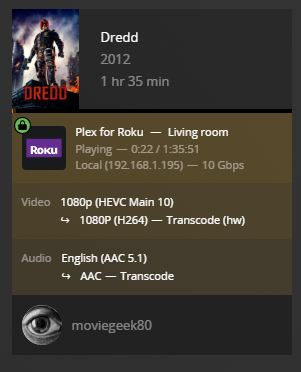
I tried scanning the logs. I don’t know what to look for, but I found a few lines that sound like direct play is disabled. Direct Play (on the client OR server side) is what allows the server to send up the file as-is and play it on the local device. If you turn that off, Plex is forced to transcode the video, and it always transcodes to 264 (since 265 real-time transcoding is too hard).
You said something about the video being… “juttery” with direct play on? Might need to look into that.
Correct. I normally leave the settings on the clients as default…but since I have gone almost 100% to H265, I’ve had to research a way to prevent the slight stuttering of playback. Only solution I found was uncheck the Direct Play box under video options for the Roku and XBOX apps.
Bonus Question: Would moving away from Roku to an Nvidia Shield help with this issue as it handles H265 better, or not?
I don’t mind transcoding everything if I have to, but optimally, the less transcoding the better on your hardware longevity.
Well, turning off Direct Play will force the server to transcode. Then it’d be good to find out why it feels “jittery” on the device.
I know my Nvidia Shield plays 265 flawlessly (but it does take up to a second to skip around. It seems to just be a symptom of how long it takes to decode from a key frame), so if you would like to upgrade your player that would be a good one to pick. The Android player apps have occasional issues, so if you never encounter oddities in Roku you need to be aware. Most of them can be fixed by just restarting the app.
I do not know the capabilities of the Roku players. I tried looking for a support article for it, but all search results keep taking me to the “Smart TV” player capability list, but not other devices. I would imagine if it can play 265, then it should play it smoothly. Is it a Roku TV, or a Roku player? How old is it?
For the Galaxy Tab A8, it does not support 10-bit HEVC video:
Jul 30, 2022 13:44:05.876 [3936] DEBUG - [Req#150/Transcode] Dredd - video.profile limitation applies: main 10 != main [list]
I searched online, but could not find any details regarding which codecs the tablet supports. There were posts regarding issues with HEVC video, but it was unclear of the root cause.
You might try encoding the video as 8-bit HEVC to see if that direct plays. You could encode just a short section as a test instead of the entire movie.
I’ve never used it, but Plex Android Mobile does support using an external player (Settings → Advanced → Player). You might try using VLC or another player. VLC will decode the video in software, hitting the tablet CPU. If the CPU cannot keep up it will stutter.
It’s a Roku 4K ( box 1st gen, not the stick). I typically only use devices that have Ethernet ports as my whole house is wired with Cat6. I rely on WiFi as little as possible.
I have tried the external media player option on the Samsung Tabs, but wasn’t a fan. I’m re-coding all the movies that I want on the tabs to H264 now… 
I do not have a Roku, so my knowledge of them is limited.
You’ve disabled Direct Play, which forces Plex to Direct Stream (remux) the media.
Plex cannot direct stream the video, so it has to transcode it.
Jul 30, 2022 14:10:15.003 [6776] DEBUG - [Req#d29/Transcode] MDE: Cannot direct stream video stream due to profile or setting limitations
I’m not sure why Plex cannot direct stream the video. It could be due to a Roku setting, limited device capabilities, or I might be missing something in the log files.
Suggestion: Re-enable Direct Play on the Roku and see what happens. If the video still transcodes, try playing an 8-bit HEVC video.
The video stutter issue can be worked on separately. Need to find out why the video is transcoding first.
Regarding Shield: I’ve a 2015 Shield Pro and it direct plays everything I toss at it. I don’t have any 10-bit HEVC SDR media, but it plays 4K HDR movies without a problem. .
Shield <–> Denon receiver <–> LG 4K OLED
“I know my Nvidia Shield plays 265 flawlessly…”
So it doesn’t transcode for H265?
Direct playing an 80 Mbps, 4K HDR Blu-ray rip with DTS 7.1 audio passthrough to the receiver (TrueHD + Atmos will also passthrough).
Plex Dashboard:

Tautulli:
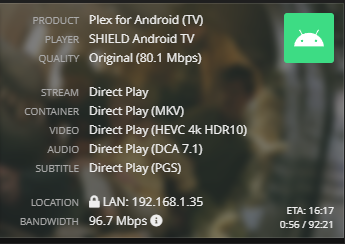
…and its handling 10 bit depth like a pro with no transcoding. Which model Shield do you have?
I have the 2015 Pro model. If you get a Shield, get the Pro. The non-Pro “tube” model has problems with high bit rate media such as 4K remuxes.
Sweet! I have been looking at those online. I think I know what to do to fix my issue now- at least with the Roku anyways. I hate to remix everything…
Thanks for your help on this topic. This has by far been the best experience I’ve had on Plex Forums since joining Plex 10 years ago.
