Here’s the details:
Windows 10 Pro 64 Bit.
All music files created from CDs using Exact Audio Copy.
All music files either WMA Lossless or FLAC.
Right click on any WMA or FLAC file to check properties>details and the correct genre is listed.
Use Plex to sort Music by genre and it only works on the WMA Lossless files. All FLAC files are ignored.
Can this be fixed? I’m pretty certain the FLAC files are not the problem. Thanks!
This is very confusing. Plex doesn’t track genres at the file level. It only applies genres to artists and albums. Further, Plex has no facility to sort by genre, so I can’t figure out what you’re talking about.
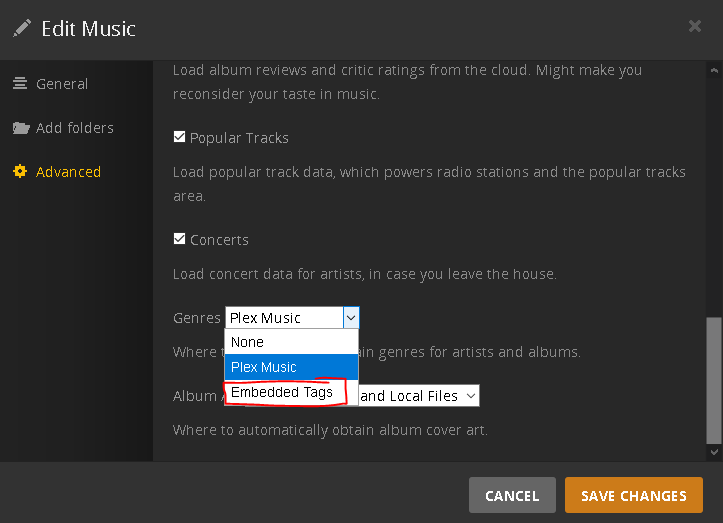
The Flac files are a problem with Plex. Plex will read the embedded tags for each file and apply them to the album the tracks are from. Plex doesn’t store individual track genre.
Plex then applies the genres from the Album(s) to the artist. (Sometimes a refresh metadata is required at the Artist level) This works for all formats, except flac.
You should see all available genres in the “Albums” view, but if you use the artist view, genres from flac files will not be available.
It’s apparently a server bug, and apparently fixed in an upcoming release.
I believe that the only place you can have genre entered in metadata is at the individual song file level. The “album” and “artist” are just folder names, although I know that information is also in the file’s metadata.
You’re wrong about not being able to sort by genre in Plex. It doesn’t work when you’re looking at artists. But it does when you’re looking at albums. Choose albums, then change “All” (before the word “Albums”) to Genre and you can choose the subtype of genre. Here’s a screenshot for the Heavy Metal genre.
My problem is similar, but not exactly as you describe. In “Artist” view, I don’t have an option to sort by genre. Perhaps that’s OK, since a “rock” artist could release a “Christmas” album. In other words, artists can have more than one genre depending on the album or even just the specific song.
But generally, a genre does apply to an entire album. I can sort by genre in album view, but I won’t see any FLAC files by genre. I can see those same FLAC albums by sorting by album title however. They are all added to my library, and I can find them, just not when choosing their genre however.
As mentioned above, Plex does not use genres at the track level. So the genre tag you have in your file will be used for the album. However, Plex does not read tags from flac files, so these are ignored in your case. If these were mp3 files, the genre info would be used for the album.
That makes perfect sense. But is it not possible to change Plex so that it will read the FLAC tags? FLAC is a pretty common, major file format for music after all.
Plex can definitely read FLAC tags (Vorbis Comments), at least Artist, Title, Album, Year etc. I’m pretty sure it does Genre? Testing now.
(edit: yes, Plex does read the Genre tags from FLAC files with Vorbis comments. Are you perhaps using alternative tag formats (APE? id3?) with your FLAC files instead of Vorbis comments?)
There are however serious limitations: Apparently, it took only the genre from one of the tracks.
So, if your album has only one genre, and you embed it into all of the track files it should work.
If each of the tracks has a different or more than one genre, it probably won’t.
I guess I know very little about various tag formats and how to control them. I create all of the FLAC files using the very old program Exact Audio Copy. It creates the tags automatically. When I look in the settings, there are many different ID3 options you can choose, i.e. ID3 v1, v1.1, v2, v2.4.0, v2 using UTF16. I see no option for Vorbis Comments. Is there a better way to rip CDs and confirm no errors than EAC? When I started ripping CDs decades ago, it was considered the best.
EAC is fine for the most part.
But you need to usually edit the tags it creates afterwards a bit.
add an Album Artist tag, particularly when there are tracks with different artists within the same album
additionally on multi-disc albums, you usually have to add or correct
the Album Title tag (to remove references to “Disc X” and unify the album title across each disc)
the Disc Number tag
Disable the checkbox “Use ID3 V2.4.0 tags instead of ID3 V2.3.0 tags”
(this has only an effect when creating mp3 files though. For creating lfac files, EAC is using an “External Compression” command line, which passes the meta tags as arguments for the flac.exe binary)
I recommend you to add mp3tag to your toolbox. It’s free and powerful.
Does EAC create id3 tags with FLAC files? I’d have to check but for many years, the standard format for FLAC tags is Vorbis comments, not id3 tags. In that case I’m not surprised that Plex has issues with them. I agree that a modern tagger like mp3tag is your friend here.
BTW @OttoKerner, are you sure about not using id3v2.4? v2.3 has some annoying limitations with multivalued fields and should really be depreciated. As far as I know Plex supports v2.4 just fine?