Server Version#: Windows 1.41.1.9057
Player Version#: 8.41 (9404)
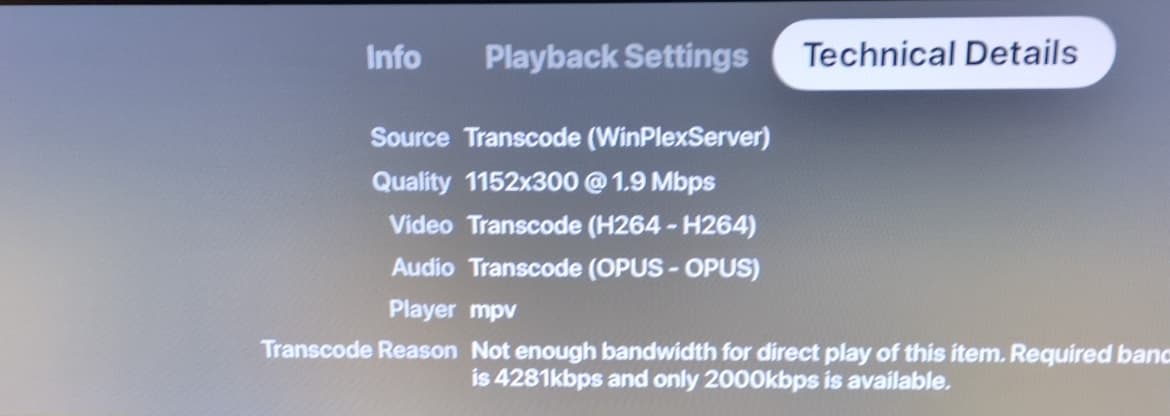
This is a weird one, reported by a remote user. They have a Sony Bravia and are using Plex on an Apple TV. I have a bunch of DVD rips… these are 480p content, 720x480. Some are several years old, and used to work fine on this set up. But now (see attachment), they are being played at strange resolutions and stretching the content. Files play fine on every other client I was able to check. It’s not just this one file but seemingly all (we tried five while troubleshooting, including a 1080p blu-ray rip). Any thoughts on where to start? I’m happy to attach logs if you think they may help.
Could you take a look at the plex media info and see if the video is stored “anamorphic”?
Hi @OttoKerner I looked at it on my end and I can see that it’s set to true, which makes sense because I can see that in my Handbrake settings. I always thought that was a good thing… is that causing me pain here? Never had an issue before. Should I have the remote user verify the same through the app?
It was a technical crutch to accomodate both 4:3 and 16:9 video pictures on DVD.
What it means is that the pixels ripped from DVD are always non-square. And the player then has to stretch the picture suitably to the square pixels of practically all displays.
And this has always been a source of trouble.
I assume it has once again reared its ugly head.
We just need to confirm whether it’s solely an issue on the ATV, or if it’s something connected to the server version.
Could you verify with other player types that it only affects the ATV?
(best to trigger transcoding by either selecting a really low bitrate or disabling direct play and direct stream in the player’s preferences)
Hi @OttoKerner, thank you for getting back to me. I have tested transcoding on the following devices and have confirmed that I’m not seeing the issue:
- iPhone iOS
- Samsung smart TV
- Amazon Firestick
Please let me know if there’s anything else from my end that can help.
Thank you for confirming that it’s indeed isolated to the ATV.
Now if you could collect log files from a playback attempt, I can add them to an official bug report.
Please enable “debug” logging (but NOT “verbose” logging) on both server and client before the playback test.
After the playback test (let it play for ~1 minute), immediately fetch both server and client logs.
https://support.plex.tv/articles/212639598-apple-tv-logs/
https://support.plex.tv/articles/200250417-plex-media-server-log-files/
Hi @OttoKerner, please find both logs attached. I’ve redacted some things but I don’t think it should impact the team’s investigation. Note: we couldn’t find any explicit setting for debug on the Apple TV so are assuming that it’s on by default. If we’re missing that let me know what I should look for. Thanks again.
com.plexapp.plex 2024-11-07–16-06-37-383.log (911.6 KB)
Plex Media Server.log (892.2 KB)
I have filed a bug report.