Do you lose the UHD resolution when doing the conversions? i’m not so concerned about the quality for remote viewers, just for my own consumption over my wired Gigabit network
I personally would not convert 4K/UHD material to 1080 or 720 or anything. What I do is have a separate 4K library that is for IN HOUSE use only. I do’t share this library with anyone outside the house so bitrates aren’t a concern. I also make sure to only use clients that will direct play the 4K material.
I will load a 1080p version of the same media for streaming for others to use which will reside in my normal movie library.
When you get into 4K content you are after the absolute best picture/audi you can get and usually you will have the storage needed to store this info. It’s not something you want to allow anyone to play that can’t direct play it since this will cripple your server (unless HW transcoding) and not really produe better results then a good 1080p rip.
And this brings us back to my original problem: how do I stream UHD content without Plex transcoding it? No one has yet answered this. What client do you use, since Plex doesn’t seem to be able to manage it?
Plex will stream it via DirectPlay provided a) the TV / player will accept and internally perform all processing for:
- The container (MKV, MP4, etc)
- The video encoding . e.g HEVC HDR or H.264 HDR (which is not typically found in published material but part of the standard) . The listed XML shown earlier was H.264 10-bit. I had missed that point because it’s so rare.
- The audio encoding (which is where most get tripped up) is 100% accepted and decoded within the player
The answer? Whatever format your TV accepts… If your media isn’t within the limits of what the TV accepts, PMS WILL transcode it.
First, you need a capable client that matches the video you are trying to stream. In addition to containers & codecs, you must pay attention to the profile and level.
Plex Web does not support 4K content.
Plex Media Player for Windows does direct play 4K content, even if using a 1080p display (I tested w/ non-HDR demo file on my PC).
Clients such as native TV apps, Amazon Fire TV, and Nvidia Shield can play 4k content, but you must pay attention to their limitations.
For example, the AFTV Gen 3 supports H.264 4K, but at 30fps and only to High@4.1 profile (tech specs). Try to play anything beyond that, even with 1080p, and it will transcode.
Direct example: This transcodes on an AFTV Gen3 due to profile & level:
<Part accessible="1" exists="1" id="17857" key="/library/parts/17857/1520350895/file.mkv" duration="8626159" file="/Volumes/Aristotle/The Glory Hole/The Shining 1980 Uncut 1080p BluRay 10-Bit DTS-HD MA 5.1 x264-BluEvo/The Shining 1980 Uncut 1080p BluRay 10-Bit DTS-HD MA 5.1 x264-BluEvo.mkv" size="13698944340" audioProfile="ma" container="mkv" videoProfile="high 10"> <Stream id="40512" streamType="1" default="1" codec="h264" index="0" bitrate="11169" bitDepth="10" chromaLocation="left" chromaSubsampling="4:2:0" frameRate="23.976" hasScalingMatrix="0" height="1080" level="50" profile="high 10" refFrames="5" scanType="progressive" width="1920"/>
Second, don’t expect anything you torrent from the Internet to play without transcoding.
There is a ton of junk out there. You have no idea of the original source material. Even if it says 4K, somebody could have upscaled a 1080p. Also, many people posting movies don’t know how to correctly transcode things. Put in the wrong settings, and you’re off to Transcode City…
Direct example: The Shining, above.
The video on 1080p Blu-rays is H.264, High@4.1, 8-bit (rip one w/ MakeMKV and check w/ MediaInfo). There is no reason to modify to 10-bit. It gains you nothing. There is no reason to use high10@level5.0. It gains you nothing.
Transcoding reduces the amount of information. Increasing bit depth or profile & level is silly. You can’t add what isn’t there to begin with. A reasonable output for transcoding a 1080p blu-ray to H264 would be high@4.0 for 30fps or lower (4.2 for 60fps). See Wikipedia if you want more details: https://en.wikipedia.org/wiki/H.264/MPEG-4_AVC#Levels
Suggestion: Try 1080p & 4K content from some well known sources. See how it works on your system. If you run into issues, then people can try and recreate the problem using the same data.
Here’s some places to start:
Big Buck Bunny:
(2D in 480p, 1080p, 4K): http://bbb3d.renderfarming.net/download.html
4kmedia.org: Demo files from LG, Samsung, etc. Don’t use the HDR files unless you have a HDR TV. They will probably either not play or transcode to 1080p.
Jellyfish Bitrate Test Files: An easy way to test various codecs/profiles/levels/etc. Start with H264, 3Mbps and increase until things break.
I do have an HDR tv. So here is what happened when I tried to play Big Buck Bunny in 4K:
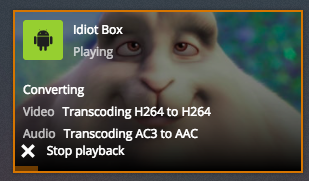
That was on the TCL UHD TV.
This is on the laptop:

And this when I attempt to play it through the Roku:

And this when I play it using the DLNA media player on the Roku:

Seems like the only thing they have in common is the Plex server. And this with a file that supposedly meets all the requirements for Direct Play in Plex. So what is going on here?
The Roku, BTW, is a Roku Ultra, purportedly 4k capable, connected via Gigabit ethernet and HDMI.
I have also included the Plex logs for more complete information.
I took a quick look through your logs and searched for “bunny” and didn’t find it at all.
So no one can tell you why these didn’t play.
However for a different movie I do see:
DEBUG - MDE: bbb_sunflower_2160p_60fps_normal (2013): Direct Play is disabled
Mar 11, 2018 13:25:08.086 [0x700000e65000] DEBUG - MDE: bbb_sunflower_2160p_60fps_normal (2013): media must be transcoded in order to use the hls protocol
Mar 11, 2018 13:25:08.086 [0x700000e65000] DEBUG - MDE: bbb_sunflower_2160p_60fps_normal (2013): selected audio stream is not the first audio stream and direct play stream selection is not enabled
Mar 11, 2018 13:25:08.086 [0x700000e65000] DEBUG - MDE: bbb_sunflower_2160p_60fps_normal (2013): no direct play video profile exists for http/mp4/h264/mp3
Mar 11, 2018 13:25:08.086 [0x700000e65000] DEBUG - MDE: bbb_sunflower_2160p_60fps_normal (2013): no direct play video profile exists for http/mp4/h264/ac3
Mar 11, 2018 13:25:08.086 [0x700000e65000] DEBUG - bbb_sunflower_2160p_60fps_normal - video.width limitation applies: 3840 > 1920
Mar 11, 2018 13:25:08.087 [0x700000e65000] DEBUG - MDE: bbb_sunflower_2160p_60fps_normal (2013): Direct Streaming is disabled, so video stream will be transcoded
Mar 11, 2018 13:25:08.087 [0x700000e65000] DEBUG - MDE: bbb_sunflower_2160p_60fps_normal (2013): no remuxable profile found, so video stream will be transcoded
Mar 11, 2018 13:25:08.087 [0x700000e65000] DEBUG - MDE: Cannot direct stream video stream due to profile or setting limitations
Mar 11, 2018 13:25:08.087 [0x700000e65000] DEBUG - Scaled up video bitrate to 12004Kbps based on 1.500000x fudge factor.
Mar 11, 2018 13:25:08.087 [0x700000e65000] DEBUG - Scaled maximum bitrate for resolution reduction to 3001Kbps.
Mar 11, 2018 13:25:08.087 [0x700000e65000] DEBUG - MDE: bbb_sunflower_2160p_60fps_normal (2013): Audio Direct Streaming is disabled, so video’s audio stream will be transcoded
Mar 11, 2018 13:25:08.087 [0x700000e65000] DEBUG - MDE: Cannot direct stream audio stream due to profile or setting limitations
So this seems to indicate direct play is turned off?!?!?
I THINK Direct Play is turned on. Under the Debug menu, I certainly have it activated. [see attached] But I seem to remember there was another setting for it somewhere else, and I have seen pictures her ein the forums of another button somewhere which I cannot find on my current Plex page.

And here is a page I cannot find in my Settings, for whatever reason (screenshot from the Plex Forums):
BTW, ‘bb_sunflower’ is the filename for Big Bunny Buck
Unless you require remote use then transcoding should be avoided at all costs not least because of the degradation in quality. Pre-transcoding seems an awful lot of effort to go to when one of the great beauties of Plex is that it is designed to do it on the fly for you.
Personally I would just choose a decent client & use the best quality media possible not some dumbed down lowest common denominator.
@webwebster The page you can’t find is from within the client app itself (Roku, TV app, etc). You’ll need to check each client individually. They’ll each look slightly different based on the capabilities of the client.
@FordGuy61 said:
@webwebster The page you can’t find is from within the client app itself (Roku, TV app, etc). You’ll need to check each client individually. They’ll each look slightly different based on the capabilities of the client.
I found something like it on the Roku app, but nothing relating to Direct Play in the Android TV app. I can set home streaming to Maximum and Adjust Automatically under Video Quality, but nowhere in the app setting can I set to Direct Play or Direct Stream. The Android app is version 6.14.1.3753. I understand that it may be that I need to use a previous version of ExoPlayer, but I would have no idea how to install such a thing inside the Plex app.
