I added about a dozen channels and mapped them during my initial setup of my live tv feature. I didn’t want to map all of my channels yet. Now that my dozen channels are working just fine, how can i get back to the mapping section to finish mapping my other channels?
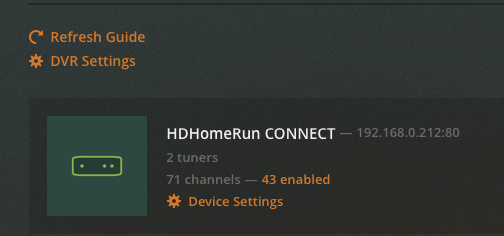
In the Plex web client, navigate to Settings -> Live TV & DVR, and then click on the “X enabled” link in the middle of the page. Once there, a list of all the scanned channels will show on the left; you can map them to a guide channel using the drop-downs on the right.
Settings can be accessed from the crossed wrench and screwdriver icon at the top-right of the web client.
I was describing how to get to the page you landed at (the wrench and screwdriver icon is a way to get into settings). Unfortunately, I have no experience with xTeVe. When using a hardware-based tuner, the screen you show there has the link I described where you can map additional channels:
Clicking on “43 enabled” brings up the dialog to edit the mappings:
It’s possible that with xTeVe you need to delete the DVR and re-add it to map channels again. However, as I have no experience with xTeVe, I’ll defer to someone who does.