Green screen during movie playback

Server Version#: 1.41.7.9717
Player Version#: 4.145.1

Plex Media Server (https://app.plex.tv) playback on Windows 10/11, Chrome and Firefox.

I’m having this issue now with a LOT of videos. Many that worked fine before and still work in VLC will NOT play through Plex, especially on Windows machines. I even purchased the HEVC codecs for Windows, and I can play the videos using windows media player.

For me it seems to be affecting H.264 encoded files as well as H.265. It happens with MP4 and MKV files. I tried using the alternate streaming profile under the debug menu thinking it was related to the browser, but that didn’t have an effect either. I tried changing the playback qualities in the player from original to automatically convert, but nothing is working. I can still play the videos all the way through in VLC, so they are not corrupt!!! Also, the videos play fine on my Sony Google TV.

It doesn’t appear to be the audio stream either. Same thing is happening with AC3, DTS, Dolby. Tried forcing the 6-channel audio for Chrome browsers but that didn’t have an effect either.

From a recent video:

  • Codec H264

  • Bitrate 3984 kbps

  • Bit Depth 8

  • Chroma Location left

  • Chroma Subsampling 4:2:0

  • Coded Height 800

  • Coded Width 1920

  • Frame Rate 23.976 fps

  • Height 800

  • Level 4.0

  • Profile high

  • Ref Frames 5

  • Scan Type progressive

  • Stream Identifier 1

  • Width 1920

  • Display Title 1080p (H.264)

  • Extended Display Title 1080p (H.264)

  • Codec AC3

  • Channels 2

  • Bitrate 320 kbps

  • Language English

  • Language Tag en

  • Audio Channel Layout stereo

  • Sampling Rate 48000 Hz

  • Stream Identifier 2

  • Display Title English (AC3 Stereo)

  • Extended Display Title English (AC3 Stereo)

I would appreciate any guidance on how to troubleshoot this further.
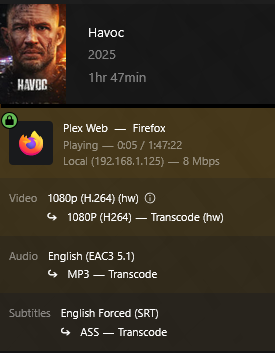
I disabled “Use Hardware Acceleration when available”, and it seems to have resolved the issue. It seems like this shouldn’t cause a problem. Why can’t Plex server resolve this on it’s own?

We’d need your hardware specs since you seem to have narrowed it down to hardware acceleration.

Does this help? I have been watching the same movies from this server for several years without issue, until recent PMS updates.

OS Name: Microsoft Windows 10 Pro
OS Version: 10.0.19045 N/A Build 19045
System Manufacturer: Intel
System Model: NUC10F1NH
System Type: x64-based PC
Processor(s): 1 Processor(s) Installed.
[01]: Intel64 Family 6 Model 61 Stepping 4 GenuineIntel ~3100 Mhz
Total Physical Memory: 16,269 MB
Available Physical Memory: 8,724 MB
Virtual Memory: Max Size: 18,701 MB
Virtual Memory: Available: 8,687 MB
Virtual Memory: In Use: 10,014 MB
Hotfix(s): 46 Hotfix(s) Installed.
Graphics Adapter: Intel Iris Graphics 6100
Graphics Adapter RAM: 1.00 GB
Driver Version: 20.19.15.5058

Just to rule out something. Does it happen when you force it to transcode? I assume you know how to tell if it’s transcoding. You said you changed the quality to “automatically” but that doesn’t mean it’s transcoding.

My hunch from all that you’ve said is that when it’s transcoding, it doesn’t show green screen.

transcoding = good
not transcoding = green screen
transcoding without hardware acceleration = good?
transcoding with hardware acceleration = green screen?

Also one thing to try is to delete your codecs folder in PMS. It will redownload fresh codecs. It’s pretty safe because Plex will just redownload the codecs.


Windows:
The codecs folder is located inside the user directory at:
%LOCALAPPDATA%\Plex Media Server\Codecs
For example: C:\Users[YourUsername]\AppData\Local\Plex Media Server\Codecs

macOS:
The codecs folder is found at:
~/Library/Application Support/Plex Media Server/Codecs
You can navigate to this folder using Finder’s “Go” menu by entering the path above.

Linux:
The codecs folder is typically located at:
$PLEX_HOME/Library/Application Support/Plex Media Server/Codecs
The exact path depends on the Linux distribution and Plex installation. A common path is:
/var/lib/plexmediaserver/Library/Application Support/Plex Media Server/Codecs

Docker:
When running Plex in a Docker container, the codecs folder location depends on the configuration specified during setup. It is generally within the mapped configuration directory, such as:
[Your_Config_Dir]/Library/Application Support/Plex Media Server/Codecs
Check your Docker container’s documentation or configuration for the exact path.

NAS Devices (e.g., QNAP, Synology):
On NAS devices, the codecs folder is within the Plex data directory, which varies by NAS brand and setup. For QNAP, you can find the Plex data directory by running:
getcfg -f /etc/config/qpkg.conf PlexMediaServer Install_path
Then append /Library/Plex Media Server/Codecs to the result. An example path might be:
/share/CACHEDEV1_DATA/.qpkg/PlexMediaServer/Library/Plex Media Server/Codecs
For Synology, it’s typically under:
/volume1/Plex/Library/Application Support/Plex Media Server/Codecs
Access may require SSH or specific NAS permissions.

NVIDIA SHIELD:
By default, the codecs folder is not user-accessible on NVIDIA SHIELD. To access it, you must move the Plex data directory to user-accessible storage (e.g., Internal Storage or a removable drive). The codecs folder would then be in:
[Chosen_Storage]/Plex Media Server/Codecs

Just checked, when it is transcoding video with hardware acceleration there is a green screen.

When it is transcoding without hardware acceleration it is fine.

Both look the same in the dashboard, but I notice that the CPU spikes to 89% when video transcoding starts, maybe the HW acceleration pushes it over the top.

So there’s two kinds of HW, the decoding one and encoding one. From your pics it looks like it’s on the encoding side that’s the problem. (hw) shows up on the both pics for decoding. Let me know if you’ve tried deleting your Codecs folder.

1 Like

I was able to shutdown Plex and delete the codec folder this morning. I reenabled “Use hardware-accelerated video encoding”, started about a dozen videos and all worked. I had no idea that the codec folder existed or that they were downloaded “on-demand”.

Thank you Christian!

1 Like

awesome

Do they just get outdated over time?

Nope, Plex handles it all, but sometimes for one reason or another, the existing codecs need to be purged.

You’re not going to believe this, but I just updated to the latest version, and it immediately started doing the same thing. Removing the codec folder didn’t help this time.

Same. Latest version broke it again and I had to rollback to the previous version.

I rolled back as well. Previous version is working correctly.

This is happening with me now- 100s of files are now green screen across numerous platforms. I’m on a windows server and deleting the codecs folder didn’t resolve it for me. Had to disable hardware acceleration, and now it can’t handle nearly the amount of streams concurrently.

What’s the fix here? If rolling back fixes it, what version should I roll back to?

There is still NO effective way to troubleshoot the issue. On Windows 11 using firefox my videos have gone back to either green or black screens with audio. Nothing seems to fix it, and Plex doesn’t give a…

This topic was automatically closed 90 days after the last reply. New replies are no longer allowed.
