Hey mate.
I’m not fully up to date with all the Intel architecture updates. But if Devils Canyon is later than Kabylake (Which I have) then you’re golden.
My Kaby is fine with quicksync on all those options.
One caveat though is transcoding the 4K if they’re hdr.
As far as I’m aware Plex still can’t do that… but as it’s nothing I ever do that info may be out of date.
Besides that it will breeze several 1080p using quicksync and assuming the source isn’t a stupidly low bit rate to start with them the output is excellent.
I don’t really share my 4K at all as no one I share with has a 4K tv. But I’m pretty sure that outside the hdr issue you will be fine with 4K in quicksync. I think I tested it for kicks at the time with 2 or 3 4K forced transcoder.
Oh all my files are 10 bit too so you should still be fine.
Edit…To clarify the hdr comment… Plex can do it. What I actually meant is I think you lose the hdr metadata.
Yeah sorry I firstly misread then I just looked it up after seeing a similar thread to see that is indeed earlier than a Kaby.
With my Kaby I never really paid much interest in GPU’s. Sorry for wasting your time.
Hopefully someone who is using a GPU will chime in.
From my observations, everything except Quick Sync is currently a pile of steaming mixed results. Probably no-one wants to stick their neck out an guarantee something works or doesn’t.
Just to chime in with my experiences.
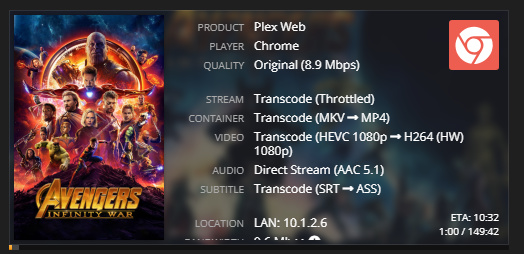
I am currently using an i7-3700 with windows 10 in an HP SFF PC. I bought and installed a low profile 1050Ti for the sole purpose of transcoding my HEVC files as you are trying to do.
It works fairly well (not perfect) at this. There are 2 issues I am currently experiencing/aware of.
The biggest issue is with HDR files it will discard the HDR metadata and you will end up with washed out looking colors (which isn’t ideal) This fix would require a software conversion algorithm / mapping from the BT2020 colorspace to the Rec 709 (SDR).
The second issue I am facing is that transcoding speed varies and can (and does) cause buffering issues. It will fluctuate between 0.6 up to 1.7x transcoding speed - usually around the 1.2x mark though.
I have my quality setting as ‘Automatic’
If Plex could firstly fix the varying transcoding speeds and set it to maximum until the buffer threshold has been meet, this would be fantastic.
The HDR to SDR conversion will likely be coming around soon as FFMPEG have recently come out with this conversion in one of their recent releases. So just waiting on Plex to implement this
I’m running Plex Media Server 1.13.5.5291 on Windows Server 2016 and I’m not able to get my GeForce GTX 1050 Ti to hardware accelerate / transcode 4K / HEVC at all… It always defaults to software… H264/AVC works 100% of the time but it will never do 4K transcoding on my GPU.
How did you manage to get your GTX 1050 Ti to work?
I’ve got a 1050ti installed on one of my ESXi 6.7 hosts and using pcie pass-through to my Plex vm. Works great, despite the two transcode limit. I ordered a Quadro P2000 yesterday so that pass-through is easier to use (dont have to disable exposing hardware virtualization to the vm) and the transcode count isn’t limited to two.
I’ll get something together once it arrives. We see about ~25 streams a day with roughly 15 being TC, so hoping the GPU will help lower power draw a little.
The latest I’ve tried is an E3-1275L v3. I have an 8700k but the igpu is disabled since I use a discrete gpu.
The E3 was able to transcode a 4k HEVC movie on the fly without too much issue though it wasn’t a large bitrate (~10k).
Hmm… So what might be the reason why my Window Server with a GeForce GTX 1050 Ti simply refuses to hw transcode HEVC? It hw transcodes pretty much anything else…
Perhaps it’s Server 2016. Hard to believe but my plex instances have always been W10 for the last few years. Have you installed the latest drivers from nvidia?
On the latest drivers. Seems like it was the stupid Aspeed integrated display adapter on the motherboard causing it. It always hw transcoded on the NVIDIA GPU but upon disabling the Aspeed adapter in device manager it seems like its always hw transcoding hevc!
from another post:
Go to Settings -> System -> Display -> Graphics Settings. Choose classic app and browse. Browse to the file C:\Program Files (x86)\Plex\Plex Media Server\PlexTranscoder.exe
Click on it when you have added it and choose options and choose the graphics card you want. I choose power saving in order for it to use the integrated Intel graphics.