So… I finally was able to make it work with the latest version. At least with Proxmox LXC Containers. I didn’t test with Docker yet.
I recently found this thread on Reddit where they mentioned exactly the same error as mine.
I decided to download all the Codecs from version 1.29.2.6364 which is the one that I know if works on my system.
After that I performed the following:
Host:
-
Performed all the GPU Passthrough following this Video
-
Install Nvidia driver. I am using 525.116.03 with cuda 12

-
Install nvidia-container-runtime and nvidia-container-toolkit
- curl -s -L https://nvidia.github.io/nvidia-container-runtime/gpgkey | apt-key add -
- curl -s -L https://nvidia.github.io/nvidia-container-runtime/$(. /etc/os-release;echo $ID$VERSION_ID)/nvidia-container-runtime.list | tee /etc/apt/sources.list.d/nvidia-container-runtime.list
- apt update
- apt install nvidia-container-runtime
- apt install nvidia-container-toolkit


LXC Container:
-
Create a Container with ubuntu 22.04. Performed the whole GPU process. Below is the LXC config file:
-
Install Nvidia driver, nvidia-container-runtime and nvidia-container-toolkit, build essential
-
apt install build-essential
-
./NVIDIA-Linux-x86_64-525.116.03.run --no-kernel-module --silent
-
apt install nvidia-container-runtime
-
apt install nvidia-container-toolkit (should be already installed)

-
-
Install ffmpeg (optional since I am using xteve)
apt install ffmpeg
-
Download plex 1.29.2.63.64 and 1.30.0.6486 version. You can file previous plex deb files here


-
Install plex 1.29.2.6364
- dpkg -i plexmediaserver_1.29.2.6364-6d72b0cf6_amd64.deb

-
Reboot Container
-
It you test Live TV you will see that it works fine.
-
It will create a Codec folder name c4efa15-4387-linux-x86_64. It should be empty and from what I noticed the files are downloaded from Plex when they are needed.

-
Copy all the Codecs file that you downloaded following the Reddit discussion.
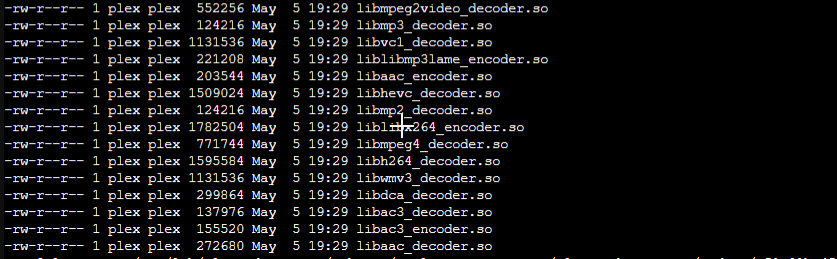
Also make sure the owner of the files are plex:plex
- Restart Plex
- Update Plex to 1.30.0.6486-629d58034_amd64.deb
- Update to the latest Plex Version.

I don’t know how or why but it works now.
