I am talking about the problem that it does not run Live tv if you user post 1.29 version
Hi,
Result of Avatar 2 4K : 7s of play then nothing on my full HD TV with Chromecast (I tried everything, reboot, etc…).
One hour before “trying to watch” the movie, it was working becuase I wanted to make sure I will not suffer technical issues.
Result:

Then I downloaded the 1080p quickly to, not disappoint my family… every 5 minutes, RAM drive was full and was stopping the movie. I had to remove the transcoding RAM drive setting to make it work…
I’m f** up! Basic things are not working anymore 
PS: Plex v1.32.0.6973
I moved to Proxmox and installed Plex inside of LXC Container…
- I downgrade to 1.29 works like a charm.
- Disable Transcoding. I can run channels completely fine.
- Using latest plex version I can’t open anything on Live tv if I set to Transcode.
I am really out of options. I am positive this is a bug, and I don’t know how I can raise this issue with Plex anymore.
I tried to read through this thread, and I think I have a similar if not same issue…
I’m on the latest proxmox on my new server build, migrated my old plex folder from my baremetal server over to my proxmox ubuntu 22.04 VM image and did pcie passthrough of my rtx 2060 GPU. It seems to transcode fine in the sense of nvidia-smi showing the transcode stream but the logs mention the failure:
[FFMPEG] - Failed to initialise VAAPI connection: -1 (unknown libva error).
I also noticed that from time to time the ram disk transcoder folder I have setup, gets really big with an entire copy of a movie put into the transcoder folder sucking up to 15-19gb of ram I’ve seen. It wont delete the file either after someone closes a connection. It will however continue to work with transcoding other movies or tv shows and not sucking up so much space but again, the error in the logs is always there as what appears to be some false positive error. I’m on the latest PMS beta from plex pass user. version 1.32.1.6999
should I try downgrading to 1.29.x?
Hi guys, if you tell me to start new thread, I will. But this one seems to be closest to what I’m struggling with.
Last Thursday (04/27) we had a power outage my UPS couldn’t hold on. After that, my preferences.xml was 0kB. I had a hard time to start all over again, but all seemed to be ok, except server load. Then I found hw transcoding is not working anymore. Nothing has changed except preferences.xml I think.
- Server Proxmox VE 7.3-6
- driver NVidia 470.161.03
- NVidia card T400
- Plex VM Debian 11 LXC
- Plex server version 1.32.1.6999
Server log full of[Req#1b3d/Transcode] [FFMPEG] - -> CUDA_ERROR_UNKNOWN: unknown error
Can please someone help me ? Plex pass lifetime, if that matters
Thank you
@Vicerak frustrating doesn’t cover it. It’s so hard to get traction on issue 
 … Is there a reason you’ve disabled transcoding? Are you finding it doesn’t work in 1.29.x when it’s on?
just checking, the live tv issue, is that when you’ve set the recordings to be transcoded live? That’s something I looked at, but never turned on because (a) my HDHomeRun doesn’t support it natively, and (b) it would kill my CPU 
Out of interest, are you using ramdisk for your transcoding? As this could be an issue if the it’s filling up during the recording of a live tv show? In that it’ll keep all of the tv show in RAM until it’s finished recording. This could be an issue if it runs out of ram and the transcoder falls over? Might be worth checking and maybe changing?
I’m currently on 1.32.0.6973 and all still appears to be well. I had a problem with a specific 4k file where I ended-up up dropping onto JellyFin since I could get it to work in that. But everything else I’ve thrown at it has been fine  Any/all transcodes (a part from the one I mentioned) have worked perfectly fine for me.
@rcgwr the logs showing the “VAAPI” message is a PITA, but only in that the transcoder always looks for Intel devices first, no matter waht. In that every time the transcoder does something, it re-checks what it can use and always defaults to Intel first. It makes reading the logs hard as you think there’s an issue. But it seems like you’re confirming it’s working with nvidia-smi?
Ramdisk… Now that’s a funny 'ld game! I’m on version 1.32.0.6973 and things are generally ok. That said, I too have seen full films/shows being left in the ramdisk transcode folder. After some hunting around I figured out that one of my (remote) friends was using the download/sync function and this is why the whole file was there. It will sit there until their device downloads it, but I do think the transcoder/PMS may be a little broken as I’d expect the file to be removed once it’s downloaded… Now, bear with me, the logging of information about how/why download/sync files are created and a log of when/by-who/download-status is just awful! In that I can’t actually trace the logs to find out what’s happening, so I can’t tell if the files are (a) to be downloaded by the remote person, or (b) they’ve been left behind by accident, after the download was complete.
So having the ramdisk is great until someone is using download/sync; I’d love to have a 2nd “transcode” folder that was only used for download/sync so that I could have it on my spinning rust (instead of ram)…
Initially I just increased the ram for the VM, but it was just getting silly. I ended up speaking with my friend and they removed the download/sync for the particular TV show. So this is not a fix, but more of a game of chess, in that I don’t know what to do now if more remote users start to download/sync stuff. What I should really do is turn off the that function
@martyzeq that doesn’t sound like a lot of fun at all… Personally, given the power outage, I’d be worried if all of your components are all ok? A UPS is supposed to protect against “spikes” but they don’t always work.
Can you just power off your existing VM, and follow your previous instructions to just create a fully new VM+PMS and get things up and running and ready for testing. You should be able to get things working and then you can verify all your hardware, e.g. graphics card. Long story short, create new VM, new install and just make sure everything does work; you can then see about “fixing” your existing VM?
One thing to note is that your graphics drivers are a little old so you should roll forward to a newer version. I’m using Nvidia 525 (525.105.17 to be precise, generally 525 should be ok, well it is for me ). Also, I know nothing of the T400 card, in-case there’s a reason why that doesn’t generally work with the latest PMS/Nvidia drivers
@Minxster thx for reply, well that NVidia is used only in Plex VM so it is not easy to tell it is working in my current (broken) state, but I can see it in lspci, in nvidia-smi so I hope so. Old drivers - well I’m one of those “if it works - don’t touch it”  So I keep only Plex server up tp date, and it was working till blackout just fine. To be honest - when my prefs.xml got dumped, I also took a chance to move library into lxc container to have it under backups (although +20GB bigger VM) - it was mountpoint before. And I cleared some caches to have VM as small as possible. T400 is quite modern, it should be supported in latest drivers too. First of all I will dig my February library backup (mea culpa
  ) just to see if transcoding is working (it was on this backup) and then I’ll go probably fresh way, newest drivers and then - not touching that machine for years hopefully
So… I finally was able to make it work with the latest version. At least with Proxmox LXC Containers. I didn’t test with Docker yet.
I recently found this thread on Reddit where they mentioned exactly the same error as mine.
I decided to download all the Codecs from version 1.29.2.6364 which is the one that I know if works on my system.
After that I performed the following:
Host:
-
Performed all the GPU Passthrough following this Video
-
Install Nvidia driver. I am using 525.116.03 with cuda 12

-
Install nvidia-container-runtime and nvidia-container-toolkit
- curl -s -L https://nvidia.github.io/nvidia-container-runtime/gpgkey | apt-key add -
- curl -s -L https://nvidia.github.io/nvidia-container-runtime/$(. /etc/os-release;echo $ID$VERSION_ID)/nvidia-container-runtime.list | tee /etc/apt/sources.list.d/nvidia-container-runtime.list
- apt update
- apt install nvidia-container-runtime
- apt install nvidia-container-toolkit


LXC Container:
-
Create a Container with ubuntu 22.04. Performed the whole GPU process. Below is the LXC config file:
-
Install Nvidia driver, nvidia-container-runtime and nvidia-container-toolkit, build essential
-
apt install build-essential
-
./NVIDIA-Linux-x86_64-525.116.03.run --no-kernel-module --silent
-
apt install nvidia-container-runtime
-
apt install nvidia-container-toolkit (should be already installed)

-
-
Install ffmpeg (optional since I am using xteve)
apt install ffmpeg
-
Download plex 1.29.2.63.64 and 1.30.0.6486 version. You can file previous plex deb files here


-
Install plex 1.29.2.6364
- dpkg -i plexmediaserver_1.29.2.6364-6d72b0cf6_amd64.deb

-
Reboot Container
-
It you test Live TV you will see that it works fine.
-
It will create a Codec folder name c4efa15-4387-linux-x86_64. It should be empty and from what I noticed the files are downloaded from Plex when they are needed.

-
Copy all the Codecs file that you downloaded following the Reddit discussion.
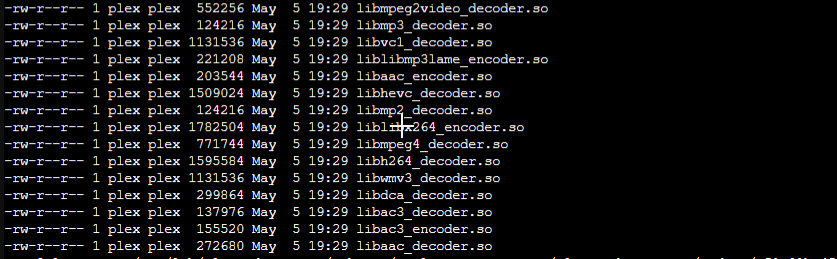
Also make sure the owner of the files are plex:plex
- Restart Plex
- Update Plex to 1.30.0.6486-629d58034_amd64.deb
- Update to the latest Plex Version.

I don’t know how or why but it works now.
oh man, thx, going to follow your path - also on proxmox, also plex in lxc, also using xteve … hope I will succeed too Are you also from Czech Republic ?
Good luck! Again, i am giving you the steps that I did. Not sure if this is all needed or not.
I am from Brazil!
well I do not have any onboard video so not sure why it is stating that message, but yes, it seems transcoding is working on my 2060 just fine. The only issue as you note is with transcoders ram disk. the family member who was transcoding the movie is using a smart TV with the built in plex app, not sure why it would be considered a download/sync. I don’t think the Plex tv app even offers the sync feature?
Hi all,
I recently posted there PMS can see Quadro P1000, but won't use it?
Is hardware transcoding pretty much broken unless you are running older versions of PMS?
@Vicerak thx man and hello to Brazil - Pele and Masopust were old time friends btw I followed your path but it didn’t work for me, I had to cowardly go back to 19-Feb-2023 backups, and even then it didn’t work, because in the meanwhile I upgraded drivers to 525.116.03, so after I downgraded to 470.161.03 transcoding was back. In my Feb backup was plexmediaserver_1.31.1.6716, when transcoding was back, I upgraded to plexmediaserver_1.32.1.6999 and transcoding is still working. Stranger things here, but I gave it at least 12 hours of my life in last two days, so I’m done for a while. Xteve and liveTV transcoding also works.
In case some devs would like to dig deeper, I can provide more logs etc, but for now I go into radio silence mode. And Plex LXC VM is based on debian 11.
Good luck everyone with sorting out all those unique and unexplainable trancoding issues
I don’t have onboard video/Intel either, but the Plex transcoder still goes and checks to see if it’s there; that’s the error message you’re seeing The normal Android TV version of the Plex Client doesn’t have the download/sync functionality. So I’m wondering if it’s their mobile device that’s doing this, it easily clicked on by mistake (as my friend did) unknowingly.
FYI - the below image is kind of wrong! “chunk-xxxxx” is where PMS is transmitting the media file whole without transcoding (I think)… If it says “media-xxxxx.ts” is what I see when a remote Roku is having media transcoded on PMS. I suspect the name/extensions will may changed on what format of file is being created
When you look at the transcode/session folder you should see something like this (when a file is being transcoded):

If you’re just seeing a single file, then that’s the output for a download/sync.
You’ll need to read, in detail, the posts and comments (in order), as a lot has been happening over the past few months.
If you have PMS 1.29.xx, transcoding should be working… Then after that there were a few versions that had issues. This went on for a few months, until things started to work again.
If you’re using a regular bare-metal Linux, or VM, the main thing is to upgrade to a more recent version of PMS (1.31.3.6819 + 1.31.3.6868) is where things start to work, and strip out all Nvidia drivers stuff and install 525.x… Flushing out all the old NVidia driver stuff can be crucial before you upgrading it again, and many folk get this wrong and wonder why they have issues.
Here’s my forum post, where we go over a few things and I finally posted up the PMS version that worked. My post went on a wild goose-chase, as using the Chrome client caused me nothing but problems and we later found it this was a different fault in PMS - this rendered some of my tests useless! But it’s all worth a read
Well, I’ve tried this, so basically, I had 530 nvidia drivers and I went “back” to 525. It didn’t change a thing. Even “worse” : for some strange reason, transcoding was limiting itself to 720p remotely (1080 was not appearing in the list despite the fact that it was allowed in player and in server settings)
@ChuckPa, anything new on you side that I could try?
Did you go back through and be 100% sure that you removed all old Nvidia drivers AND their dependencies? This catches out a lot of folk?
Did you see and follow this? : https://forums.plex.tv/t/pms-version-1-30-1-6562-this-update-stopped-my-transcodes-from-working/826453/97
I’ve not idea why you’d have limited choices for transcoding, that’s a new one on me.
Yep, I really tried as mentioned in the thread and as today, it is still struggling to open a poor 1080p on my notebook in the web client 
