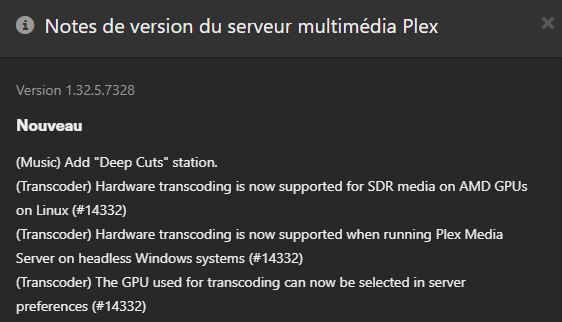
FYI Web Client still has some issues with it, can you installed the native Plex Client?
Other than that, I’m fresh out of ideas. The issues from earlier this year, to do with transcoding, seems to now be fully resolved. I can only suggest trying to install a fresh new PMS and just testing to see if it works? If there is an issue with how you’re implementing your Nvidia drivers, this could carry-over to the new PMS, but it’s still a good test to try out.
But by looking how to passthrough GPU to a docker instance, I also seen that at least on Ubuntu, there is dedicated headless drivers. Is there any equivalent on RHEL? Maybe it worth the try…
Another question: is there anything I can setup in my preferences file, I’ve seem the option “VaapiDriver=XXXX” is existing.
Do you have any experience to tell me which Nvidia drivers would be the “best” to choose (branch, version, repository…) to install it on a dedicated AlmaLinux 8 server? I’m planning a dedicated server (but still not sure if Plex will run bare metal or on docker on this box)
But about drivers, more I dig, more I’m confused to chose which ones: “Production” version numbers seems higher than “Functionality” ones. For me it doesn’t makes sense!
Here’s the unfiltered list from dpkg for my machine
[chuck@glockner ~.1997]$ dpkg -l | grep nvidia
ii  gpustat                               0.6.0-1                                 all          pretty nvidia device monitor
ii  libnvidia-cfg1-525-server:amd64       525.105.17-0ubuntu0.22.04.1             amd64        NVIDIA binary OpenGL/GLX configuration library
ii  libnvidia-common-525-server           525.105.17-0ubuntu0.22.04.1             all          Shared files used by the NVIDIA libraries
ii  libnvidia-compute-525-server:amd64    525.105.17-0ubuntu0.22.04.1             amd64        NVIDIA libcompute package
ii  libnvidia-decode-525-server:amd64     525.105.17-0ubuntu0.22.04.1             amd64        NVIDIA Video Decoding runtime libraries
ii  libnvidia-egl-wayland1:amd64          1:1.1.9-1.1                             amd64        Wayland EGL External Platform library -- shared library
ii  libnvidia-encode-525-server:amd64     525.105.17-0ubuntu0.22.04.1             amd64        NVENC Video Encoding runtime library
ii  libnvidia-extra-525-server:amd64      525.105.17-0ubuntu0.22.04.1             amd64        Extra libraries for the NVIDIA Server Driver
ii  libnvidia-fbc1-525-server:amd64       525.105.17-0ubuntu0.22.04.1             amd64        NVIDIA OpenGL-based Framebuffer Capture runtime library
ii  libnvidia-gl-525-server:amd64         525.105.17-0ubuntu0.22.04.1             amd64        NVIDIA OpenGL/GLX/EGL/GLES GLVND libraries and Vulkan ICD
ii  libnvidia-ml-dev:amd64                11.5.50~11.5.1-1ubuntu1                 amd64        NVIDIA Management Library (NVML) development files
ii  nvidia-compute-utils-525-server       525.105.17-0ubuntu0.22.04.1             amd64        NVIDIA compute utilities
ii  nvidia-cuda-dev:amd64                 11.5.1-1ubuntu1                         amd64        NVIDIA CUDA development files
ii  nvidia-cuda-gdb                       11.5.114~11.5.1-1ubuntu1                amd64        NVIDIA CUDA Debugger (GDB)
ii  nvidia-cuda-toolkit                   11.5.1-1ubuntu1                         amd64        NVIDIA CUDA development toolkit
ii  nvidia-cuda-toolkit-doc               11.5.1-1ubuntu1                         all          NVIDIA CUDA and OpenCL documentation
ii  nvidia-dkms-525-server                525.105.17-0ubuntu0.22.04.1             amd64        NVIDIA DKMS package
ii  nvidia-driver-525-server              525.105.17-0ubuntu0.22.04.1             amd64        NVIDIA Server Driver metapackage
ii  nvidia-kernel-common-525-server       525.105.17-0ubuntu0.22.04.1             amd64        Shared files used with the kernel module
ii  nvidia-kernel-source-525-server       525.105.17-0ubuntu0.22.04.1             amd64        NVIDIA kernel source package
ii  nvidia-opencl-dev:amd64               11.5.1-1ubuntu1                         amd64        NVIDIA OpenCL development files
ii  nvidia-prime                          0.8.17.1                                all          Tools to enable NVIDIA's Prime
ii  nvidia-profiler                       11.5.114~11.5.1-1ubuntu1                amd64        NVIDIA Profiler for CUDA and OpenCL
ii  nvidia-utils-525-server               525.105.17-0ubuntu0.22.04.1             amd64        NVIDIA Server Driver support binaries
ii  nvidia-visual-profiler                11.5.114~11.5.1-1ubuntu1                amd64        NVIDIA Visual Profiler for CUDA and OpenCL
ii  xserver-xorg-video-nvidia-525-server  525.105.17-0ubuntu0.22.04.1             amd64        NVIDIA binary Xorg driver
[chuck@glockner ~.1998]$
As I write this, Ubuntu is updating to -
reconfiguring packages ...
(Reading database ... 180783 files and directories currently installed.)
Preparing to unpack .../00-ubuntu-drivers-common_1%3a0.9.6.2~0.22.04.4_amd64.deb ...
Unpacking ubuntu-drivers-common (1:0.9.6.2~0.22.04.4) over (1:0.9.6.2~0.22.04.3) ...
Preparing to unpack .../01-libmm-glib0_1.20.0-1~ubuntu22.04.2_amd64.deb ...
Unpacking libmm-glib0:amd64 (1.20.0-1~ubuntu22.04.2) over (1.20.0-1~ubuntu22.04.1) ...
Preparing to unpack .../02-nvidia-driver-525-server_525.125.06-0ubuntu0.22.04.1_amd64.deb ...
Unpacking nvidia-driver-525-server (525.125.06-0ubuntu0.22.04.1) over (525.105.17-0ubuntu0.22.04.1) ...
Preparing to unpack .../03-libnvidia-extra-525-server_525.125.06-0ubuntu0.22.04.1_amd64.deb ...
Unpacking libnvidia-extra-525-server:amd64 (525.125.06-0ubuntu0.22.04.1) over (525.105.17-0ubuntu0.22.04.1) ...
Preparing to unpack .../04-libnvidia-common-525-server_525.125.06-0ubuntu0.22.04.1_all.deb ...
Unpacking libnvidia-common-525-server (525.125.06-0ubuntu0.22.04.1) over (525.105.17-0ubuntu0.22.04.1) ...
Preparing to unpack .../05-libnvidia-gl-525-server_525.125.06-0ubuntu0.22.04.1_amd64.deb ...
Unpacking libnvidia-gl-525-server:amd64 (525.125.06-0ubuntu0.22.04.1) over (525.105.17-0ubuntu0.22.04.1) ...
Preparing to unpack .../06-nvidia-dkms-525-server_525.125.06-0ubuntu0.22.04.1_amd64.deb ...
Removing all DKMS Modules
Done.
Unpacking nvidia-dkms-525-server (525.125.06-0ubuntu0.22.04.1) over (525.105.17-0ubuntu0.22.04.1) ...
Preparing to unpack .../07-nvidia-kernel-source-525-server_525.125.06-0ubuntu0.22.04.1_amd64.deb ...
Unpacking nvidia-kernel-source-525-server (525.125.06-0ubuntu0.22.04.1) over (525.105.17-0ubuntu0.22.04.1) ...
Preparing to unpack .../08-nvidia-kernel-common-525-server_525.125.06-0ubuntu0.22.04.1_amd64.deb ...
Unpacking nvidia-kernel-common-525-server (525.125.06-0ubuntu0.22.04.1) over (525.105.17-0ubuntu0.22.04.1) ...
Preparing to unpack .../09-libnvidia-decode-525-server_525.125.06-0ubuntu0.22.04.1_amd64.deb ...
Unpacking libnvidia-decode-525-server:amd64 (525.125.06-0ubuntu0.22.04.1) over (525.105.17-0ubuntu0.22.04.1) ...
Preparing to unpack .../10-libnvidia-compute-525-server_525.125.06-0ubuntu0.22.04.1_amd64.deb ...
Unpacking libnvidia-compute-525-server:amd64 (525.125.06-0ubuntu0.22.04.1) over (525.105.17-0ubuntu0.22.04.1) ...
Preparing to unpack .../11-nvidia-compute-utils-525-server_525.125.06-0ubuntu0.22.04.1_amd64.deb ...
Unpacking nvidia-compute-utils-525-server (525.125.06-0ubuntu0.22.04.1) over (525.105.17-0ubuntu0.22.04.1) ...
Preparing to unpack .../12-libnvidia-encode-525-server_525.125.06-0ubuntu0.22.04.1_amd64.deb ...
Unpacking libnvidia-encode-525-server:amd64 (525.125.06-0ubuntu0.22.04.1) over (525.105.17-0ubuntu0.22.04.1) ...
Preparing to unpack .../13-nvidia-utils-525-server_525.125.06-0ubuntu0.22.04.1_amd64.deb ...
Unpacking nvidia-utils-525-server (525.125.06-0ubuntu0.22.04.1) over (525.105.17-0ubuntu0.22.04.1) ...
Preparing to unpack .../14-xserver-xorg-video-nvidia-525-server_525.125.06-0ubuntu0.22.04.1_amd64.deb ...
Unpacking xserver-xorg-video-nvidia-525-server (525.125.06-0ubuntu0.22.04.1) over (525.105.17-0ubuntu0.22.04.1) ...
Preparing to unpack .../15-libnvidia-fbc1-525-server_525.125.06-0ubuntu0.22.04.1_amd64.deb ...
Unpacking libnvidia-fbc1-525-server:amd64 (525.125.06-0ubuntu0.22.04.1) over (525.105.17-0ubuntu0.22.04.1) ...
Preparing to unpack .../16-libnvidia-cfg1-525-server_525.125.06-0ubuntu0.22.04.1_amd64.deb ...
Unpacking libnvidia-cfg1-525-server:amd64 (525.125.06-0ubuntu0.22.04.1) over (525.105.17-0ubuntu0.22.04.1) ...
Preparing to unpack .../17-modemmanager_1.20.0-1~ubuntu22.04.2_amd64.deb ...
Unpacking modemmanager (1.20.0-1~ubuntu22.04.2) over (1.20.0-1~ubuntu22.04.1) ...
Setting up libnvidia-fbc1-525-server:amd64 (525.125.06-0ubuntu0.22.04.1) ...
Setting up nvidia-kernel-common-525-server (525.125.06-0ubuntu0.22.04.1) ...
I will report in a moment
EDIT: Updating to 525.125.06 (Ubuntu vetted) works correctly for a P2200
I’m on the same version still as @ChuckPa, being 525.105.17. I’ve never used AlmaLinux, but am using Ubuntu 20.04. So I’d just stick with that if you can. I did mess with 530 drivers, when I had a docker+gpu issue, but I just reverted back to 525 as they’re working well; they’re also the latest stable “server” edition/version (I think ).
I’m using ESXi with h/w passthrough (not really ideal and kinda frowned upon ) and haven’t had any issues from ESXi/VMs. I did recently spin up a docker container in said VM, just so I could have a 2nd instance of Plex that could use the GPU, and this actually works really well. It took me a while to get it going though. And again, not idea going from ESXi, to VM, to Docker, to the final container
I’d suggest just playing around with your build/*nix to try and get it working, and also find it’s limitations. Basically try and break it Maximum streams + maximum transcodes. Throw some subtitles at it (as that caused loads of problems). I did this with my builds so I can find any weaknesses… This gives you plenty of times to re-install and try other solutions; there is nothing worse than rolling out a new PMS and trying to use it in prod, only for it to have issues!
The thing that is not clear to me, is do I need to install CUDA “on the top” of nvidia drivers for Plex and if yes, which version? For now, I’ve installed 525 series with CUDA 12.0 (12.1 and 12.2 didn’t want to install for dependencies reasons).
BTW, is there something else to install for decoding/transcoding properly (codecs)?
But this “mess” is really annoying because you don’t really know what will work and what will not unless trying!
I’m using ESXi with h/w passthrough (not really ideal and kinda frowned upon
Yes I know the feeling because that is what I had (and I will try now docker on a physical machine because I have other plans for that machine like home assistant so “passthrough to Docker only” might be my solution for a while if I can validate the GPU tests. This also gives a nice start base to introduce all the ARRs containers later on…
I’m since 3 months in a “Docker” binge and migrated almost all my web apps - Like Netbox, Leantime, Grafana, etc… in this new direction, Plex should follow!
I use Ubuntu SERVER for all this because the Nvidia drivers are vetted and stable. ( I’m not stable so I need all the help I can get ) Running a desktop environment in a VM is a complete waste.
Plex already exists in Docker and has for a LONG time.
– No, we’re not going to binge because our bellies are full LOL
Plex w/ HW transcoding under ESXi
– Start Preparing VM definition
– Allocate memory for the VM
– RESERVE the memory (lock VMs memory into RAM – required step)
– ADD PCI device (either QSV - UHD device or Nvidia)
– Add ISO to boot and create VM
Load up guest VM
setup guest appropriate for needs
– This brings CUDA with it
Confirm packages libnvidia-encode and libnvidia-decode were also installed
– manually install these if needed (apt-get install …)
Well, I think I DID IT !!!
Almalinux Server Headless, Docker and GPU passthrough.
I could validate the HW transcoding on a test instance so I did the swap from the VM to the container.
It works VERY good (the host is a I5, 32 GB RAM, 1 TB SSD and 2x10GB/s in LACP for the network. I could run 4x4K streams without an issue (after patching of course). Web client works finally again.
But install drivers is a f***** pain on Linux, I hesitated to go back to an headless Windows core !!!
The only “loss” for now is that I had a reverse proxy on the VM itself to use the web client on port 443, which is now back to 32400. I could not find a way to have both unless using another reverse proxy somewhere else. Is there a way to have internal port 32400 available on 2 external ports with docker?
I think I’ll close the thread but I have to say it: it was, despite all the technical challenges, a real pleasure exchanging with you guys!
Couldn’t event get Cockpit to work on it properly without creating a “fake” bond… (it’s my favorite remote control tool for Linux)
Well, I tihink Linux is all about compromises… today I struggled get the proper backup solution for my physical server.
Could not get Veeam agent working, neither Synology agent… so I went with a basic rsync to backup all my containers files! My goodness it was painful!!!
Back at that time, I “translated” the Plex Windows registry settings to the Preference.xml file… I didn’t want to do that backwards, but if I want to go back to VM, maybe “this is the way” to get NVIDIA properly passthrough to Plex!
Well, we all have different mental health troubles I guess…
Jul 22, 2023 02:16:38.937 [139793322867512] DEBUG - [Req#59/Transcode] [FFMPEG] - Loaded sym: cuEGLStreamProducerDisconnect
Jul 22, 2023 02:16:38.937 [139793322867512] DEBUG - [Req#59/Transcode] [FFMPEG] - Loaded sym: cuEGLStreamConsumerDisconnect
Jul 22, 2023 02:16:38.937 [139793322867512] DEBUG - [Req#59/Transcode] [FFMPEG] - Loaded sym: cuEGLStreamProducerPresentFrame
Jul 22, 2023 02:16:38.937 [139793322867512] DEBUG - [Req#59/Transcode] [FFMPEG] - Loaded sym: cuEGLStreamProducerReturnFrame
Jul 22, 2023 02:16:38.937 [139793322867512] ERROR - [Req#59/Transcode] [FFMPEG] - cu->cuDeviceGetByPCIBusId(&hwctx->internal->cuda_device, pci_bus_id) failed
Jul 22, 2023 02:16:38.937 [139793322867512] ERROR - [Req#59/Transcode] [FFMPEG] -  -> CUDA_ERROR_INVALID_DEVICE: invalid device ordinal
Jul 22, 2023 02:16:38.937 [139793322867512] ERROR - [Req#59/Transcode] [FFMPEG] -
Jul 22, 2023 02:16:38.937 [139793322867512] DEBUG - [Req#59/Transcode] Codecs: hardware transcoding: opening hw device failed - probably not supported by this system, error: Generic error in an external library
Jul 22, 2023 02:16:38.937 [139793322867512] DEBUG - [Req#59/Transcode] Could not create hardware context for hevc
Jul 22, 2023 02:16:38.937 [139793322867512] DEBUG - [Req#59/Transcode] Once Upon a Time in the City of New York - audio.channels limitation applies: 6 > 2
Jul 22, 2023 02:16:38.937 [139793322867512] DEBUG - [Req#59/Transcode] MDE: Cannot direct stream audio stream due to profile or setting limitations
Jul 22, 2023 02:16:38.937 [139793322867512] DEBUG - [Req#59/Transcode] MDE: Beauty and the Beast - S1 E1 - Once Upon a Time in the City of New York: selected me
Is this the 535 driver ? It looks like it based on the error.
Is this in a VM?
I’ve spent the last 2+ hours trying to install 22.04.2 LTS on AlderLake with Nvidia 3040 GPU and it hangs every time the INSTANT I boot up after installing the 525 or 535 driver.
I have 535 on my Xeon machine (P2200) and it’s solid.
Yes the host machine is running Proxmox 8 with Debian 12 VM + GPU passthrough (RTX A4000) and 535.54.03 driver. Running smooth & stable until the latest PMS update. Was on Proxmox 7.4 + 525 before that, running for ~6 months without a single issue.
I am running this on Threadripper PRO. I have had no luck running PMS stable on Xeon machines.


 ).
). ) and haven’t had any issues from ESXi/VMs. I did recently spin up a docker container in said VM, just so I could have a 2nd instance of Plex that could use the GPU, and this actually works really well. It took me a while to get it going though. And again, not idea going from ESXi, to VM, to Docker, to the final container

 ) Running a desktop environment in a VM is a complete waste.
 LOL
LOL


 _
_