I went and updated to the latest version (1.32.8.7639, stable). I am seeing hardware transcoding working, along with HDR tone mapping. Running on J4125 (Synology DS920+), Linuxserver docker image. Great work folks
I’ve been using / testing it on Ubuntu. I’d like to see your DEBUG server logs ZIP file.
There is only one known issue at this point and it’s tied to the Linux kernel (6.1) in their 6.12.4 update (works perfectly on 5.x kernels).
Because it first showed up with Unraid, I’m working with them to figure out what changed
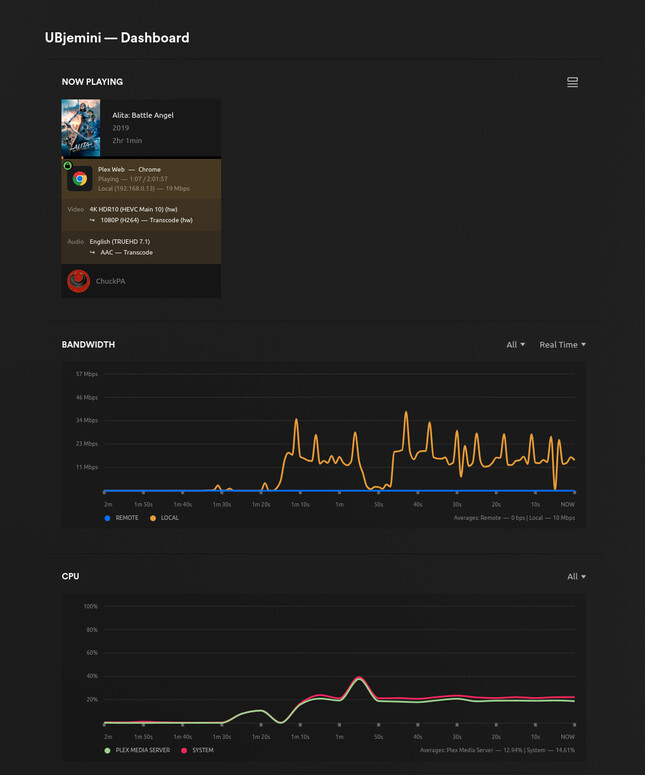
Here it is, 1.32.8 , HW transcoding and tonemapping
root@jemini:/home/chuck# uname -a
Linux jemini 5.15.0-89-generic #99~20.04.1-Ubuntu SMP Thu Nov 2 15:16:47 UTC 2023 x86_64 x86_64 x86_64 GNU/Linux
root@jemini:/home/chuck# cat /proc/cpuinfo | grep ‘model name’ | uniq
model name : Intel(R) Celeron(R) J4125 CPU @ 2.00GHz
root@jemini:/home/chuck#
No HW Accel (Tone Mapping Enabled).log (4.5 KB)
Hardware Acceleration Working.log (5.2 KB)
Hi Chuck, I don’t want to post the entire zip file here because of personally identifiable information. I think the snippets above might show the issue. Let me know if you want me to sent the full logs to you directly.
Here is my kernel/CPU info in the same format as what you used:
robert@robert-server:~$ uname -a
Linux robert-server 6.2.0-37-generic #38~22.04.1-Ubuntu SMP PREEMPT_DYNAMIC Thu Nov  2 18:01:13 UTC 2 x86_64 x86_64 x86_64 GNU/Linux
robert@robert-server:~$ cat /proc/cpuinfo | grep "model name" | uniq
model name	: Intel(R) Celeron(R) J4125 CPU @ 2.00GHz
We know of a problem with 6.x kernels and tone mapping.
Simply stated: If you turn off tone mapping, does HW otherwise work correctly ?
Next question, What is the default kernel for your machine? Did you manually install 6.2 ?
When I turn off tone mapping then yes HW acceleration is working and I can see this in the Plex dashboard. Per the logs it is finding and using device ‘/dev/dri/renderD128’ for the vaapi API. With tone mapping on running the same media file it’s not finding this device and I don’t see H/W text in Plex dashboard.
Default kernel was 5.15 I believe, I did a dist-upgrade a while back to test graphics drivers. I could definitely consider downgrading again if you are saying it works fine on 5.
Using Synology 920+, Plex version 1.32.8.7639-7000 (installed as Synology package), HW tone mapping off. I can see HW/hw acceleration as “working” (the flag is there), but the CPU usage is actually matching a situation when a CPU-based transcoding is used.
Dec 07, 2023 22:57:37.533 [140076770343736] DEBUG - [Req#34931/Transcode] Starting a transcode session w1tcah7wxa9pj5gum9t7p8k7 at offset -1.0 (state=3)
Dec 07, 2023 22:57:37.534 [140076770343736] DEBUG - [Req#34931/Transcode] TPU: hardware transcoding: using hardware decode accelerator vaapi
Dec 07, 2023 22:57:37.534 [140076770343736] DEBUG - [Req#34931/Transcode] TPU: hardware transcoding: zero-copy support present
Dec 07, 2023 22:57:37.534 [140076770343736] DEBUG - [Req#34931/Transcode] TPU: hardware transcoding: using zero-copy transcoding
Dec 07, 2023 22:57:37.534 [140076770343736] DEBUG - [Req#34931/Transcode] [Universal] Using local file path instead of URL: /volume3/tv-shows_2/The Kominsky Method (2018)/Season 01/The Kominsky Method (2018) - S01E03 - Chapter 3 A Prostate Enlarges (1080p BluRay x265 t3nzin).mkv
Dec 07, 2023 22:57:37.534 [140076770343736] DEBUG - [Req#34931/Transcode] Codecs: hardware transcoding: testing API vaapi for device '/dev/dri/renderD128' (GeminiLake [UHD Graphics 600])
Dec 07, 2023 22:57:37.536 [140076770343736] DEBUG - [Req#34931/Transcode/DriverDL/ivd] Skipping download; already exists
Dec 07, 2023 22:57:37.536 [140076770343736] DEBUG - [Req#34931/Transcode] TPU: hardware transcoding: final decoder: vaapi, final encoder: vaapi
Dec 07, 2023 22:57:37.537 [140076770343736] DEBUG - [Req#34931/Transcode/JobRunner] Job running: FFMPEG_EXTERNAL_LIBS='/var/packages/PlexMediaServer/shares/PlexMediaServer/AppData/Plex\ Media\ Server/Codecs/90a317c-4653-linux-x86_64/' LIBVA_DRIVERS_PATH="/var/packages/PlexMediaServer/shares/PlexMediaServer/AppData/Plex Media Server/Cache/va-dri-linux-x86_64" X_PLEX_TOKEN=xxxxxxxxxxxxxxxxxxxxxxxxxxxxxxxxxxxxxxxxxx "/volume2/@appstore/PlexMediaServer/Plex Transcoder" -codec:0 hevc -hwaccel:0 vaapi -hwaccel_fallback_threshold:0 10 -hwaccel_output_format:0 vaapi -hwaccel_device:0 vaapi -codec:1 aac -analyzeduration 20000000 -probesize 20000000 -i "/volume3/tv-shows_2/The Kominsky Method (2018)/Season 01/The Kominsky Method (2018) - S01E03 - Chapter 3 A Prostate Enlarges (1080p BluRay x265 t3nzin).mkv" -filter_complex "[0:0]hwupload[0];[0]scale_vaapi=w=720:h=380:format=nv12[1];[1]hwupload[2]" -map "[2]" -codec:0 h264_vaapi -b:0 1289k -maxrate:0 1719k -bufsize:0 3438k -r:0 23.975999999999999 -force_key_frames:0 "expr:gte(t,n_forced*8)" -filter_complex "[0:1] aresample=async=1:ochl='stereo':rematrix_maxval=0.000000dB:osr=48000[3]" -map "[3]" -metadata:s:1 language=eng -codec:1 aac -b:1 170k -f dash -seg_duration 8 -dash_segment_type mp4 -init_seg_name 'init-stream$RepresentationID$.m4s' -media_seg_name 'chunk-stream$RepresentationID$-$Number%05d$.m4s' -window_size 5 -delete_removed false -skip_to_segment 1 -time_delta 0.0625 -manifest_name "http://127.0.0.1:32400/video/:/transcode/session/w1tcah7wxa9pj5gum9t7p8k7/27acf3b1-49a7-42aa-81cc-a0483da34730/manifest?X-Plex-Http-Pipeline=infinite" -avoid_negative_ts disabled -map_metadata -1 -map_chapters -1 dash -start_at_zero -copyts -vsync cfr -init_hw_device vaapi=vaapi:/dev/dri/renderD128,driver=i965 -filter_hw_device vaapi -y -nostats -loglevel quiet -loglevel_plex error -progressurl http://127.0.0.1:32400/video/:/transcode/session/w1tcah7wxa9pj5gum9t7p8k7/27acf3b1-49a7-42aa-81cc-a0483da34730/progress
ApolloLake & GeminiLake do not require 6.x kernels.
Going back to 5.15 and holding there will get this working again for now.
We are working on the OpenCL component of the transcoder.
To avoid the need for two different versions, we’re trying to create one which works with Pre-6.0 and post-6.0 kernels.
I have a kabylake (i7-8809g nuc) on Ubuntu 20.04 LTS with 5.15
My Ubuntu Server NAS is also running 5.15 kernel.
Only when you get into those CPUs which require Intel Compute Runtime (Tiger Lake and above —> RaptorLake) do you need the 6.x kernel but on those hosts you’ll find tonemapping works because of how it’s done.
root@glockner:/home/chuck/bin# uname -a
Linux glockner 5.15.0-89-generic #99-Ubuntu SMP Mon Oct 30 20:42:41 UTC 2023 x86_64 x86_64 x86_64 GNU/Linux
root@glockner:/home/chuck/bin# grep PRETTY /etc/os-release
PRETTY_NAME="Ubuntu 22.04.3 LTS"
root@glockner:/home/chuck/bin#
[chuck@lizum ~.1990]$ uname -a
Linux lizum 5.15.0-89-generic #99~20.04.1-Ubuntu SMP Thu Nov 2 15:16:47 UTC 2023 x86_64 x86_64 x86_64 GNU/Linux
[chuck@lizum ~.1991]$ grep PRETTY /etc/os-release
PRETTY_NAME="Ubuntu 20.04.6 LTS"
[chuck@lizum ~.1992]$
Here’s my J4125 development box.
chuck@jemini:~$ uname -a
Linux jemini 5.15.0-89-generic #99~20.04.1-Ubuntu SMP Thu Nov 2 15:16:47 UTC 2023 x86_64 x86_64 x86_64 GNU/Linux
chuck@jemini:~$ cat /proc/cpuinfo | grep 'model name' | uniq
model name	: Intel(R) Celeron(R) J4125 CPU @ 2.00GHz
chuck@jemini:~$ cat /etc/os-release | grep PRETTY
PRETTY_NAME="Ubuntu 20.04.6 LTS"
chuck@jemini:~$
Yes, update is needed but jumping to the ‘latest & greatest’ kernel is not without peril.
Version 1.32.8.7639-fb6452ebf
“UBjemini” == “Ubuntu Jemini” 

Tonemapping is enabled

You will still have CPU load for any subtitles.
The DS920+ doesn’t use a 6.x kernel. You should have full tone mapping functionality.
If you do not, may I please see your DEBUG log files ZIP which captures the playback failure ?
I completely forgot about this part, I am sorry. Yes, that’s probably the cause, the video had subtitles. If I find any situation when a video without subtitles is causing this, I’ll add the DEBUG logs.
Thank you!
DS423+ with GeminiLake CPU HW is not working. No HW logo at all, CPU at 100% and constant buffering. Version 1.32.8.7639. Trying to transcode 4k movie to 1080p or 720p, but no luck. Any ideas or updates on that?DSM 7.2.1-69057 Update 3
It does work on DS423+ and all Gemini & ApolloLake models.
Do you have PGS subtitles in the file?
Yes, i do. I have PGS and SRT subtitles in various files and hardware transcoding isn’t working on any of the files. HW logo doesn’t come up in the dashboard and PMS is using 100% of Synology CPU, it is using software transcoding. Another person I know with same NAS and config (docker trashguides) is experiencing same issues. Can you recheck/retest? It definitely isn’t working for us.
You currently will NOT get HW transcoding when there are:
– PGS/VOBSUB/DVDRIP image based subtitles in the file.
– Text based (SRT, ASS, SSA) subtitles are set to “Always Burn” in the player.
The image merge (subtitle into the video frame) is done by software. This is what suppresses HW
It’s unfortunately always been this way with PMS – Until now.
We have just completed the testing of how to make HW transcoding work for image-based subtitles.
We also have a plan (a few details to work out) for how to burn text-based subtitles in hybrid software/hardware transcoding.
After the holidays, this will be the top-priority transcoding task to finish up the integration into PMS and share as a Forum Preview before widespread release.
I have just tested HW transcoding with files with SRT subs. Burn subtitles Automatic, Only Advanced Formats, Always. Tested with all three options - HW TRANSCODING IS NOT WORKING EITHER with any of those options…
What has changed that broke hw transcoding? Before it worked with any file and any type of subs in the file.
I need your DEBUG server logs ZIP file which captures this.
I have a J4125 machine here in my office and it works fine.
I need to see what isn’t working for yours.
Well this is not true of course, we talked so many times about that issue…
Yes, the subtitle overlay is done in software, but I had absolutely no problem with HW-decoding and HW-encoding even when burning PGS or SRT until you broke all that stuff recently.
At the moment it works fine though using 1.32.5 and the repaired i965 driver you provided.

Just to be clear - I don’t normally use subs, but they are available within the file if I want them/need. HW transcoding isn’t working even when subtiles are not selected (subtitles none)
-
You’re running in a container (hotio image)
-
It is seeing the hardware
Dec 11, 2023 14:13:50.020 [140543876057912] DEBUG - [GPU] Got device: GeminiLake [UHD Graphics 600], intel@builtin, default true, best true, ID 8086:3185@0000:00:02.0, DevID [8086:3185], flags 0x34e7
- You’re not getting HW transcoding and tone mapping.
Dec 11, 2023 14:17:52.578 [140543842290488] DEBUG - [Req#17c/Transcode] Codecs: hardware transcoding: testing API vaapi for device ‘/dev/dri/renderD128’ (GeminiLake [UHD Graphics 600])
Dec 11, 2023 14:17:52.578 [140543842290488] ERROR - [Req#17c/Transcode] [FFMPEG] - No VA display found for device /dev/dri/renderD128.
Dec 11, 2023 14:17:52.578 [140543842290488] DEBUG - [Req#17c/Transcode] Codecs: hardware transcoding: opening hw device failed - probably not supported by this system, error: Invalid argument
Dec 11, 2023 14:17:52.578 [140543842290488] DEBUG - [Req#17c/Transcode] Could not create hardware context for h264_vaapi
Dec 11, 2023 14:17:52.578 [140543842290488] DEBUG - [Req#17c/Transcode] Codecs: testing hevc (decoder) with hwdevice vaapi
Dec 11, 2023 14:17:52.578 [140543842290488] DEBUG - [Req#17c/Transcode] Codecs: hardware transcoding: testing API vaapi for device ‘/dev/dri/renderD128’ (GeminiLake [UHD Graphics 600])
Dec 11, 2023 14:17:52.578 [140543842290488] ERROR - [Req#17c/Transcode] [FFMPEG] - No VA display found for device /dev/dri/renderD128.
Dec 11, 2023 14:17:52.578 [140543842290488] DEBUG - [Req#17c/Transcode] Codecs: hardware transcoding: opening hw device failed - probably not supported by this system, error: Invalid argument
Dec 11, 2023 14:17:52.578 [140543842290488] DEBUG - [Req#17c/Transcode] Could not create hardware context for hevc
Dec 11, 2023 14:17:52.579 [140543842290488] DEBUG - [Req#17c/Transcode] MDE: Selected protocol hls; container: mpegts
Dec 11, 2023 14:17:52.579 [140543842290488] DEBUG - [Req#17c/Transcode] MDE: analyzing media item 2722
There is a KNOWN ISSUE with OpenCL on non 5.x Linux kernels.
Questions:
-
Are you passing all of
/dev/drito the container or only/dev/dri/renderD128? -
Which distribution and kernel version? (it looks like a 4.x Linux kernel)
-
If you turn ToneMapping OFF, does it work ?
- I am not sure. It is set up through trashguides for Synology. Plex is set up to auto update when update is available.
- DSM 7.2.1-69057 Update 3. How do I find the Kernel version?
- It doesn’t work with or without it.
