I’ve done it before by exporting the container in the GUI as a json. Then you edit the json to use the specific image version which you would have downloaded from the registry. Then reimport the json into a new container with the GUI.
If that works – great.
I’ve done it the ‘old school’ way and just slapped it around on the command line 
There are some kind of difference between docker linuxserver and plexinc?
Yes, there are some differences in how the container starts & included libraries.
They are all from the same PMS binaries .
@ChuckPa there was a new beta release posted today but it still doesn’t have the Jxxx fixes.
Any news, updates you can share or we purely wait for the 19th?
feedback into another discussion
http://lscr.io/linuxserver/plex:latest (v1.32.3.7192) does not work on my 918+…
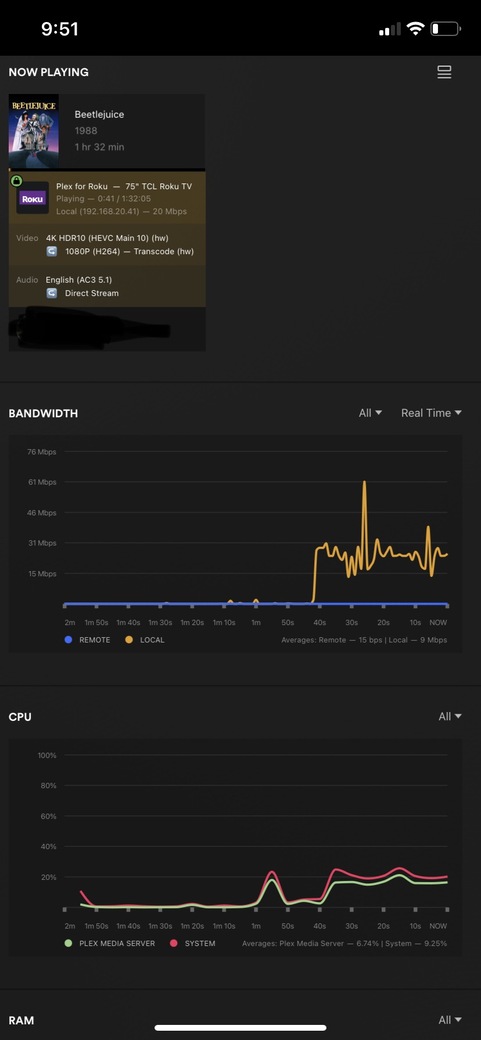
hardware transcoding disabled.
I need the DEBUG log files ZIP please .
Which J-series CPU?
ApolloLake fix is in the beta (1.32.4)
@ChuckPa, Is for a 1019+, Celeron J3455,
Here are the logs with 1.32.4.7195 , there is no indication for HW transcoding in dashboard view and CPU goes really high.
Plex Media Server Logs_2023-06-13_15-35-39.zip (1.4 MB)
Thank you. I’m going to take this to the Engineer. (and bring a dead  too – lol)
Thanks, maybe a chocolate will help more:-)
nah

I assume we have to wait for 1.32.5 betas to fix the Celeron family? Or you hope to push a new beta to fix it in 1.32.4?
I’m hoping this is just a build issue and they’ll update the existing release and push new binaries.
Hence we can keep engineering build, hopefully the real betas will not ask to uninstall? Can you ask this please? Also most important, maybe the first .5 beta build?
I’m going to grab the first 1,32,5 build I can get my greedy hands on 
We’ll get there… one way or another
Count me in, I want to help here, legacy Intels may sound old age, but they are cost efficient and working well in NAS, for 1080p streaming anywhere and on any screen.
Hi,
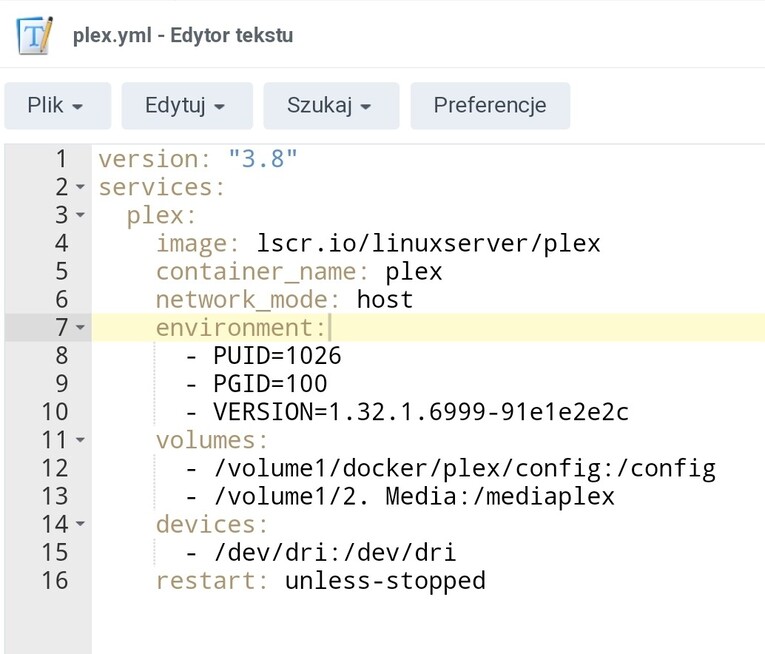
here ist my plex.yml from linuxserver.
With this I have installed my PMS and it allows to update to the newer versions.
I just cd into the directory and run it over my plex docker container with SSH command:
sudo docker-compose -f plex.yml up -d
It recreates the container overriting it automatically.
It can also downgrade, as I did it yesterday. You just need to write the correct version in the code (from linuxserver Releases · linuxserver/docker-plex · GitHub)
I have downgraded to 1.32.1.6999, as the newer won’t allow transcoding on my DS920+.
Sorry for jpg, I am on my mobile and could not copy the text.