Server Version#:
Player Version#:
Tuner Make/Model: HDHomeRun Connect Quatro
Guide/Lineup name:
Using XMLTV?: No
Channel number/Name: All
<If providing server logs please do NOT turn on verbose logging, only debug logging should be enabled>
Just got my HDHomeRun set up and was excited to have it available through plex, but while everything on the HDHomeRun seems to be working well, i.e. I can watch live TV via the homerun Android app, Windows app and even Plex detected it along with the channels, for some reason I cannot watch any live TV channel via Plex. I’ve tried the Web client, Windows plex client, Android plex client, different computers/browsers etc, and doesn’t work.
I can watch my local media files but only live TV has an issue where it takes forever to try and load the channel, eventually timing out and then throwing the error message “Source Is Unavailable”.
I’ve updated plex to the latest version, I’ve updated the hdhomerun firmware and I’ve been deployed a whole new plex server to see if that resolved it, but it does exactly the same thing 
All devices are on the same L2 subnet 192.168.10.x /24, but I do have a pfsense firewall router that is pretty strict when it comes to external ports. Wasn’t sure if there was some public internet access that needs to be configured for plex to talk to the hdhomerun?
This could be caused because your Plex server is deciding to transcode the live TV stream from your HDHR when serving to the client(s), but your other media is in a format that doesn’t require transcoding.
Edit: I see you are running on a NAS. Everything should still apply, but what is the brand/model of your NAS? It will help understanding the specs of your Plex server hardware.
Please also take a look at the dashboard in Plex web while you are successfully playing one of your media files, and then compare to during the time it is attempting to start a live TV stream. Make sure the “Show Details” button ( ) to the right is clicked. You are looking for something like this:
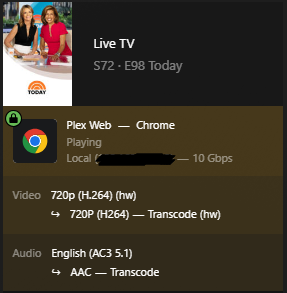
In the screen shot you can see I’m using Plex Web to view live tv. Plex Web tends to be the worst of the Plex clients in terms of not being able to direct play or direct stream, and having to fall back to transcoding. We want to confirm that Plex is seeing your client(s) as “Local” as in the screen snapshot. We also want to see if video is transcoding, and if so if hardware transcoding (the “hw”) is being used. If it is transcoding, but there is no “hw”, then it is using software transcoding and your CPU may be having trouble meeting the demand. If it is software transcoding then scroll down in the dashboard while a live tv stream is trying to start and see if the CPU graph is showing that it is maxed.
Ideally you want to be able to either direct stream or direct play. Many OTA live tv broadcasts still use MPEG2, so sometimes it can take some client tweaks to get to direct stream. However, it is good to know if your system can handle transcoding.
You are able to play your local media files, so I don’t think your firewall is an issue, but thank you for providing your network topology. It could be important.
If none of the above appears to be the problem, then we will likely need debug level server logs posted here that cover the time period where you have tried to start a live tv session.
Hi hokierulz, thanks for your reply! Plex is primarily running as a jail my TruNAS server (updated to latest version) which is a virtual machine on an ESXi server.
However, to troubleshoot this specific issue, I stopped that instance, and spun up a new instance on my Synology DS1621 NAS. New IP, same subnet, NAS is directly connected to the same switch that my HDHomeRun is patched to, but I ended up getting exactly the same problem.
I’ve tried with transcoding enabled and disabled, but no joy, but as my physical CPU on the TrueNas instance is a Intel Xeon E5 2698 V4 (20 Core), and is hardly being touched according to ESXi, so I think we can rule that one out.
I’ll get a debug running tonight and try and get some more details, but from the basic plex Tuner Service.log, I see the following:
Jan 10, 2024 22:53:12.146 [0x246e90c33000] INFO - [I] broker_t::start…
Jan 10, 2024 22:53:12.289 [0x246e90c33000] INFO - [I] device_manager_t::init.
Jan 10, 2024 22:53:12.289 [0x246e90c33000] INFO - [I] device_manager_t::init. Initialize provider manager
Jan 10, 2024 22:53:12.289 [0x246e90c33000] INFO - [I] device_manager_t::init. Initialize all device auxes
Jan 10, 2024 22:53:12.289 [0x246e90c33000] INFO - [I] dvb_device_factory_t::get_aux_list
Jan 10, 2024 22:53:12.292 [0x246e90c33000] INFO - [I] web_server_t::start. Starting web server on port 32600
Jan 10, 2024 22:53:15.039 [0x246e90c35300] INFO - [I] web_service_t::process_device_discovery
Jan 10, 2024 22:53:15.039 [0x246e90c35300] INFO - [I] device_reactor_t::get_device_list ()
Jan 10, 2024 22:53:17.049 [0x246e90c35300] INFO - [I] SAT2IP - discover_satip_servers(): no servers found
Yet at the same time, if I open the HDHomeRun config GUI, I can clearly see the selected channel is running by one of the tuners, and is allocated to the Plex server on some random port between 30000 and 60000.
Thank you for the tuner service log snippet. The “SAT2IP - discover_satip_servers(): no servers found” isn’t a problem. I have a HDHR extend, and I get that message as well and I have fully functional Live TV. I do get some info level “Found Device” messages in that log that aren’t in your post, but that may not be an issue. Of course the fact that Plex is successfully allocating a tuner on your HDHR is good.
Hopefully the full debug level server logs will give us more info. Typically next I would look in the “Plex Media Server.log” series of files at the time of an attempted tune.
