I’ll take a look. Don’t know at the moment why they would be considered the same. Can you give me some examples, station and times, so I can take a look at the XMLTV.
May be another quirk to how plex is parsing the data.
I’ll take a look. Don’t know at the moment why they would be considered the same. Can you give me some examples, station and times, so I can take a look at the XMLTV.
May be another quirk to how plex is parsing the data.
I’ve downloaded about 2 weeks worth and there is only one showing of college football, yet there should be atleast 10+ showings for tomorrow:

Tommorrow at noon there are two college football games on espn and espn2 but they have the same subtitle:

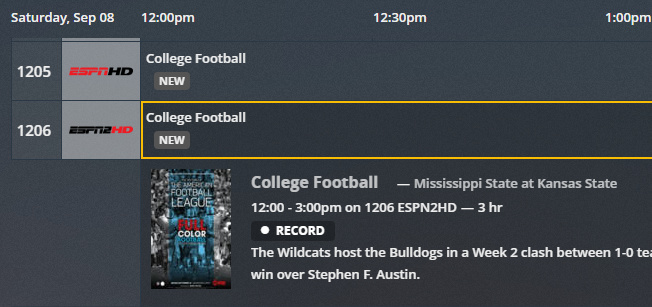
Seems like other shows such as NFL Football only has one showing when there should be atleast 3-4+ over the next two weeks.
let me know if you need more info.
Thanks!
Okay, I’ll track this down. Must be in my conversion from MXF file to XMLTV. The errors you are seeing are in the XMLTV file as well.
EDIT: No, I take that back. The XMLTV is just fine. I was searching on the Mississippi at Kansas game you showed and it really is showing multiple times… just certainly not at the same time on both ESPN and ESPN2.
Are you using the lineup from SD, or the custom lineup in EPG123? Shouldn’t matter, just another data point in this. The only thing I can think of is Plex is expecting the “date” element filled in.
If you search the XMLTV file for EP02994183.1516, you can add the date field manually like below and see if that changes anything.
  <programme start="20180908160000" stop="20180908190000" channel="EPG123.45507.schedulesdirect.org">
    <title>College Football</title>
    <sub-title>Arizona at Houston or Georgia Tech at South Florida</sub-title>
    <desc>Regional coverage of Arizona at Houston or Georgia Tech at South Florida.</desc>
    <date>20180908</date>
    <category>Sports</category>
    <category>Football</category>
    <language>en</language>
    <icon src="https://s3.amazonaws.com/schedulesdirect/assets/p191261_b_h3_am.jpg" />
    <episode-num system="dd_progid">EP02994183.1516</episode-num>
    <episode-num system="original-air-date">2018-09-08</episode-num>
    <video>
      <quality>HDTV</quality>
    </video>
    <new />
    <subtitles type="teletext" />
  </programme>
Certainly would be nice if the Plex team chimed in and let everyone know what is required for an xmltv file to work properly within their software.
What is this 5 part series “Full Color Football” and where is it coming from? It doesn’t exist in the xmltv file. It looks to me Plex is trying to help you out and pulling data from somewhere else?
Okay, still avoiding paying for a Plex Pass in order to figure out their code, but I took a look at IceTV XMLTV format for Plex and noticed a live sport event from them looks like the below:
<programme airingID="140789207" mediaID="13016-0" start="20180909020000 +0000" stop="20180909033000 +0000" channel="2659">
  <title lang="en">AFL: Game Day</title>
  <desc lang="en">Hamish McLachlan hosts a weekly panel to discuss, review and preview all things AFL.</desc>
  <category lang="en">Sport</category>
  <category lang="en">Talk Show</category>
  <category lang="en">AFL</category>
  <language lang="en">English</language>
  <icon src="http://images.icetv.com.au/placeholder/13016_poster.png" width="1000" height="680" />
  <country lang="en">Australia</country>
  <sport lang="en">AFL</sport>
  <episode-num system="original-air-date">2018-09-09 10:00:00</episode-num>
  <video>
   <present>yes</present>
   <colour>yes</colour>
   <aspect>16:9</aspect>
   <quality>HDTV</quality>
  </video>
  <premiere />
  <subtitles type="teletext" />
  <rating system="ACMA">
   <value>PG</value>
  </rating>
 </programme>
They don’t include the date element either, but they add a few things that are not defined in the XMLTV DTD.
The airingID and mediaID attributes are not part of the XMLTV description document and I assume this is IceTV’s equivalent to our “dd_progid” episode numbering system.
They add a < sport > element which may have a positive impact in this case. I am assuming that sports is the only thing affected, but I have no idea what Plex is doing.
Also of note is IceTV seems to use the Premiere flag to indicate a Live event… I think I’ll use that. That is something the XMLTV is missing.
I used OTA of my local zip as lineup 1 and SDust PremiumTV eastern as lineup 2.
I added the data node to my xmltv for the football game you mentioned and refreshed the epg in plex with no luck, could not find that game in the listings.
I have no idea where “Full Color Football” is coming from. Plex grabbed that from gracenote for all the college football games when i pulled the epg from directv when i first set up plex with sdust premium tv. I tried to delete the dvr and restart plex, than import the 123epg xmltv file with no luck.
Is there a way to “clear the cache”… get rid of that stuff? I think maybe it decided all “College Football” games are “Full Color Football”, and all “NFL Football” games are something else. I think I also saw somewhere you can disable Plex from getting more information from TMDB and TVDB?
Right now, I can only guess that this is something specific to either Plex, or some crud left behind from your other setup/sources that is causing the problem. I have no problem adding or changing something in my XMLTV file generation to be a work-around but I’ve got nothing to work on at the moment. Nothing that makes sense anyway.
Found the issue. Sports entries in Plex evidently need an “xmltv_ns” value for season, episode, and part number just like a normal series. Otherwise they are all considered the same “episode”. 
Also, the “Full Color Football” is because you had ‘Enhanced Guide’ enabled in the DVR Settings. Plex was trying to help you out there.
Now I have to determine what, if anything, I am going to be able to do about it on my end. I don’t want it to be hacky, and I don’t want it to adversely affect other consumers like emby.
To be continued…
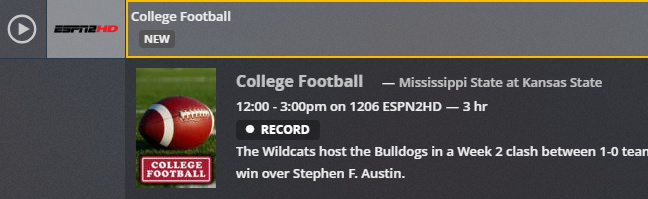
Yes that did the trick with turning off the “enhanced guide”:
I appreciate all the hard work in looking into this, you have a fine application!
To be clear, the new version of epg123 is working as it should if ‘enhanced guide’ option is off?
EPG123 is, but Plex is deciding that all “College Football” games are the same game, all “NFL Football” games are the same game, and there is only a single game for all other sports. Without any help from the Plex team, I’m going to have to figure out a way to get Plex to recognize they are all different besides having to give each game a random season number and episode number.
Yes that did the trick with turning off the “enhanced guide”
@mjholla82 Did you do anything besides turning off the enhanced guide? I see that @garyan2 had you making changes to your xmltv file, but was that necessary or did turning off the enhanced guide fix everything?
@dinki Turning off the enhanced guide made it so plex would not overwrite the match or image for a certain title from the xmltv.
With enhanced guide on, plex was putting “Full Color Football” for all college football titles. Turning this off gave all the college football games the generic and correct college football image from the xmltv.
I did try a manual change suggested from @garyan2 to the xmltv to see if it separated a college football title with no luck. He is currently trying to figure out a way to get Plex to recognize that all college football games are not the same.
Thanks to you both for working on this. It sure is nice that @garyan2 has put in some work on getting this fixed for us. Would be nice to get that kind of support from Plex dev team and save everyone from this headache.
Thanks. I think I’ve cracked the code/trick that satisfies me. I’m testing it out now and will probably throw a download link shortly.
New version that should get everything looking and acting proper in your guide.
Seems to be working great! All college football programs have unique descriptions as they should and only movies show up in the movies display. Great job and thank you!
I’ve just switched over to linux and am wondering if you know of a way to run epg123 in linux? I know it’s deviating from your purpose of the program but curious if you know if anyone has created a docker image running epg123 under wine?
Sorry. That skill is outside my wheelhouse. Like you said, EPG123 was designed for Windows Media Center… Windows being the key word there.
Thanks so much @garyan2, you are the man. All sporting events now have all episodes (or games) showing!
