Server Version#:1.19.1.2645
Player Version#:4.22.3
I have an xfinity gateway CGM4140COM
The server is a Dell Optiplex 755 running windows 7 Pro
This is getting really frustrating. My Plex server has been running perfectly for years. The last couple of weeks not so much.
I posted previously that under remote access it shows “Not available outside your network”, but I was able to access. I can but it is far more difficult and if I can access it shows as an indirect connection. This was never the case before. Now it requires multiple “retry connection”. Then when/if it does connect the connection is indirect.
Two things have changed in the past few of weeks:
Comcast replaced my modem/router to the model noted above
Plex pushed a server update
Here is the screen shot of the remote access page. Is there supposed to be a red x after the public IP address?
Really not sure what to do at this point. I have double checked firewall settings and anti-virus. Neither one of them has been changed or adjusted.
I appreciate any help or suggestions.
Brian
Yea the remote indicator go red every so often, but remote access still works…
Think it just the high rate of internet traffic currently, that not all Plex API messages get through timely.
The red x is there all the time.
I have never had an indirect connection before.
Check your router configuration. Any custom configuration was most likely lost when Comcast installed the new router. I’ve never heard of an ISP checking, much less maintaining, custom router configurations when replacing equipment for residential users.
- Port forwarding rules: To forward the outside traffic to your Plex server.
- IP Address Reservation: If your Plex Server uses a router assigned address instead of a static address.
- DHCP Address Pool: If your Plex Server has a static IP address, it needs to fall outside the DHCP pool to avoid address conflicts.
See Troubleshooting Remote Access support article.
No. It should show your public IP address and the port number used for remote access.
If configured and working correctly, it may still occasionally show “Not Available.” Your server periodically checks in with servers at Plex. If the process fails (busy servers, busy internet, etc) it may incorrectly indicate remote access is unavailable.
You can verify using canyouseeme.org. Put in the port used for Plex to test (default:32400).
https://support.plex.tv/articles/200931138-troubleshooting-remote-access/
I went to canyouseeme.org. It showed the IP address and port 80. I put in port 32400 and clicked check port. It gave me “This site can’t be reached” message.
Xfinity…
do the still have this weird webpage where you are supposed to set options of your router?
I think they recently activated some additional security feature which prevents all clients on the local network from accessing your server’s FQDN.
See Xfinity XFi Security and impact on availability of Remote Access
Expected.
Check port forwarding rules, etc.
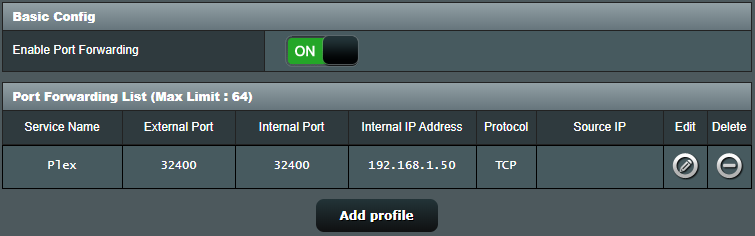
I’ve an ASUS router. Here’s what the rule looks like in my system. Yours will be similar.
Service Name: Plex (doesn’t matter, any name is OK)
External Port: 32400 (default, can change if desired).
Internal Port: 32400 (do not change)
Internal IP Address: The IP address of your plex server
Protocol: TCP. (required).
Source IP: Leave Blank. (May also be called “outside IP” or similar)
THANK YOU! It was the xfi advanced security settings noted in the link you provided. From the timing it felt like it had to do with the modem upgrade.