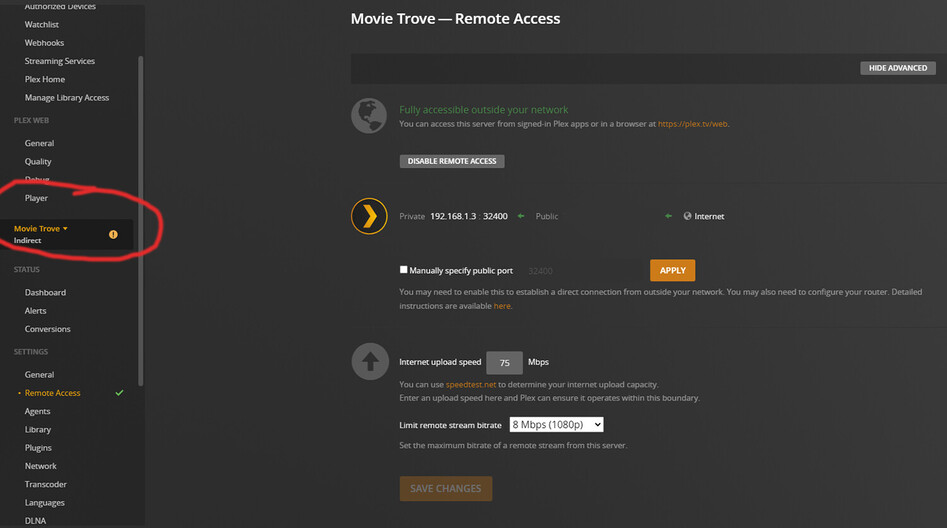
Today i upgraded my old verizon fios router to the newest fios router. before this, remote access was working. after the upgrade remote access is not working properly, and all connections are indirect. ive searched and cant figure anything out, my upnp is enabled in the router as well. i have attached logs, can anyone help me?
I suggest you try dropping UPnP and go with a manual port forward.
Was there any change in your data plan when you got the new router? Did you verify the router has a publicly accessible/routable IPv4 address? If you setup a manual port forward… can you access the public port on your router’s WAN IP address from outside your home network?
there was no change in anything, just a router upgrade. i have managed to get remote access working, but all connections are coming up as indirect. im not sure if it has a public accessible address, i have an option to do a dmz host and make a public address, is that what i should do?
You changed the device that controls remote access to your server.
Indirect connections use Plex Relay. It is a fallback for when Remote Access is not working or not available. Connections are tunneled through a host at plex.tv and are limited to 2 Mbps (1 Mbps w/o a Plex Pass).
In Settings → Remote Access + Show Advanced
Does it say Not available outside your network or Fully accessible outside your network?
What is displayed for the public address (Show Advanced)? Is it 71.245.x.x?
Is a port number listed next to the public address? If so, what is it?
Is the checkbox for Manually specify public port selected? If so, deselect it, click apply, then disable remote access and re-enable remote access (to try to re-register with hosts at plex.tv).
That’s good. It means the port is open in the router and the web site can see Plex Media Server.
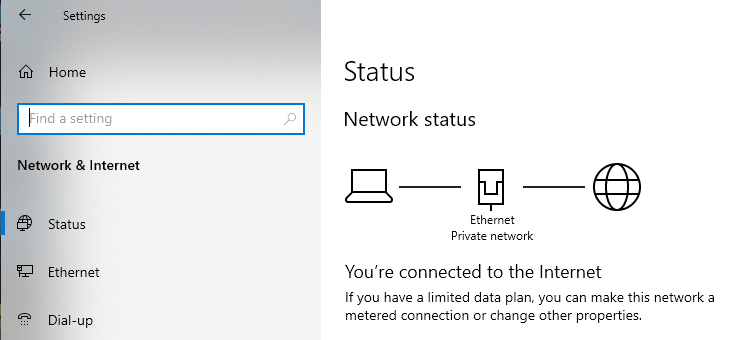
One more thing to check, the Plex server Ethernet port status
On the PC running Plex Media Server, check Settings → Network & Internet.
It should say “Ethernet Private Network” under the Ethernet jack icon between the PC & globe.
If it says a public network, then click on Properties and change it to Private. Then reboot the PC.
“Public” will isolate local devices from the server, making them appear as remote devices. Windows sometimes reverts from Private to Public when a router is changed. It sees the new Ethernet MAC address of the router and thinks it is on a new network.
How do things look?
Do remote devices (phone on mobile net, etc) appear as Remote, not Indirect, in the Plex Dashboard?
Do local devices appear as Local, not remote/indirect, and can they stream OK?
ok so funny thing happened, i checked the status, and everything is now suddenly all green… remote access and a direct connection! but, i went to check my network status, and its already on private. i dont know why all of a sudden its working as intended, but it is. i’ll keep an eye on it incase it fluctuates, going indirect to direct but so far its steady direct
thank you for all your help, i really appreciate it
What do you mean with ‘Indirect’ ?
What is the difference between ‘indirect’ and ‘direct’ ?
I don’t know if this is the same issue, but trying to play videos from my PS5, it always reach my 3 feet away NAS…through the internet !!! (and with terrible video quality).
Plex usually distinguishes if a stream is local (=inside your home network) or remote (=outside your home network). If you have a complex home network, Plex will only consider the subnet to which the server is connected as local by default.
Sometimes, a remote client cannot find a direct connection to your server (there’s a number of scenarios why this can happen). In that case, the connection can be routed through a relay server of Plex.
direct: your Plex Client → your Plex Media Server
indirect: your Plex Client → Plex Relay → your Plex Media Server
Indirect connections are limited to 1 Mbps (2 Mbps for Plex Pass members). That’s usually enough to browse your server or stream some music.
If you get to see an indirect connection you should review your remote access setup. That means the Plex remote access settings but also your home network setup incl. the router configuration and potentially limiting factors of your ISP (see “The basics of remote access troubleshooting” guide linked above).
I am having a similar issue, can anyone possibly help me troubleshoot? I am running plex from a Qnap TVSh 1688x. My internet is through Spectrum Fiber. I have my modem/router Netgear Nighthawk CAX 80 running 1GB of internet into my Cisco Meraki switch that feeds my Qnap Server. I just recently moved and never had this issue before but ever since being in my new house and setting up internet, I am having this indirect connection issue.
I am not well versed in networking so I am not even sure on the first place I should look to troubleshoot this issue.
After a change of router, Windows will definitely switch the network connection to be treated as “public”, instead of “private”.
Check this first, and change if necessary before doing anything else.
Then stop Plex server using its task tray icon.
Wait a few minutes, then restart it.
Then let it sit for an hour.
If you had a manual port forwarding in the old router, re-create it in the new router.
After a few hours waiting time, restart the server again.