New to setting up plex. I have moved my HD to an HTPC. That is connected to the home network with ethernet when trying to play movies on my Nvidia shield that is also connected with ethernet I’m getting bad buffering is there a way to stop this?
You need to see if the server reports that it is a local or remote connection. Log in to app.plex.tv in a browser. When streaming to the shield, check the browser, click the heartbeat icon in the upper right, and click on dashboard. This screen can tell us a lot about what is happening, to determine if it’s a network issue or possibly a transcode issue. A screenshot of this screen would help.

This is part that’s going to be helpful

Where can I get this?
Make sure you’re playing a video
It’s right above where your screen shot shows. Scroll up
If the box is collapsed you have to click “show details”
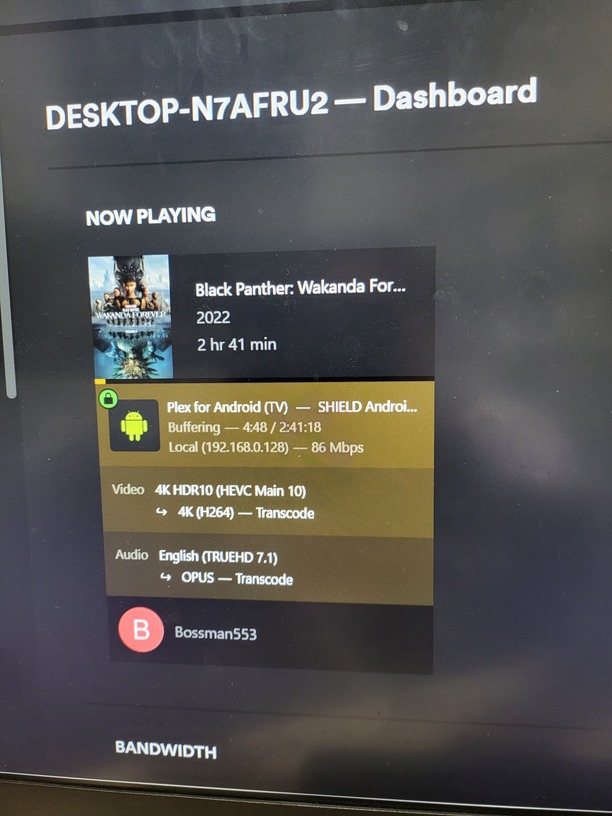
Well, the video is transcoding. and I think that transcoding on-the-fly of 4K video is going to be VERY CPU intensive. It’s possible your computer simply cannot handle the strain. If you scroll a bit further down on that screen you showed us, you might be able to see the server’s CPU usage stat. Is it maxing out at 100% during a stream?
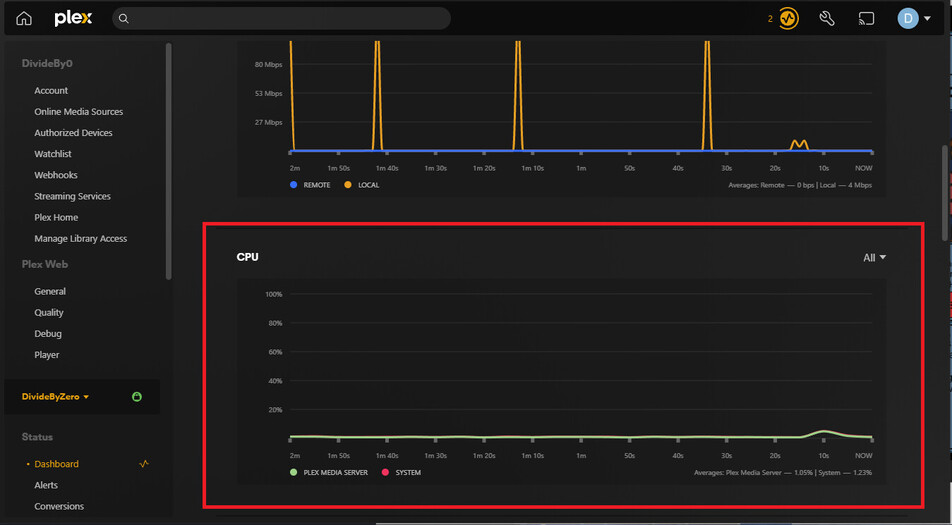
Is the Shield or the PC on wifi? You’re reaching the possible network limits of 10/100 network traffic with an 86 Mbps video.


Plex Media Server version? Settings → Server_Name → General
Platform? Windows/Linux/etc?
To what is the Shield connected?
If connected to a 4K HDR capable TV the video should direct play, not transcode.
Not sure if this helps. This is the PC, and thank you very much. I just didn’t get why when I had the hard drives on the Sheild. I thought with it being in the network, it wouldn’t be a problem.
Cooler Master Hyper 212 Black Edition CPU Air Cooler, Silencio FP120 Fan, Anodized Gun-Metal Black, Brushed Nickel Fins, 4 Copper Direct Contact Heat Pipes for AMD Ryzen/Intel LGA1700/1200/1151
Noctua NF-P12 redux-1700 PWM, High-Performance Cooling Fan, 4-Pin, 1700 RPM
PNY GeForce RTX™ 3050 8GB Verto Dual Fan Graphics Card
MSI Z490-A PRO ProSeries ATX Motherboard (10th Gen Intel Core, LGA 1200 Socket, DDR4, Dual M.2 Slots, USB 3.2 Gen 2, 2.5G LAN, DP/HDMI)
Cooler Master MasterBox MCB-B600L-KANN-S00 ATX Mid-Tower
Silicon Power Value Gaming DDR4 RAM 16GB (8GBx2) 3200MHz (PC4 25600) CL16 1.35V Desktop Memory Module
Corsair CX-M Series, CX750M, Modular Power Supply, 80
Cooler Master Hyper 212 Black Edition CPU Air Cooler, Silencio FP120 Fan, Anodized Gun-Metal Black, Brushed Nickel Fins, 4 Copper Direct Contact Heat Pipes for AMD Ryzen/Intel LGA1700/1200/1151
Noctua NF-P12 redux-1700 PWM, High-Performance Cooling Fan, 4-Pin, 1700 RPM
PNY GeForce RTX™ 3050 8GB Verto Dual Fan Graphics Card
MSI Z490-A PRO ProSeries ATX Motherboard (10th Gen Intel Core, LGA 1200 Socket, DDR4, Dual M.2 Slots, USB 3.2 Gen 2, 2.5G LAN, DP/HDMI)
Cooler Master MasterBox MCB-B600L-KANN-S00 ATX Mid-Tower
Silicon Power Value Gaming DDR4 RAM 16GB (8GBx2) 3200MHz (PC4 25600) CL16 1.35V Desktop Memory Module
Corsair CX-M Series, CX750M, Modular Power Supply, 80

Check the box for Use Hardware Acceleration when available.
Also, which CPU?
Version 1.31.0.6654 Windows
The PC and Shield are connected to my TP-Link AC2600. Yes, the tv and Projector are both 4k HDR capable.
To which device is the Shield connected?
Make & model?
The Shield should direct play 4K HDR video when connected to a 4K HDR compatible TV/projector. Trying to figure out why the video is transcoding.
Are you running the 64-bit version of Plex Media Server?
If installed in c:\windows\program files\ then it is the 64-bit version.
If installed in c:\windows\program files (x86)\ then it is the 32-bit version.
You need the 64-bit version for HDR to SDR Tonemapping to use the Nvidia GPU instead of the CPU.
The shield is connected to Anthem AV70, which is also HDR.
The Sheild is a P2897
Plex is the 64-bit
The Anthem should passthrough the HDR video.
What is the projector make/model?
Thanks for the info. That’s a sweet setup.
Not sure why Plex is transcoding the video and audio. Both should direct play.
Most likely a configuration problem somewhere.
Let’s review the Shield settings.
In the Plex app on the Shield, make sure Passthrough = HDMI.
For the Shield settings…
Device Preferences → About → Status → HDMI
- You should see 10-bit or 12-bit Rec 2020
- Also, Dolby TrueHD listed under Audio Mode
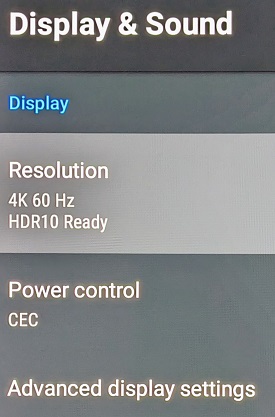
Device Preferences → Display & Sound
- Resolution should say 4K & HDR10 Ready
- Advanced Sound Settings → Available Formats should be Auto.
From my Shield:
Shield ← HDMI → Denon AVR-X4300H ← HDMI → LG B7 OLED


Mines started buffering all the time on the home network after the last update, i just unticked "use recomended settngs " in the quality settings and its fixed it.
