[HELP Needed] Local *direct* playback keeps buffering

Server Version#: 1.42.1.10060
Player Version#: Plex for LG - 5.93.2

<Plex Media Server Logs_2025-09-02_11-46-57.zip (2,5 MB)>

Hi there,

I’m having an issue with Plex local streaming that’s driving me crazy.

This is the long story short:

Since I swapped my HDD Array because of failure, I’m getting buffering issue for the first 10-15 minutes of play of large media files.

I tried both Plex-Media-Server Official and Linuxserver containers: same results.

I also adjusted file paths to bypass Unraid FUSE layer.

If you need more details, here’s the

Full Story

Back in May I had to swap my previous 20TB Toshiba MG10ACA20TE HDD because I started getting hundreds of reallocated sectors warnings.

When I replaced the Toshiba HDD with a Segate IronWolf Pro, I did a “Preclear” with Unraid official plugin before to create a new Array and start content migration.

I also increased NAS RAM from 16GB to 32GB.

I have an UGREEN NASync DXP6800 Pro equipped with:

• 2x 16GB RAM DDR5-4800 Crucial CT16G48C40S5
• 1x 2TB NVME WD Black SN850X
• 1x 22TB Seagate IronWolf Pro ST22000NT001

At first boot I performed a MemTest two times to check for DDR modules stability and everything went fine.

So I booted original OS (UGOS Pro) to check for firmware/BIOS updates and I let it to install them.

As of today, every software is updated to latest stable version.

Then I switched to Unraid OS and I set up my NAS as following:

Cache Pool: 1x 2TB NVME WD Black SN850X
Array Pool: 1x 22TB Seagate IronWolf Pro

(No Parity-Disks since I don’t need of that.)

Cache Pool is for Docker Containers and related directories (like AppData).
Array Pool is to store Media Files (Movies and TV Shows).

I have a large collection of 4K HDR Movies (each MKV file is between 50GB and 120GB) and also +80 TV Shows (in a mix of 1080p/4K MKV files).

The buffering issue just happens with large MKV files (starting from ~50GB, mostly movies) but they’re all directly played with no transcode on any item (video, audio, subtitles, etc.).

I use a LG TV as Plex Client with webOS Plex App.

I use wired LAN connection on both NAS (10Gbps) and TV (1Gbps). I also tried to switch from LAN to WiFi on my TV since it has WiFi 6 (and I have a WiFi 7 Router) but the buffering issue doesn’t seem to be related to network bandwidth.

I really don’t know how to fix this strange behaviour, I wish you can help me.

Thanks.

Disable the Verbose setting for server logging and Restart Plex Media Server, then try your tests again to post new logs.
TV’s don’t have 1GbE adapters, are you using a USB Ethernet adapter?
Plex is starting before unraid has fully setup the network.
Docker should use HOST mode if not already.
Your DNS on the unraid doesn’t properly resolve plex.tv nor the Plex Cert mapping to the PMS. (DNS Rebinding)
10GBe sounds cool but Plex doesn’t like Jumbo Frames and most people don’t buy uplevel switches to go with it. Use the 2.5 GbE port if your device has it or make sure Jumbo Frames are disabled everywhere.
Just from reading this forum, relying on the LG Plex app seems fraught with complications. Have you considered a streaming box?

Hi @pl_5309

Thank you for your reply.

Disable the Verbose setting for server logging and Restart Plex Media Server, then try your tests again to post new logs.

Okay, I did it.
Plex Media Server Logs_2025-09-02_19-02-46.zip (63,9 KB)

TV’s don’t have 1GbE adapters, are you using a USB Ethernet adapter?

I didn’t know that such a premium TV has a very poor LAN adapter.
Then, I moved to WiFi (TV has WiFi 6 and my router is WiFi 7).

Plex is starting before unraid has fully setup the network.

What do you mean? And how can I avoid this?

Docker should use HOST mode if not already.

PMS Docker Container Network Type is already set on “Host”.

Your DNS on the unraid doesn’t properly resolve plex.tv nor the Plex Cert mapping to the PMS. (DNS Rebinding)

So how can I fix that?

10GBe sounds cool but Plex doesn’t like Jumbo Frames and most people don’t buy uplevel switches to go with it. Use the 2.5 GbE port if your device has it or make sure Jumbo Frames are disabled everywhere.

I use an unmanaged Netgear Switch (XS508M) to connect both NAS and Router with 10Gbps LAN end-to-end. Never enabled Jumbo Frames.

Just from reading this forum, relying on the LG Plex app seems fraught with complications. Have you considered a streaming box?

I’m waiting for the new Apple TV.

I was using the last ATV 4K model (the one with 1Gbps LAN) until march. Then I sold it and I used Plex on LG TV but I never had this kind of buffering issue until I swapped the disk from Toshiba to Iron Wolf Pro.

Thank you in advance!

DNS:
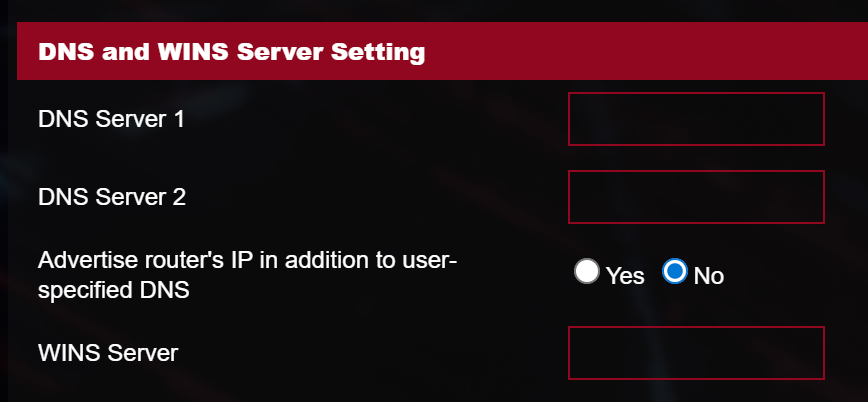
Set your router to use 1.1.1.1 or 8.8.8.8 for DNS

https://support.plex.tv/articles/206225077-how-to-use-secure-server-connections/

As you said it is buffering, make sure you don’t have more than 16 audio streams with your files. At this point since the only major change was the rebuild I think the underlying issue is there.

Hi @pl_5309

Thank you for your suggestions.

DNS:
Set your router to use 1.1.1.1 or 8.8.8.8 for DNS

I already use 3rd party DNS (OpenDNS 208.67.222.222 - 208.67.220.220) for WAN:

Do I have to set them also for LAN?

Make sure you don’t have more than 16 audio streams with your files.

What do you mean exactly?

Thanks again.

When you rebuilt your server did you start Plex from scratch or copy over the databases?

If you copied the databases over then you will probably need to re-analyze your files. You can start by doing one and seeing if it plays any better.

For the DNS, start by gathering information.

From the Plex Server, preferably from inside the Docker Container, run nslookup and you should get output similar to mine. This tells me that my router is providing DNS resolution and I get back two valid Plex addresses. If the DNS server isn’t your router or the OpenDNS servers then investigate what is intercepting the lookukp.

 nslookup plex.tv
Server:         192.168.1.1
Address:        192.168.1.1#53

Non-authoritative answer:
Name:   plex.tv
Address: 34.252.152.163
Name:   plex.tv
Address: 52.210.55.142

When you rebuilt your server did you start Plex from scratch or copy over the databases?

I swapped the whole NAS, so everything was new and I performed a fresh installation.
I never restore any backup, I just want everything to start from scratch.

For the DNS, start by gathering information.

This is what I get from Unraid console:

root@NAS:~# nslookup plex.tv
Server:         192.168.0.1
Address:        192.168.0.1#53

Non-authoritative answer:
Name:   plex.tv
Address: 34.252.152.163
Name:   plex.tv
Address: 52.210.55.142

I don’t think it’s possible to do it from PMS Docker Container since I read it doesn’t have nslookup.
This is what I get when I open Console from Plex Docker Container:

# nslookup plex.tv
sh: 1: nslookup: not found
# bash
root@NAS:/# nslookup plex.tv
bash: nslookup: command not found
root@NAS:/# 

So how can I do it from PMS Docker Container under Unraid?

[EDIT]

I tried this:

curl -v 'https://plex.tv'

And I got:

root@NAS:/mnt/cache/appdata/Plex-Media-Server/Library/Application Support/Plex Media Server# curl -v 'https://plex.tv'
* Host plex.tv:443 was resolved.
* IPv6: (none)
* IPv4: 52.210.55.142, 34.252.152.163
*   Trying 52.210.55.142:443...
* ALPN: curl offers h2,http/1.1
* TLSv1.3 (OUT), TLS handshake, Client hello (1):
*  CAfile: none
*  CApath: /etc/ssl/certs
* TLSv1.3 (IN), TLS handshake, Server hello (2):
* TLSv1.3 (IN), TLS change cipher, Change cipher spec (1):
* TLSv1.3 (IN), TLS handshake, Encrypted Extensions (8):
* TLSv1.3 (IN), TLS handshake, Certificate (11):
* TLSv1.3 (IN), TLS handshake, CERT verify (15):
* TLSv1.3 (IN), TLS handshake, Finished (20):
* TLSv1.3 (OUT), TLS change cipher, Change cipher spec (1):
* TLSv1.3 (OUT), TLS handshake, Finished (20):
* SSL connection using TLSv1.3 / TLS_AES_256_GCM_SHA384 / X25519MLKEM768 / RSASSA-PSS
* ALPN: server accepted http/1.1
* Server certificate:
*  subject: C=CH; ST=Nidwalden; L=Stans; O=Plex GmbH; CN=*.plex.tv
*  start date: Aug 21 00:00:00 2024 GMT
*  expire date: Sep 21 23:59:59 2025 GMT
*  subjectAltName: host "plex.tv" matched cert's "plex.tv"
*  issuer: C=US; O=DigiCert Inc; CN=DigiCert Global G2 TLS RSA SHA256 2020 CA1
*  SSL certificate verify ok.
*   Certificate level 0: Public key type RSA (2048/112 Bits/secBits), signed using sha256WithRSAEncryption
*   Certificate level 1: Public key type RSA (2048/112 Bits/secBits), signed using sha256WithRSAEncryption
*   Certificate level 2: Public key type RSA (2048/112 Bits/secBits), signed using sha256WithRSAEncryption
* Connected to plex.tv (52.210.55.142) port 443
* using HTTP/1.x
> GET / HTTP/1.1
> Host: plex.tv
> User-Agent: curl/8.15.0
> Accept: */*
> 
* Request completely sent off
* TLSv1.3 (IN), TLS handshake, Newsession Ticket (4):
< HTTP/1.1 302 Found
< Date: Wed, 03 Sep 2025 17:44:46 GMT
< Content-Type: text/html; charset=utf-8
< Transfer-Encoding: chunked
< Connection: keep-alive
< Location: https://www.plex.tv/
< Cache-Control: no-cache
< Set-Cookie: _my-plex_session_32=TEo2bGVJUjhEMWdRNHRMcDlzYlUzN1hUYkJNSk1RWHI5K1RLR1VNSU51Smc3L0llMmc3d0ZTTzdhcGZtV1hBZGFmYTFBckxCaWJSNk1PQWJBaVRVemNuNU5BZXM1MGdRR2JVcFRjQjNjQkJXcXBTdTQxditDZXkvQjV2Vmp5U3VUSEJlQ1lKN2FWamowSFpHZTAwd09TRWpyaGg4ODU3SnlWQVRuem9uWmhJPS0tQXk3a2xOTHp4VjZDM3lyVHVWVlFmdz09--7bc97bb33e3a250bfc442e68504cd50faea89eb2; path=/; HttpOnly; secure
< X-Request-Id: 85d8ea766b5020d0c3184f8d0e07bc07
< X-Runtime: 0.003962
< Strict-Transport-Security: max-age=31536000; includeSubDomains; preload
< Referrer-Policy: origin-when-cross-origin
< X-Content-Type-Options: nosniff
< X-Frame-Options: SAMEORIGIN
< X-XSS-Protection: 1; mode=block
< vary: Origin
< 
* Connection #0 to host plex.tv left intact

Then I tried this other:

curl -v plex.tv

And I got this:

Host plex.tv:80 was resolved.
* IPv6: (none)
* IPv4: 34.252.152.163, 52.210.55.142
*   Trying 34.252.152.163:80...
* Connected to plex.tv (34.252.152.163) port 80
* using HTTP/1.x
> GET / HTTP/1.1
> Host: plex.tv
> User-Agent: curl/8.15.0
> Accept: */*
> 
* Request completely sent off
< HTTP/1.1 308 Permanent Redirect
< Date: Wed, 03 Sep 2025 17:46:14 GMT
< Content-Type: text/html
< Content-Length: 164
< Connection: keep-alive
< Location: https://plex.tv
< Strict-Transport-Security: max-age=31536000; includeSubDomains; preload
< X-Frame-Options: SAMEORIGIN
< X-XSS-Protection: 1; mode=block
< 
<html>
<head><title>308 Permanent Redirect</title></head>
<body>
<center><h1>308 Permanent Redirect</h1></center>
<hr><center>nginx</center>
</body>
</html>
* Connection #0 to host plex.tv left intact

Is there any issue?

Thanks

docker exec -ti  {container_name}  /bin/bash

I don’t run Plex in docker but I would think nslookup and curl are there. since it uses them.

This should give you your public ip and it should match your router. (no need to post)

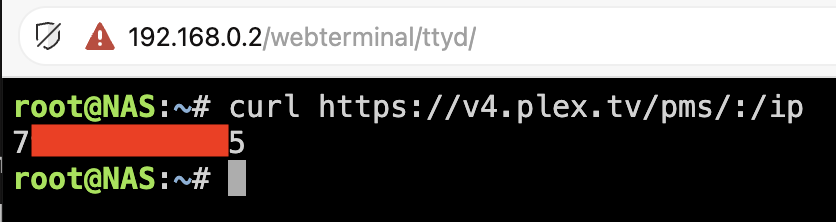
curl https://v4.plex.tv/pms/:/ip

If the docker is HOST mode Plex is seeing it published with 172-17-0-1.abcdefghijklmnopqrstuvwxyz012345.plex.direct. Are any of these fields (Server Settings > Network) filled in?

Sorry @pl_5309, where do I have to execute this command?

If I try from PMS Docker Console it doesn’t work:

If I run it from Unraid Console, nothing happens:

curl https://v4.plex.tv/pms/:/ip

This is the only command that works and WAN IP has a match:

These are my Plex network settings:

I’m still facing the buffering issue and I still don’t know how to fix it.

I have unraid, and an LG TV. I don’t normally use it as a client, but thought I would test it with high bitrate 4k/HDR content, over wifi. I had no issues. Not bypassing the FUSE layer either. I’d be curious to see what your Dashboard looks like, to see what network bandwidth is being used. I know the LG doesn’t like TrueHD audio. Someone else mentioned maybe the file has too many audio tracks. I’ve seen other media player apps (Channels/Infuse) have a way to test the server connection speed. Too bad we don’t have that in the Plex app.

Is the audio track dts? I had this issue with an older movie, Killer Klowns from outer space, lg wouldn’t renew the dts license so had to replace the movie with one that didn’t use dts, don’t have that issue on all dts material just some

Hello @TheDaveAbides,

Thank you for your reply!

I know the LG doesn’t like TrueHD audio.

Most of my movies have AC3 5.1. Some of them have both AC3 5.1 and E-AC3 5.1. Just few have DTS 5.1/DTS-HD “MA” or “HRA” 5.1/7.1.

My TV model (OLED65G45LW), according to LG, is capable to play the following audio codecs:

AC4, AC3 (Dolby Digital), EAC3, HE-AAC, AAC, MP2, MP3, PCM, WMA, apt-X

I use a Sonos Arc Ultra soundbar connected via HDMI 2 (eARC) and I enabled “Pass Through” as Digital Audio Output (Settings/Audio/Advanced Settings/Digital audio output).

Sonos Arc Ultra supports these audio codecs.

Anyway, I never saw “Audio transcoding” with any audio format. Period.

Someone else mentioned maybe the file has too many audio tracks.

My Movies Library is almost the same since 10-15 years, with just few additions per year.

I change TV every 2 years and I’m with LG since E6 (then E9, G1, G2 and now G4). My previous TVs always had a wired connection via LAN (that I learnt some posts ago that it’s capped at 100Mbps).

I started having local playback buffering issue since early 2025, never had this before.

This one: It put you into a shell inside the container where you could run nslookup and curl.

Which points to your server build, can you post your docker compose/run.

Provided your /config has all your Plex Media Server files, you can drop and rebuild the container to see if that helps.

Hello @pl_5309,

Thank you for your reply.

This one: It put you into a shell inside the container where you could run nslookup and curl.

Anyway, I tried again as you suggested but it still doesn’t work:

The only command that works in the shell inside the container is this one:

Which points to your server build, can you post your docker compose/run.

Provided your /config has all your Plex Media Server files, you can drop and rebuild the container to see if that helps.

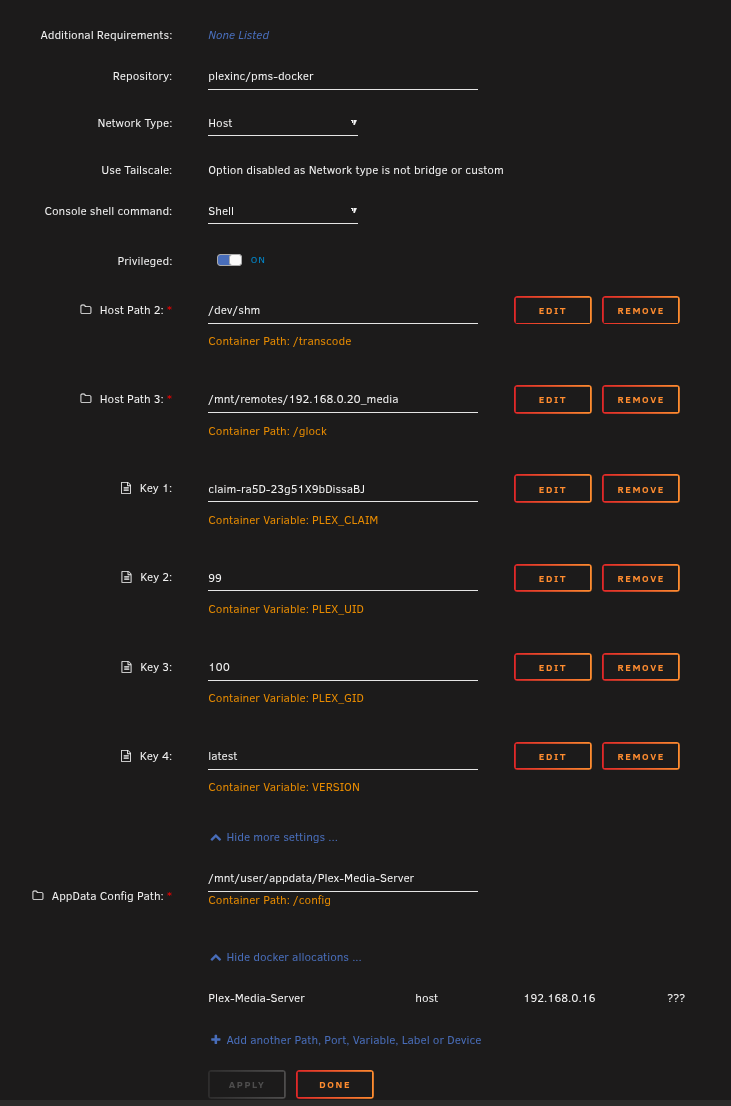
This is the (default) AppData Config Path:

I can’t find any Docker compose/run.
I was just able to grab these two files around:

config.v2.zip (2,4 KB)
Preferences.zip (970 Byte)

Thanks for help!

I don’t have a spare machine to load up UNRAID to be of further assistance and don’t want to waste any more of your time. There are a few others reporting problems with LG tv’s but it usually comes down the the Media File (too many Audio/Sub Title tracks) or Server Networking setup which Plex is dependent on.

Thanks, but as I said before, my medias haven’t changed so the problem is not audio/subtitle tracks related.

On Unraid Forum they all confirmed that the issue is related to PMS Docker Container, but I can’t fix it since there are missing troubleshooting tools like “nslookup”.

Is there any Plex Admin/Developer reading this forum? I payed for a Plex Pass lifetime so I expect to receive serious technical support.

Thanks.

Plex Pass is a license to additional features and does not provide additional support beyond what is found in these forums.

Having said that, paging @ChuckPa, time to spin up your UNRAID.

Unraid still spinning madly (but so is the owner :wink: )

Tried to read and understand what’s happening / not happening so please enlighten me where I’ve missed it.

my container config is simple, but also Privileged.

Box config is:
(Gateway - 192.168.0.1 is a PfSense box which forwards to 1.1.1.1
Therefore all DNS goes to 1.1.1.1)

Looking at the Config provided –

  1. PMS not running (port not open)
   "StartedAt": "2025-09-08T11:42:32.768596609Z",
    "FinishedAt": "2025-09-08T00:00:16.160555411Z",
    "Health": {
      "Status": "starting",
      "FailingStreak": 0,
      "Log": [
        {
          "Start": "2025-09-08T01:59:54.587788518+02:00",
          "End": "2025-09-08T01:59:54.631971676+02:00",
          "ExitCode": 0,
          "Output": ""
        },
        {
          "Start": "2025-09-08T01:59:59.633101243+02:00",
          "End": "2025-09-08T01:59:59.682255333+02:00",
          "ExitCode": 0,
          "Output": ""
        },
        {
          "Start": "2025-09-08T02:00:04.683421626+02:00",
          "End": "2025-09-08T02:00:04.735262081+02:00",
          "ExitCode": 0,
          "Output": ""
        },
        {
          "Start": "2025-09-08T02:00:09.73633724+02:00",
          "End": "2025-09-08T02:00:09.77784004+02:00",
          "ExitCode": 1,
          "Output": "curl: (7) Failed to connect to localhost port 32400 after 0 ms: Couldn't connect to server\n"
        },
        {
          "Start": "2025-09-08T02:00:14.778291568+02:00",
          "End": "2025-09-08T02:00:14.818859777+02:00",
          "ExitCode": 1,
          "Output": "curl: (7) Failed to connect to localhost port 32400 after 0 ms: Couldn't connect to server\n"
  1. This looks like the network layer has problems.
  "Image": "sha256:c247fa8b05953acc4f98dd4523e1faa94fcaa9ae054cb8043618f596ec3fcf38",
  "ImageManifest": null,
  "NetworkSettings": {
    "Bridge": "",
    "SandboxID": "50d2b46961aa8fb58ca53270f4b7f613f56d77d44e3c2a9b0ff38461c4d062a5",
    "SandboxKey": "/var/run/docker/netns/default",
    "HairpinMode": false,
    "LinkLocalIPv6Address": "",
    "LinkLocalIPv6PrefixLen": 0,
    "Networks": {
      "host": {
        "IPAMConfig": null,
        "Links": null,
        "Aliases": null,
        "MacAddress": "",
        "DriverOpts": null,
        "NetworkID": "cfedbff2f61a35b3d2ca3551fe5840b401d3ae205a25ff0929d57d62640abb57",
        "EndpointID": "1ae75a066a8cbd2acea9b52301a23d8bac62a7fb36f3e3dfa0b1bd14a6a20aaa",
        "Gateway": "",
        "IPAddress": "",
        "IPPrefixLen": 0,
        "IPv6Gateway": "",
        "GlobalIPv6Address": "",
        "GlobalIPv6PrefixLen": 0,
        "DNSNames": null,
        "IPAMOperational": false,
        "DesiredMacAddress": ""
      }
    },
    "Service": null,
    "Ports": {},
    "SecondaryIPAddresses": null,
    "SecondaryIPv6Addresses": null,
    "HasSwarmEndpoint": false
  },
  "LogPath": "/var/lib/docker/containers/8415ac427bfdf5250c64176df2a6d844ec2f55eff1f36a6e4a9a304fd2a5c71c/8415ac427bfdf5250c64176df2a6d844ec2f55eff1f36a6e4a9a304fd2a5c71c-json.log",
  "Name": "/Plex-Media-Server",

Hello @ChuckPa,

Thank you for your reply.

I started from scratch by formatting Unraid USB Key and now I’m reconfiguring everything without restoring any backup (I hate backups).

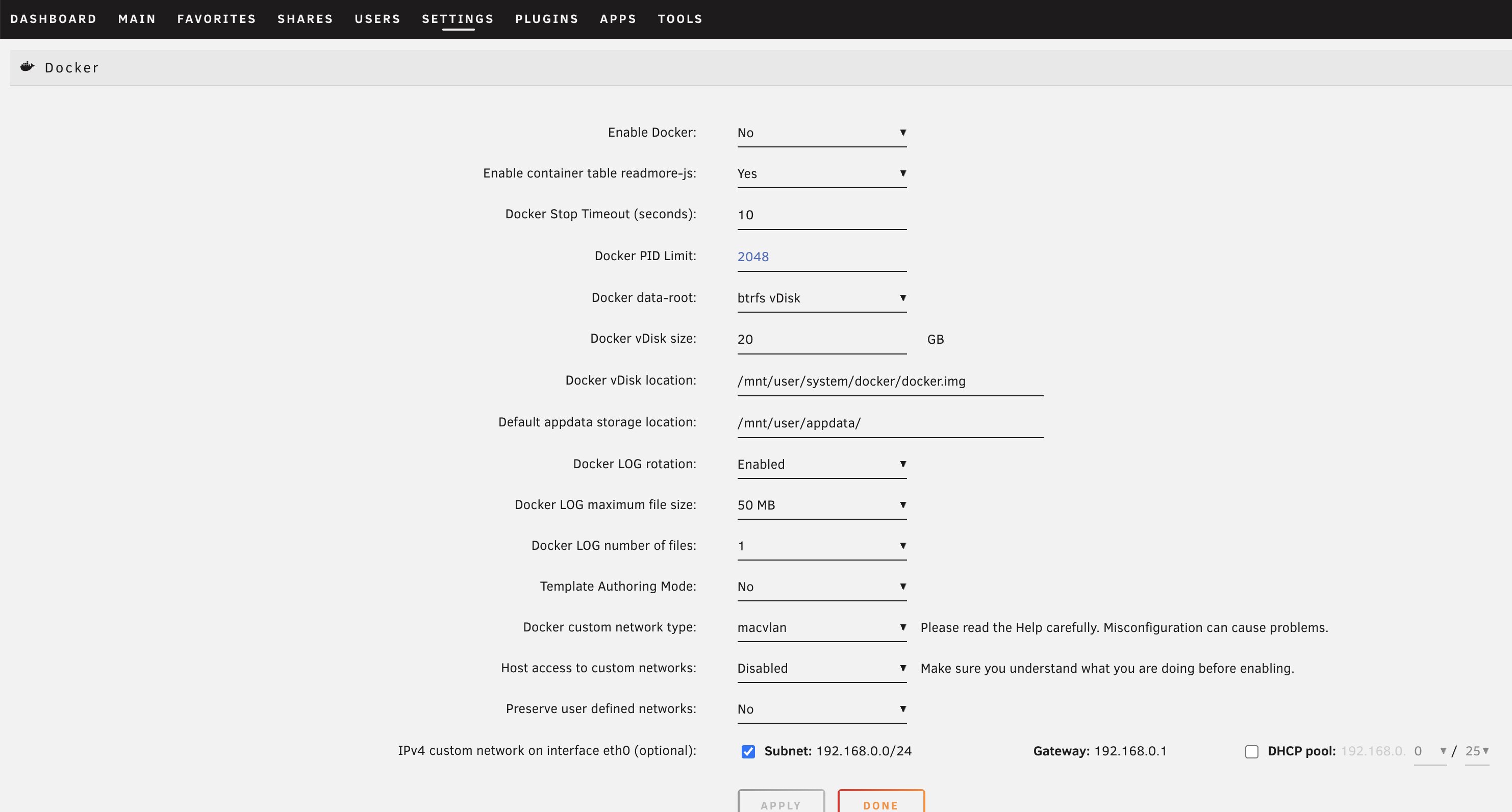
These are the default settings when configuring Docker service for the very first time:

Can you please show how’s your Docker settings under “Settings → Docker”?

Previously I was using “Docker data-root” as “folder” instead of “vDisk”:

So which setting is better?

If vDisk is the best choice, which one is better between “XFS vDisk” and “BTRFS vDisk”?
My cache pool is formatted with ZFS file system.

Thank you!

Hey @ChuckPa,

I’m still waiting for your suggestions to go further.

Can you please help me?
Really thanks!