Lag during playback over NFS

Server Version#: 1.40.4.8679
Player Version#: Nvidia ShieldTV Pro (10.18.1.1096)

Running Plex in docker container from LinuxServer.io. Been running this setup for years on my (old) QNAP and just using the local disk for the volumes. Works without issue.

Recently created a new Plex container on a separate device (Intel NUC) and mounting the content volumes (NFSv4) from the QNAP. Plex server content is running on a local drive.
There is a delay whenever I start playback.

For large files (4k) it can be 10-15 seconds before playback starts. I see less delay on smaller (1080p) content.

I haven’t been able to identify a network bottleneck - iperf3 shows over 900Mbit/s both directions from the ShieldTV to the NAS. I get the same speeds from the host running the Plex Server to the NAS.

Speed tests over NFS are showing saturation of the network connection, so I don’t think that’s the concern. But here are the nfs flags in case it helps.

Flags:	rw,relatime,vers=4.0,rsize=524288,wsize=524288,namlen=255,hard,proto=tcp,timeo=600,retrans=2,sec=sys

Any guidance on troubleshooting this issue will be much appreciated. Let me know if I can provide additional detail or logs. Thank you in advance.

@chuckpa Hoping to get some help on this NFS lag issue. I am actively debugging and not sure where to go next.

Just got home.
About to help another user.
Soon as I’m done, I’ll be back.

In the interim, please post your /etc/fstab mount entries for those directories and details of both network wiring and NFS server

I’d like to see server debug logs which capture it please.
I want to make sure it’s not a transcoding issue (4K)
I ask because I have multiple NUCs here and don’t have lag issues.

Thanks for getting back to me so promptly.

I am mounting these directly through Docker, so I don’t have anything in /etc/fstab. I posted the flags and their values negotiated from the server in the original post. Let me know if you’d like anything additional there, happy to provide anything you need.

Network wise - everything is gig networking and iperf, as well as a dd copy across the mount points (both directions), show speeds well enough that I am less concerned about those. I will happily send some of that information if you feel it would be pertinent. I will never pass up a second set of eyes to review that content. I need to setup those tests again, so will get that back to you in a few hours.

I can send server debug logs this evening as well. Post anything additional you’d like to see and I will get it loaded.

Again, thank you.

Just finished helping the user. Reading now

I see what’s happening.

The docker driver is slow.

Compare:

docker exec -it container_name bash
->  dd if=pathname of=/dev/null bs=4M status=progress

with a host based NFS mount of the same directory but using a different file (avoid cache problem)

Thanks for that suggestion @ChuckPa! I hadn’t thought of testing NFS inside the container. Definitely appreciated. Test doesn’t seem to show it is slower within the container versus directly.

Here is directly (write: 116 / read: 95.4):

Here is inside the plex container (write: 115 / read:101):

Here is an iperf3 test from the QNAP NAS to the nvidia shieldtv pro to show the whole path:

Let me know if you’d like anything additional on this direction or if you’d still like to see debug logs and I can grab them.

@maaadAPE

When running iperf3, don’t forget the -R side (reverse).
This is the Remote sending the client data.

[chuck@lizum Downloads.2009]$ iperf3 -c glock
Connecting to host glock, port 5201
[  5] local 192.168.0.13 port 43658 connected to 192.168.0.20 port 5201
[ ID] Interval           Transfer     Bitrate         Retr  Cwnd
[  5]   0.00-1.00   sec  1.09 GBytes  9.35 Gbits/sec   59   1.37 MBytes       
[  5]   1.00-2.00   sec  1.09 GBytes  9.34 Gbits/sec    0   1.42 MBytes       
[  5]   2.00-3.00   sec  1.09 GBytes  9.34 Gbits/sec    1   1.43 MBytes       
[  5]   3.00-4.00   sec  1.09 GBytes  9.35 Gbits/sec  535   1.13 MBytes       
[  5]   4.00-5.00   sec  1.09 GBytes  9.38 Gbits/sec    5   1.39 MBytes       
[  5]   5.00-6.00   sec  1.09 GBytes  9.41 Gbits/sec    0   1.41 MBytes       
[  5]   6.00-7.00   sec  1.09 GBytes  9.39 Gbits/sec    0   1.43 MBytes       
[  5]   7.00-8.00   sec  1.10 GBytes  9.41 Gbits/sec    0   1.44 MBytes       
[  5]   8.00-9.00   sec  1.09 GBytes  9.41 Gbits/sec    0   1.45 MBytes       
[  5]   9.00-10.00  sec  1.10 GBytes  9.42 Gbits/sec    0   1.46 MBytes       
- - - - - - - - - - - - - - - - - - - - - - - - -
[ ID] Interval           Transfer     Bitrate         Retr
[  5]   0.00-10.00  sec  10.9 GBytes  9.38 Gbits/sec  600             sender
[  5]   0.00-10.04  sec  10.9 GBytes  9.34 Gbits/sec                  receiver

iperf Done.
[chuck@lizum Downloads.2010]$ iperf3 -c glock -R
Connecting to host glock, port 5201
Reverse mode, remote host glock is sending
[  5] local 192.168.0.13 port 50084 connected to 192.168.0.20 port 5201
[ ID] Interval           Transfer     Bitrate
[  5]   0.00-1.00   sec   865 MBytes  7.26 Gbits/sec                  
[  5]   1.00-2.00   sec   878 MBytes  7.36 Gbits/sec                  
[  5]   2.00-3.00   sec   848 MBytes  7.11 Gbits/sec                  
[  5]   3.00-4.00   sec   928 MBytes  7.78 Gbits/sec                  
[  5]   4.00-5.00   sec   973 MBytes  8.16 Gbits/sec                  
[  5]   5.00-6.00   sec   921 MBytes  7.72 Gbits/sec                  
[  5]   6.00-7.00   sec   961 MBytes  8.06 Gbits/sec                  
[  5]   7.00-8.00   sec   976 MBytes  8.19 Gbits/sec                  
[  5]   8.00-9.00   sec   982 MBytes  8.24 Gbits/sec                  
[  5]   9.00-10.00  sec   972 MBytes  8.16 Gbits/sec                  
- - - - - - - - - - - - - - - - - - - - - - - - -
[ ID] Interval           Transfer     Bitrate         Retr
[  5]   0.00-10.04  sec  9.09 GBytes  7.78 Gbits/sec    1             sender
[  5]   0.00-10.00  sec  9.09 GBytes  7.80 Gbits/sec                  receiver

iperf Done.
[chuck@lizum Downloads.2011]$ 

I doubt it’s NFS. I would like to see PMS DEBUG logs which capture the start of the playback.

Debug logs attached. I started one of the problematic episodes, let it run for 20 seconds, then stopped it, and grabbed the logs. As a note, this time it didn’t lag as much as usual. Still a brief lag (3-4 seconds) from when I hit play and watched the spinning thing.

Verbose is turned off and debug is turned on.
Plex Media Server Logs_2024-08-03_09-15-26.zip (3.8 MB)

@maaadAPE

I see, most likely, the root problem.

  1. You’re playing 2160p (most likely HDR content ??)
/data/tv/The Handmaid's Tale/Season 05/The Handmaid's Tale - S05E09 - Allegiance - WEBDL-2160p - TRUFFLE.mkv
  1. On an i7-6700, which does not have HDR HW capability, therefore needing to transcode in software.
Aug 03, 2024 01:44:03.051 [140651335973688] INFO - Plex Media Server v1.40.4.8679-424562606 - Docker Docker Container (LinuxServer.io) x86_64 - build: linux-x86_64 debian - GMT -07:00
Aug 03, 2024 01:44:03.052 [140651335973688] INFO - Linux version: 5.15.0-117-generic, language: en-US
Aug 03, 2024 01:44:03.052 [140651335973688] INFO - Processor: 8-core Intel(R) Core(TM) i7-6770HQ CPU @ 2.60GHz

If, whichever host & motherboard this machine is running on, uses a socketed CPU , The i7-7700 (UHD capable) is a pin-for-pin replacement and the Linux kernel you’re using (5.15) has everything it needs built in already.

That could definitely make sense. I am running on a Intel NUC Kit NUC6i7KYK, so I assume I cannot just update the CPU. Any suggestions on new hardware?

When I run Plex on my QNAP, upgraded with a Intel Xeon Processor E3-1245, I don’t experience these same issues. When running in this situation I am NOT using NFS, and just local /share/ directories.

Thanks again for all the assistance and guidance.

Doesn’t have a GPU onboard (it’s 2011 vintage). coughs lol

Does your QNAP support PCIe cards?
My TVS-1282 does.

If your QNAP does, get a Nvidia, P2000 or P2200 (better)

If you do get a GPU card for the QNAP and it doesn’t engage properly,
I’ve already fixed it in the packaging but will give you the fix so you can do it manually.

A thought — Which E3-1245?

The E3-1245 v5 has HDR graphics onboard.

I’m pretty sure the E3-1245 is the original v1, which does have a GPU:

https://ark.intel.com/content/www/us/en/ark/products/52274/intel-xeon-processor-e3-1245-8m-cache-3-30-ghz.html

But it also doesn’t have HDR. So both of my old CPUs are missing HDR.

Is there any reason the E3-1245 wouldn’t have the same playback lag as the i7-6700? I assumed it was NFS as that was the difference from running on the QNAP versus the NUC. We have HDR on the list, but is there anything else it could be?

I know I am dealing with a bunch of old hardware here, just trying to debug the situation as best I can before I have to spend money on something new. I did pick up a NUC9i7QN to test, but I’d really rather not spend the $400.

The intel spec says it does support QSV. Intel support for QSV began with the -2xxx CPUs.

I can guarantee it doesn’t support HDR. It predates HEVC and HDR video

The CPU was released in 2011.
The i7-6700 (skylake) does not support HEVC, HDR and was released 2015.
The i7-7700 (kabylake) does support HEVC, HDR and was released in 2017.

That said, yes, you can HW transcode H264 but not HEVC.

The NUC9 you show has UHD 630 graphics. This is what gives us HEVC HDR HW support. Other Xeons with P600 graphics have the same capability.

Hugely appreciate all your responses on this thread. Do you think the NUC9 with UHD 630 is worth $400? Or are there better options available? I already have the memory and drive, so I am covered there.

That nuc contains an i7-9750H (CoffeeLake).
It’s the step above my KabyLake. That will be solid.

https://ark.intel.com/content/www/us/en/ark/products/191045/intel-core-i7-9750h-processor-12m-cache-up-to-4-50-ghz.html

The link you posted did not say anything about how much memory is installed

If you look at the Amazon link, “Frequently bought together”, it shows the memory and SSD.

This is considered a Kit, meaning you’ll have to open it, unplug the wires from the CPU element board, remove it from the case , then install memory and SSD(s).

If you have fat fingers, you might want to get a smaller set of screwdrivers with magnet / magnetic tips – it REALLY helps (I’m 65 and have such a kit).

Installing memory and SSD are easy.

The ONLY caution is the WiFi antenna. You MUST lift up. Don’t pull out at an angle as it will break the connector off the motherboard. A small, pointed, pair of needle nose pliers will do the trick …, or a small straight-blade screwdriver to lift it out of the socket.

LOTS of YouTube videos on this – Fear not. Watch a few, learn, PLAN, and then go for it and enjoy the build.

I would recommend 64 GB of RAM (do this once and be done)

As for the SSD…,

  1. I use the Samsung 970 Pro 1TB in the NUCs I have.
  2. New NUC12 is getting WD Black 2TB (850X)

Try to plan for a durable SSD because PMS does a lot of writing to the SSD and you don’t want to be forced into replacing it in 4 years time.

NOTE: If you go for the Samsung 980 or 990 SSDs, I would update their firmware BEFORE you put them in the NUC. (NUC bios is really fussy / difficult when it comes to updating the SSD). I say this because of a bug in them which caused the SSDs to lock up at the 4TB usage point. May / May not be an issue. (it was a COVID issue but don’t know if you’re getting new stock or old stock)

Thanks for that detailed information. One additional thing I noted is that the GPU in the current NUC seems better than the one in the new NUC. I assume because the new is intended to be used with a PCIe GPU?

Intel Iris Pro Graphics 580 (old) vs Intel UHD Graphics 630 (new).

Am I reading that wrong? Will it matter for my use case?

The 5xx GPUs are H264 and MPEG2 only.
The 6xx GPUs are HEVC-grade and include those below it.

The UHD630 is the defacto standard and a great iGPU.
My NUC8 has two iGPUs – AMD and UHD630.

This is how I know from experience what it can do.

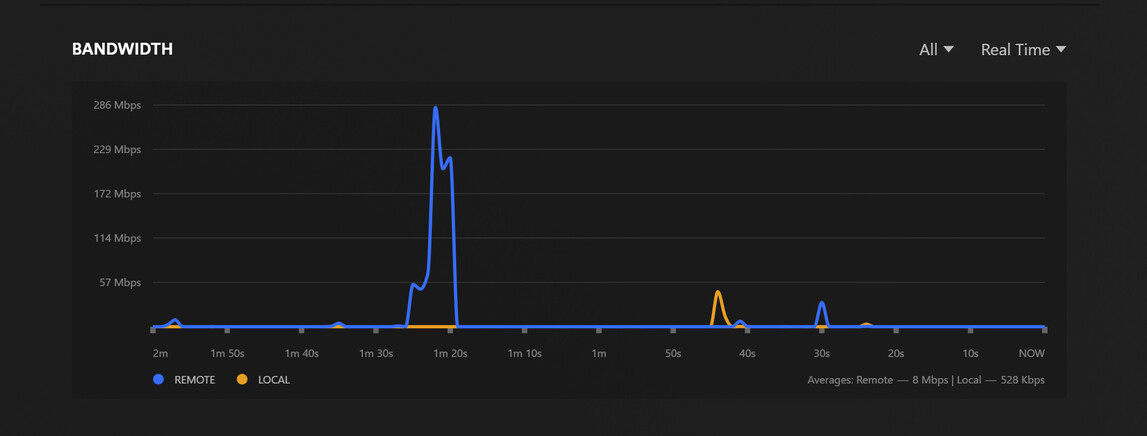
@ChuckPa - New device arrived today, I will get it setup and test tomorrow. But wanted to ask you to review a new set of logs after I just ran into the problem. It took about 20 seconds to start and I was able to grab the logs shortly after. I’ve attached the logs and a few screenshots of the dashboard.

The dashboard show’s it as direct play, but shouldn’t I need to transcode if it is HDR?

Plex Media Server Logs_2024-08-07_21-31-44.zip (3.9 MB)


Alright, new NUC is installed and running. Concerning part from the log I uploaded in the previous post:

Aug 07, 2024 21:30:38.996 [140517867064120] DEBUG - Failed to stream media, client probably disconnected after 65536 bytes: 32 - Broken pipe
<redacted>
Aug 07, 2024 21:30:38.996 [140517864954680] DEBUG - Failed to stream media, client probably disconnected after 65536 bytes: 32 - Broken pipe
<redacted>
Aug 07, 2024 21:30:47.174 [140517867064120] DEBUG - Failed to stream media, client probably disconnected after 638976 bytes: 32 - Broken pipe

That period (21:30:38 - 21:30:47) seems like it would match-up with the lag that I experienced. Looking forward to your feedback @ChuckPa .