Server Version#: 1.41.0.8994 (Synology DS920+)
Player Version#: Fire TV 10.22.0.157 (6a8017c9), Android app 10.22.1.1607 (d108dc3f)
Dear all,
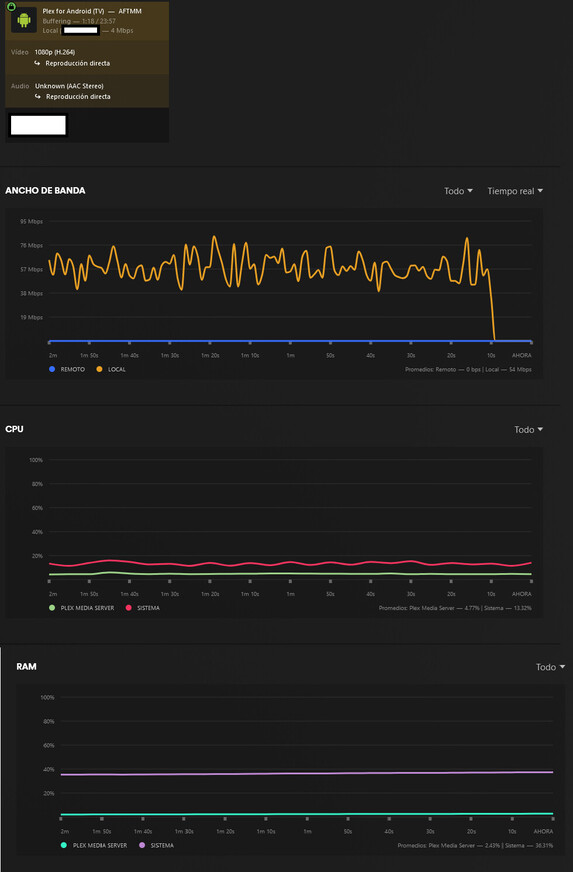
I have a large collection of anime files with the bellow combination of codecs for audio and video. The thing is that playing from the web player works fine, but doing so from the Fire TV app and the Android app produces a weird problem: it play the first minute or so fine and afterwards buffers every second for a while, reproduces 1-2 seconds and then another 20ish seconds of buffering, making everything unwatchable. This does not happens tho if I use an external player or if I force transcodification by using mobile data. I think is a problem of the Plex player on those apps. I am a Plex Pass holder btw.
General
Complete name : TEST.mp4
Format: MPEG-4
Format profile: Base Media / Version 2
Codec ID : mp42 (isom/iso2/avc1/mp41/mp42/3gp5)
File size: 264 MiB
Duration: 23 min 42 s
Overall bit rate: 1 558 kb/s
Frame rate: 23.976 FPS
Writing application: Lavf58.76.100
Video
ID: 201
Format: AVC
Format/Info : Advanced Video Codec
Format profile : High@L4
Format settings: CABAC / 4 Ref Frames
Format settings, CABAC : Yes
Format settings, Reference frames: 4 frames
Codec ID: avc1
Codec ID/Info: Advanced Video Coding
Duration: 23 min 42 s
Bit rate: 1 424 kb/s
Width: 1 920 pixels
Height: 1 080 pixels
Display aspect ratio: 16:9
Frame rate mode: Constant
Frame rate: 23.976 (24000/1001) FPS
Color space: YUV
Chroma subsampling: 4:2:0
Bit depth: 8 bits
Scan type: Progressive
Bits/(Pixel*Frame): 0.029
Stream size: 241 MiB (91%)
Writing library: x264 core 163 r3060 5db6aa6
Encoding settings: cabac=1 / ref=1 / deblock=1:1:1 / analyse=0x3:0x113 / me=hex / subme=2 / psy=1 / psy_rd=0.40:0.00 / mixed_ref=0 / me_range=16 / chroma_me=1 / trellis=0 / 8x8dct=1 / cqm=0 / deadzone=21,11 / fast_pskip=1 / chroma_qp_offset=0 / threads=16 / lookahead_threads=5 / sliced_threads=0 / nr=0 / decimate=1 / interlaced=0 / bluray_compat=0 / constrained_intra=0 / bframes=5 / b_pyramid=2 / b_adapt=1 / b_bias=0 / direct=1 / weightb=1 / open_gop=0 / weightp=1 / keyint=250 / keyint_min=23 / scenecut=40 / intra_refresh=0 / rc_lookahead=10 / rc=crf / mbtree=1 / crf=22.0 / qcomp=0.60 / qpmin=0 / qpmax=69 / qpstep=4 / ip_ratio=1.40 / aq=1:0.60
Language: Japanese
Tagged date : 2024-10-03 17:01:56 UTC
mdhd_Duration: 1422087
Codec configuration box: avcC
Audio
ID : 101
Format: AAC LC
Format/Info: Advanced Audio Codec Low Complexity
Codec ID: 2 / 40 / mp4a-40-2
Duration: 23 min 42 s
Source duration: 23 min 42 s
Source_Duration_LastFrame: -11 ms
Bit rate mode: Constant
Bit rate: 128 kb/s
Channel(s): 2 channels
Channel layout: L R
Sampling rate: 48.0 kHz
Frame rate: 46.875 FPS (1024 SPF)
Compression mode: Lossy
Stream size: 21.7 MiB (8%)
Source stream size: 21.7 MiB (8%)
Title : Japanese [Original]
Language: Japanese
Default: Yes
Alternate group: 1
Tagged date : 2024-10-03 17:01:56 UTC
Other #1
ID : 2
Type : Object description
Format : System
Codec ID: 01 / mp4s-01
Duration : 1 s 0 ms
Encoded date: 2024-10-03 17:01:56 UTC
Tagged date: 2024-10-03 17:01:56 UTC
Other #2
ID: 1
Type: Scene description
Format: System Core
Codec ID : 02 / mp4s-02
Duration: 1 s 0 ms
Encoded date: 2024-10-03 17:01:56 UTC
Tagged date: 2024-10-03 17:01:56 UTC
This only happens with this type of files with this specific combination of video/audio codecs but does not happens with anything else. Optimizing for TV and Mobile works fine but if I need to do this for my ENTIRE collection…
Can I have a hand on this?
Thanks
Edit: added dashboard screenshot
FIX?
Okay, I have find a solution that does not involve limiting the bandwith, kind of. Changing maximum level of H264 from 5.2 to 3.2 drops the BW use from crazy to normal as it forces it to transcode without dropping the quality.
