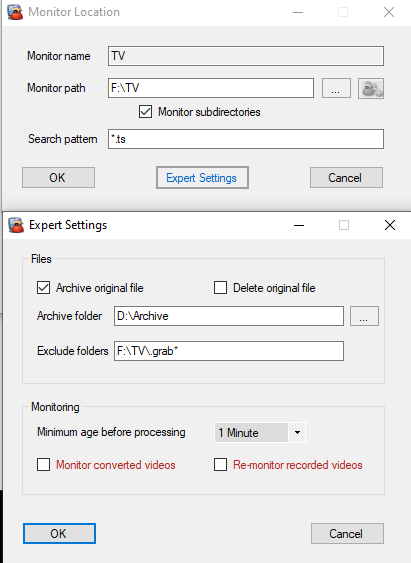
So I’ve been fiddling with some things after I got the DVR setup on Sunday… I decided to try using MCEBuddy to convert those files, remove commercials, and make them smaller.
Here’s what I’ve noticed:
Plex records file into .grab folder, as it’s supposed to, once the recording is done, it seems to take plex sometimes 5 minutes to move into a folder tree and it does so as follows:
Showname (year)\Season XX\Showname (year) - SXXEXX - Episode name.ts
That all works well and as advertised. The part I am having trouble figuring out is the MCEBuddy. I have set it to view the root of my TV Shows library, and it looks for any new .ts files, and then it transcodes, here’s where the problem lies:
Problem 1) Sometimes, Plex isn’t moving the file from .grab into the tree fast enough, and so MCEBuddy attempts a transcode from within the .grab folder… After plex moves the file, the process starts over again, NBD since this happens over the course of 5-7 minutes… But it would be nice if it waited for the files to get moved to their proper show folder tree in the first place.
Problem 2) Inside of MCEBuddy, I have set the following naming convention: /%Showname%/Season %season%##/%Showname% - S%season%##E%episode%## - %episodename%"
please note there are \ in the above they just don’t show up on the forum so I used / instead
In the box that is representative of what this is supposed to look like I get:
Title\Season 01\Title - S01E02 - Subtitle.mkv
So far so good… But what actually spits out is:
Criminal Minds (2005) - S09E12 - The Black Queen\Season\Criminal Minds (2005) - S09E12 - The Black Queen - SE - .mkv
So it doesn’t seem that the naming convention is working as it should. It’s using ‘Criminal Minds (2005) - S09E12 - The Black Queen’ As the Show name, and then it’s not adding in the Season and Episode numbers because it can’t find them?
Does anyone know how to fix this so that it goes to the proper folder locations?