Just a quick question that I suspect will be a checksum/dbase issue or related.
I record live TV using Plex (HDHomeRun Prime)
I love the commercial remove functionality, but find it too much stress on the CPU at runtime.
I decided to look for a post-processing solution
Found MCEBuddy 2.5 and am using the timed trial version
Everything works great except that once I modify the recorded file (same name, exact format written back to the folder) I can’t play the new commercial free version…it just hangs.
If I back up the original file and place it back in the folder everything works fine again.
I have tested the newly created file on another system and it works great and is commercial free.
I would like to go ahead and donate to MCEBuddy to get a version that it not time limited (full version, just time limited when you pull down the trial version)
But, I don’t see any point in donating and not being able to run MCEBuddy as a post process on Plex live DVR recordings if Plex is unable to play them properly after they are modifed.
My guess is that there is some checksum and/or dbase limitation within Plex (not just a simple pointer to the file) that is limiting my ability to manipulate the file external to Plex and still be able to play within Plex.
Any help is appreciated.
Would need more information on the file not playing. I use mcebuddy on all recordings and even transcode the HEVC for storage/file size difference and have no issues with playing my recordings. I have mcebuddy watch recording folders ignoring the .grab folder. I used to use the post processing script but have moved away from that to just letting mcebuddy look in the folders for files to process.
Thanks johnm_ColaSC,
The files are recorded as .ts type by Plex on my TerraMaster NAS and I am storing them in a mapped network location and post processing them with my Windows machine (to remove commercials) using MCEBuddy 2.5.
Essentially doing the same as you and just letting mcebuddy look in the folders for files to process,.
The file are named the same and retain type (ts) but obviously smaller as the commercials are removed.
A couple quick points:
- I have tested this with a few different size recordings and the result is the same
- I have tested the post processed file on the windows machine and it is playable and looks to be correct
- The biggest issue seems to be replacing the file with an externally processed file
Sounds like you are not having that issue.
Let me try another recording tonight (deleted all my recordings) and give you the exact specs.
The setting in your mcebuddy.conf files might also help to know what the settings for the conversion are. Only other difference is my Plex Server is on the same machine as mcebuddy.
I am also not replacing the ts file but creating a mp4 replacement file. So the ts is moved to an archive folder by mcebuddy and the new mp4 file is moved to the recording folder.
Also what are you using for playing the video file replaced by mcebuddy?
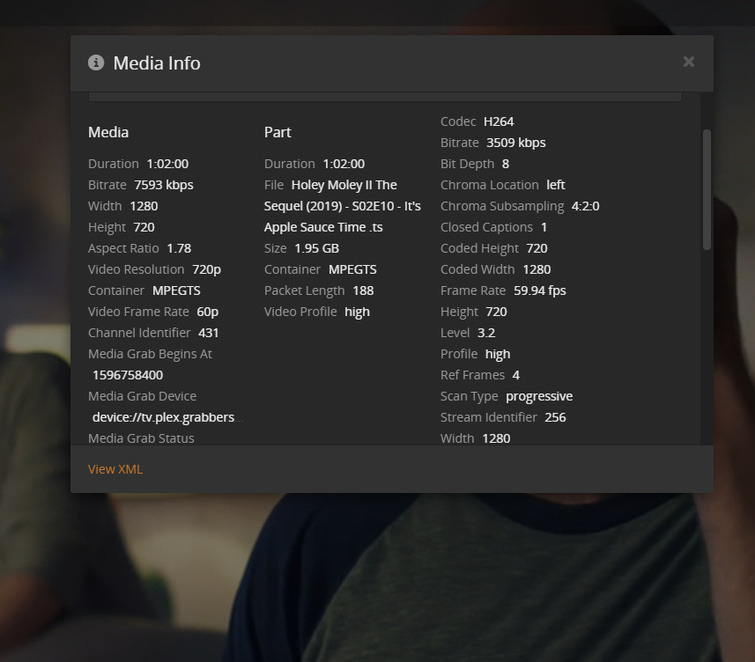
If you could also post the xml info for the mcebuddy processed file and the original file recorded by Plex. You can get the xml info by choosing Get Info on a recorded file and at the bottom left of the Get Info should be a View XML link.
While playing the file a screenshot of the Server Dashboard, Now Playing information for the show you are attempting to play would also be good.
Thanks for all your follow up, appreciate it!
I did some checking last night and this morning and pulled the XML you requested.
I noticed that it did not change between the original file and the modified file…I guess that makes sense because I kind of pulled the rug out from underneath.
Anyway, the media info did clearly show a size value that reflected the original file size:
Size 1.95 GB
and I can see where it is getting the value from the XML:
<MediaContainer size="1" allowSync="1" identifier="com.plexapp.plugins.library" librarySectionID="1" librarySectionTitle="TV Shows" librarySectionUUID="fc1daed2-2f3a-46d8-889d-f11d8feb2dec" mediaTagPrefix="/system/bundle/media/flags/" mediaTagVersion="1594906309">
<Video ratingKey="378" key="/library/metadata/378" skipParent="1" grandparentRatingKey="376" guid="plex://episode/5f1bebc90f8a05004296995c" parentGuid="plex://season/5eb6098637ccbe004151de18/2" grandparentGuid="plex://show/5eb6098637ccbe004151de18" type="episode" title="It's Apple Sauce Time!" grandparentKey="/library/metadata/376" librarySectionTitle="TV Shows" librarySectionID="1" librarySectionKey="/library/sections/1" grandparentTitle="Holey Moley II: The Sequel" parentTitle="Season 2" contentRating="TV-PG" summary="Mini-golf lovers from around the country compete on an extreme obstacle golf course to win prizes and a trip to the finals on "Mt. Holey Moley."" index="10" parentIndex="2" year="2020" thumb="/library/metadata/378/thumb/1596762062" grandparentThumb="/library/metadata/376/thumb/1596762062" duration="3720046" originallyAvailableAt="2020-08-06" addedAt="1596762060" updatedAt="1596762062">
<Media id="308" duration="3720046" bitrate="4502" width="1280" height="720" aspectRatio="1.78" audioChannels="6" audioCodec="ac3" videoCodec="h264" videoResolution="720" container="mpegts" videoFrameRate="60p" channelIdentifier="431" mediaGrabBeginsAt="1596758400" mediaGrabDevice="device://tv.plex.grabbers.hdhomerun/1313E105" mediaGrabStatus="complete" origin="dvr" videoProfile="high">
<Part accessible="1" exists="1" id="308" key="/library/parts/308/1596762060/file.ts" duration="3720046" file="/mnt/md0/public/TV recordings/Holey Moley II The Sequel (2019)/Season 02/Holey Moley II The Sequel (2019) - S02E10 - It's Apple Sauce Time .ts" **size="2093238060"** container="mpegts" packetLength="188" videoProfile="high">
<Stream id="1159" streamType="1" codec="h264" index="0" bitrate="3926" bitDepth="8" chromaLocation="left" chromaSubsampling="4:2:0" closedCaptions="1" codedHeight="720" codedWidth="1280" frameRate="59.940" hasScalingMatrix="0" height="720" level="32" profile="high" refFrames="4" scanType="progressive" streamIdentifier="256" width="1280" displayTitle="720p (H.264)"/>
<Stream id="1161" streamType="2" selected="1" codec="ac3" index="1" channels="6" bitrate="384" language="English" languageCode="eng" audioChannelLayout="5.1(side)" samplingRate="48000" streamIdentifier="257" displayTitle="English (AC3 5.1)"/>
<Stream id="1162" streamType="2" codec="ac3" index="2" channels="2" bitrate="192" language="Español" languageCode="spa" audioChannelLayout="stereo" samplingRate="48000" streamIdentifier="258" displayTitle="Español (AC3 Stereo)"/>
<Stream id="1160" streamType="3" codec="eia_608" index="0" embeddedInVideo="1" streamIdentifier="256" displayTitle="Unknown (Closed Captions)"/>
</Part>
</Media>
<Genre id="14533" filter="genre=14533" tag="Sport"/>
<Genre id="14534" filter="genre=14534" tag="Reality"/>
<Extras size="0"> </Extras>
</Video>
</MediaContainer>
I also noticed that the original file is owned by Plex user and the modified is if course owned by me. Maybe I need to do a chown on it as well.
MCEBuddy was originally producing mp4 by default and I am fine with that format as well, just want to be able to process the original file to remove commercials and replace it with a commercial free version that is playable.
I can expand on my setup a little more…
I have an HDHomeRun prime that is using an Xfinity cable card (3 tuner) and a TerraMaster NAS F2-221 with expanded memory to 4GB RAM. I am also running two iron wolf 6 TB drives and some custom cooling to keep temps down.
For the front ends in the house I connect with the Plex server using the Roku plex client to stream throughout the house.
I mainly do any troubleshooting and/or checking on things from my Windows machine at home.
I do check that I get the same results from Roku client that I get from Windows machine testing as well.
When I first started with this setup I was so happy with the comskip functionality but that quickly got quashed when I saw how much CPU was being driven to do a runtime process of the video file.
I looked high and low for a way to make it a scheduled task that could run later instead but couldn’t find anything like that…during my search I did stumble upon MCEBuddy which seemed like a great solution to post process the files but I think this is Windows only as i see folks offering suggestions of using Virtual machines on Linux.
Terra Master runs some OS called TOS which is likely a hybrid linux/unix flavor and I could probably run virtual box or maybe docker to get MCEBuddy to run on it but not sure all that would work yet.
I guess I don’t have to go down this road either, if you have any suggestions for post processing scripts that I am missing I am open to changing direction as well
This is the running original version.
Sounds like:
Permissions, make sure plex has permission to read files owned by you, or chown them to plex.
You need to rescan so plex can see the file has changed
Replacing ts with mp4 is fine, make sure ‘empty trash automatically’ is enabled so the old file path is removed from plex db
I think you are probably right, but after playing around with chmod and chown I just thought this is too much work to skip commercials. I will keep looking for a better way to just automate a conversion and be able to use the file.
Thanks for your help!
Mcebuddy does have in the System Settings a username/password option. I have never personally used this but maybe it could be used for the Plex account on your NAS. I don’t think you can have the mapped folder from the Windows computer and would have to use \\server\share for telling mcebuddy where to look for recordings.

Thanks john_ColaSC,
I did have to use this setting for a mapped drive from Windows to my NAS.
I can try an experiment by removing the mapped drive to avoid my creds and trying Plex creds, although I am not entirely sure what the Plex creds would be since that seems to be a default built in user. Will let you know how things went.
Thanks,
Sean