I’m looking for some help with my firewall rules. I’m trying to make my firewall more secure so I have specified where my server can be connected from. To do this I’ve run
nslookup Plex.tv
and added the returned IPs (99.80.242.242, 99.81.213.165, 99.80.231.223) into the source. I’ve then opened up port 32400 and added the Destination server ip to my server.
I’m now being told that my server is ‘Not available outside your network’ however I can connect to the server fine, and play media but only over insecure connections.
Have added them to the list, but still no joy. If I look in the ‘remote access’ tab on the server It is showing an ipv6 address trying to connect - could this have something to do with it?
If so, that’s a new one on me. The IP address shown there is the one to which the Plex servers are attempting to connect. That is, what it believes to be your public IP. My understanding is that, given their state of IPv6 deployment, the only way Plex will attempt this is if you’ve specified an IPv6 address as the host in the URL configured in the Customer Server Access URL in the Network section of the server settings:
Ah, that makes more sense. Try disabling IPv6 support in PMS’ settings:
Settings -> Network -> Enable server support for IPv6
I’m not sure if a PMS restart is required for this to take effect.
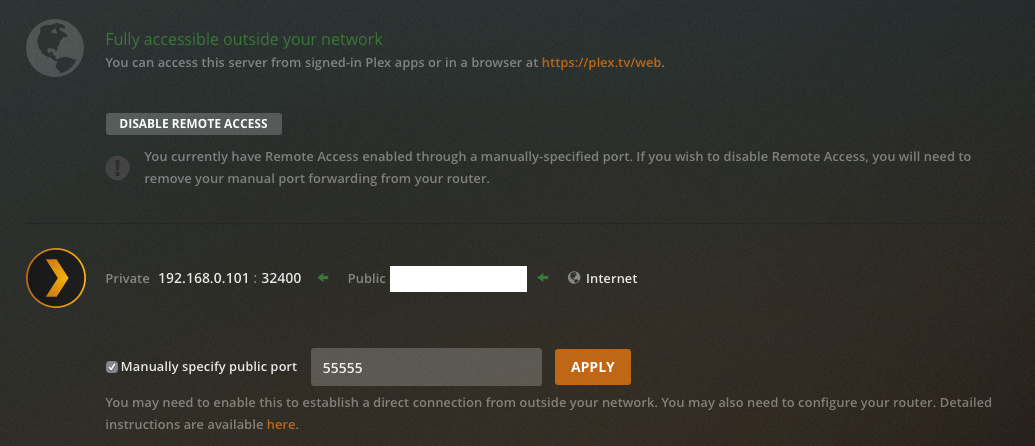
Also, the way your remote access settings are currently configured, you need to have UPnP enabled on your router for this to work. If you’d like to use a manual port forward rule you need to check the box “Manually specify a public port” in the Remote Access area.
See the note I added to my post above. If you’re using manual forwarding rules in your router, check the “Manually specify a public port box” option. You can leave the default of port 32400 (just make sure your firewall rule expects that). As it is, PMS is trying to negotiate a port forwarding rule via UPnP.
Was remote access working properly previously? Based on the initial post, I assume so. If so, back out the changes and get back to a working state. Then, set up the manual port forward, without the source IP address restrictions. After that is working, add in the additional restrictions and see if that’s what’s breaking it.
IP address list to which I pointed you is supposed to be updated dynamically as the list of servers changes, but I’m not sure how frequently.
Have reverted to my previous config. Is ‘Fully accessible outside your network’ BUT I can’t access it locally (not even using the server ip on the server).
I did a server update earlier today as well. Don’t know if that could cause an issue.
Edit - just reverted from secure connections ‘required’ to ‘preferred’ and now can access on local network
Edit 2: Have added my local network to the “List of IP addresses and networks that are allowed without auth” and set secure connections back to “required”. Now just need together external access working properly.
Is Plex just over TCP or is it over UDP as well for remote access?
Just TCP. I’d recommend trying a “simple” manual port forward to start with, that is, one with no source IP address restrictions. To do that, create the rule on your router and configure the “Manually specify a public port” option on the server to 32400. On the router, use port 32400 for both the public and private (external and internal, router terminology varies) ports. Your server’s IP address would be the private/internal IP address. The protocol/transport should be TCP.