@dklein Is the source file 10 bit or 8 bit?
Hi Chris,
I’m able to replicate the issues with 8-Bit H264, 8-Bit HEVC, and 10-Bit HEVC SDR content.
Here’s the mediainfo from a few clips that all triggered the color shift:
HEVC- 8 Bit.txt (4.7 KB)
h264 8 Bit.txt (4.2 KB)
HEVC-10bit.txt (5.9 KB)
Thanks
8bit for me was not fine, 10bit worked fine.
I also noticed when trying to transcode the 8bit source, it dropped back to the CPU. The 10bit still took advantage of the GPU to transcode which was fine.
small feedback here
n100m alderlake igpu
Unraid plexinc Docker
version 1.41.1.9043
sources tested
hevc 4k progressiv HDR
hevc 1080p (25 and 50)
h264 720p (Live TV)
h264 1080i (Live TV)
clients tested (forced transcode to 1080 or 720)
chrome Browser
ShieldTV 2019 + 2017
Samsung TV App (Tizen 2020 UE65q95t)
Samsung Android App (S22, S23)
all working fine incl. tonemappings etc
as i saw there is a newer “test” build, also tried the .9055 version, which ended up with
stop with error cant play (sometimes)
transcode to h264 instead hevc (most common)
would need more debugging …
here i can say 9043 working fine, 9055 not
no iOS devices to test as my enviroment is not Apple 
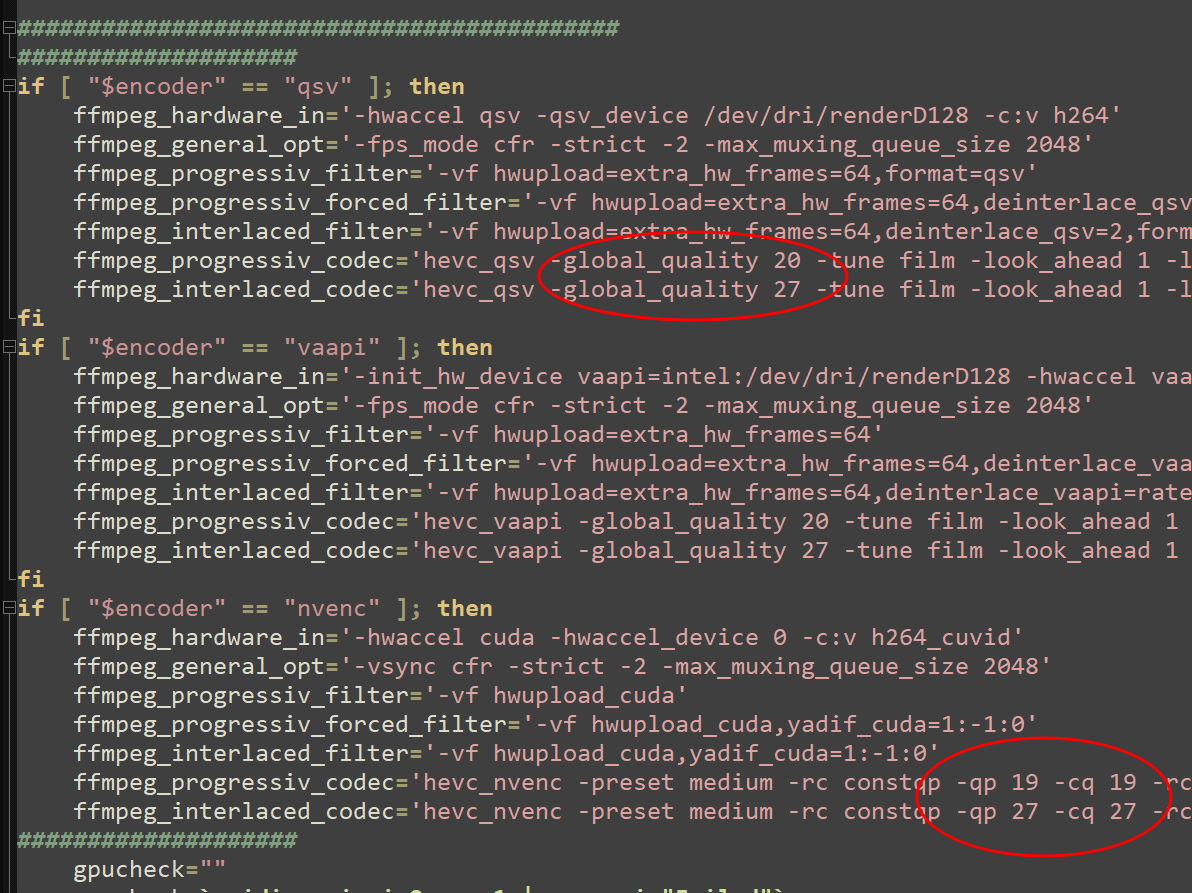
Imagine if they just let the server owner decide for themselves. Like this:

Except… those are software encoding settings. Not used in hardware accelerated encoding. But I’m sure they can make it a little more customizable.
Edit: @alturismo – If the encoding is being decided by a quality factor, you can have massively different rates needed depending on the content itself (grainy or high-action might result in a stream that is too large to play back smoothly over the limited connection). So you would have to under-estimate the correct numbers to make sure even high-demand transcodes still fit within acceptable rates for delivery. Plus something that compresses well would get delivered in lower quality than necessary, because it would be following the same rules you set for the more active video.
actually im running pretty good with my encoding setups for my recordings, but yes, results of course differ depending on source … but thats actually also something i want.
result here should be always h264 > hevc without any reasonable visible loss …
so my results differ from 0 (pretty rare) to 70 % win in size …
and about limited bandwith, thats where i want to use transcoding streams to mobile as sample but my recordings … are a different story, just my point.
So some cards do use qscale because they do not support constant bitrate encoding.
While it does not makes sense to give server owners control over quality of typical transcodes it does make sense to give them control over quality/size of dvr transcodes. Let me look into how difficult it would be for me to add something.
@alturismo can you please attach some logs?
In relation to ? the .9055 experience ?
Yes, the errors you are seeing
That would be ideal!
i just did some tests using the 264 encoder and the 265 encoder at 0.7 and 1.5 bitrates and now the 265 is a fraction bigger but worse quality
ok, hre are some logs in comparision, same Medias/LiveTV played on 9043 and 9055
issues on 9055 here are
- 1080p Media sources (h264 && hevc), both error out

- LiveTV source h264 (720p + 1080i), both fall to h264 encode with oversaturated colors
- 4k Media source worked out
logs attached
9055_Media_4k_hevc_Plex Transcoder Statistics.log (62,0 KB)
9055_Media_1080p_h264_error_s3014_Plex Transcoder Statistics.log (4,2 KB)
9055_Media_1080p_hevc_error_s3015_Plex Transcoder Statistics.log (4,2 KB)
9055_TV_720p_h264_error_colors_and_h264_Plex Transcoder Statistics.log (39,5 KB)
9055_TV_1080i_h264_error_colors_and_h264_Plex Transcoder Statistics.log (24,9 KB)
while on 9043 all play fine transcoded in hevc
9043_Media_4k_hevc_Plex Transcoder Statistics.log (73,0 KB)
9043_Media_1080p_h264_Plex Transcoder Statistics.log (43,9 KB)
9043_Media_1080p_hevc_Plex Transcoder Statistics.log (29,7 KB)
9043_TV_720p_h264_Plex Transcoder Statistics.log (29,3 KB)
9043_TV_1080i_h264_Plex Transcoder Statistics.log (43,2 KB)
@alturismo the transcoder statitistics are not useful, i need the main plex media server logs.
Plex Media Server.1.log (3,5 MB)
this should be the error/s 9055 log from today morning
@ReaperSPTN2109 were your 264 encoder and 265 encoder from the same build?
@nstraughan How to get to this build on unRaid? Thanks!
I did the 264 on both this build and the normal public build and the 265 on this build
both builds on 264 were the same size and quality from what i could tell and the 265 was about 7mb bigger on both sd 0.7 and sd 1,5
these were optimized versions not on the fly transcode
Is 1.41.1.9043-2ace0c939 still the latest version that has HEVC encoding or is there a newer version that I should be running?
