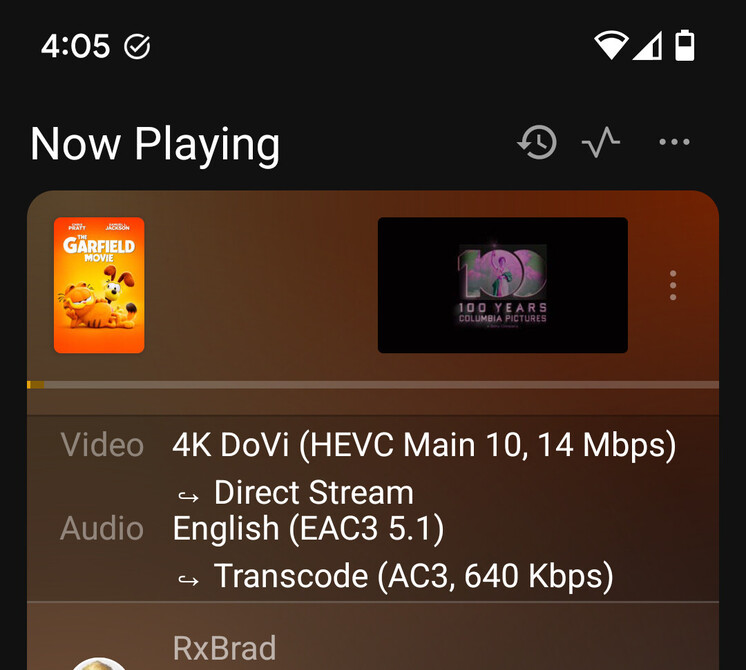
Here you go. I tried recording 3 different shows using HEVC transcoding so you should see three failures.
Thanks again.
Plex Media Server Logs_2024-10-04_11-50-13.zip (26.0 KB)
Here you go. I tried recording 3 different shows using HEVC transcoding so you should see three failures.
Thanks again.
Plex Media Server Logs_2024-10-04_11-50-13.zip (26.0 KB)
Since this change, when something is transcoded to hevc, the sound is transcoded from eac3 to opus.
I revert back to “release” version, there is no sound transcoding
@RxBrad are you certain that it is direct played? Pms has very little to do with direct play and shouldnt affect playback.
I set the Home Streaming to maximum bitrate. I only have a handful of files that are DV with no HDR10 or HDR10+ fallback. I tried them all.
On the release version of Plex, the Dolby Vision logo briefly appears in the upper right of my screen, and they all play normally.
On the current HEVC alpha, either they play correctly (in the form of 1 movie). Or they give a playback error and don’t start, in the case of another. The rest play, but the Dolby Vision logo does not appear; the TV states it’s showing SDR video; and the color palette looks odd like my purplish Garfield example. Plex Dash, however, says it’s directly playing the video.
“Convert maximum” is definatly not direct play. I have been unable to reproduce your results. What version are you using? Also, can you send me a sample of one of your problem videos?
zzzpredators.zip (5.1 MB)
zzzgarfield.zip (3.9 MB)
I cut a few seconds out of 2 videos. Both play fine on the latest release version. Colors are off in the HEVC test. Coincidentally, the colors look like they do in the Plex Dash snapshot when they’re off.
@RxBrad it will be fixed in the next release (not sure when that will be)
I may be missing it, but does Optimized Versions not go H264 → HEVC?
PS I’m using Original Quality Profile, which might be playing a factor into it.
Optimized versions have their own setting for hevc
Probably low on the priority list, but it looks like Tautulli wants colorspace info that isn’t being passed into the Plex Session XML quite yet, so it knows if transcodes are in SDR or HDR. (This may or may not affect Plex Dash at some point, also?)
May I ask where if it’s possible for Original Quality optimization? I enabled it HEVC for optimization, and HEVC → HEVC works now, I guess I was hoping H264 → HEVC is possible but no big deal.
that would be super useful for low bandwith situations with an x265 compatible device
H264->hevc optimization was working at one point, i will check it out
Okay so because I’m not getting any support from you guys regarding limiting resolution/bitrate on the server I decided to take matters into my own hands and “hack” Plex Transcoder:
Like I already said Plex should make a greater effort in avoiding burning in subtitles at all cost because that in and of itself makes 4K unattainable for me. I’ve experimented a bit and it seems like I can’t even do 2160p@1Mb/s with burned-in subtitles but without I can do 2160p@40Mb/s (haven’t tested nearly long enough but 2160p@50Mb/s buffered). I can also do 1080p@80Mb/s regardless of subtitles (again not a thorough test but 1080p@100Mb/s buffered). So I modified the transcoder so it will automatically scale it down to 1080p if it detects burning-in and will also automatically limit the bitrate (despite what the user requested) to a yet-to-be-determined maximum (the dashboard will “lie” in that case). I just wish I could do that in the web interface instead of like this.
Any idea of GPU %load impact using HEVC versus h264 ?
According to Tautulli transcoding speed at 4 Mbps 720p :
i’m running uhd 770 iGPU
Gpu load is going to be VERY gpu dependant
sure, but is there a performance ratio between h264 and h265 encoding for the same bitrate usage ?
how is it possible to bench ?
??? (Also, I’m not sure this thread is the place for this…)
Settings → Remote Access

@Escoundudo , My understanding is that Plex will default to CPU transcoding when burning in subtitles based on Chris’ post above: HEVC Encoding Forum Preview - #215 by chris_decker08
This could be why you’re seeing a drastic decrease in transcode ability when subtitles are enabled. Are you using PGS or SRT based subtitles?
Out of curiosity, what file are you modifying? I’m happy to take a look and test myself.
it ONLY uses the CPU for burn in, encoding, decoding, scaling, ect are still GPIU