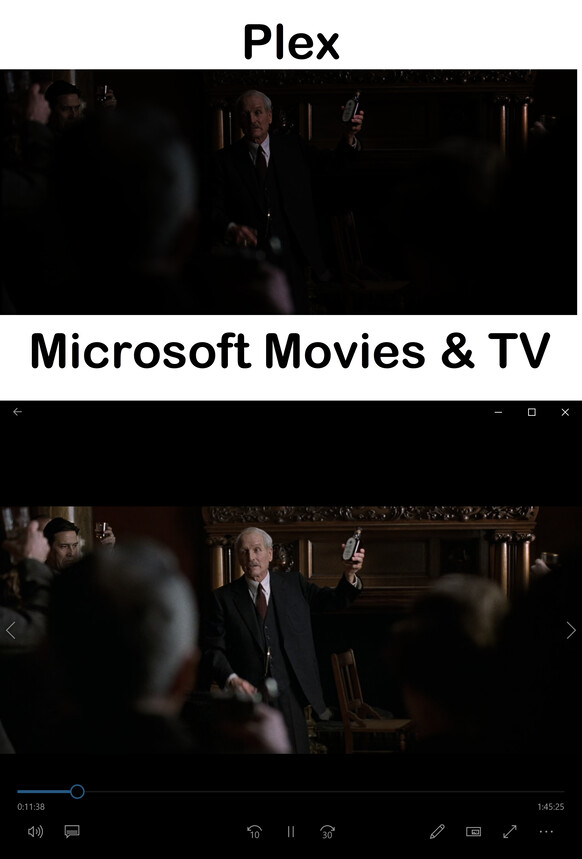
When Plex plays back my HEVC files they are dark. Has anyone else had this issue?
I have tried it with “Use hardware acceleration when available” enabled and then disabled. It did not fix the problem. I have a Lifetime Plex Pass.
When I play the file using VLC or Microsoft Movies & TV, the display is not dark.
Installed I have the latest versions of K-Lite Codec, VLC, and I have purchased the Microsoft HEVC Video Extensions.
The PC is connected to the TV using an HDMI cable. The TV is a monitor for the PC
I open the Plex Server app and start the movie from there.
File Name: Road to Perdition (2002).mkv
STATISTICS_WRITING_APP mkvmerge v20.0.0 (‘I Am The Sun’) 64-bit
Codec: MPEG-H Part2/HEVC (H.265) (hevc)
Frame rate: 23.976024
Video resolution: 1918x816
Here are the system specs
Plex
Server Version#: 1.31.2.6810
Player Version#: 4.100.1
Processor Intel(R) Core™ i5-4570 CPU @ 3.20GHz
Installed RAM 8.00 GB
Windows 10 Pro
Version 22H2
OS build 19045.2728
Windows Feature Experience Pack 120.2212.4190.0
Boot Drive: 256GB SSD
Storage Drive: Seagate Exos X16 14TB 7200 RPM SATA 6Gb/s 256MB Cache 3.5-Inch Internal Data Center HDD Enterprise Hard Drive (ST14000NM001G)
Display Adapter: GEFORCE GT 1030 2GB GDDR5 64-Bit Video Graphics Card GPU PCIe 3.0 DirectX 12 ITX HDCP DVI HDMI
Driver: GeForce Game Ready Driver 531.29
Out of interest, what HDMI black level do you have set on the display (if using RGB) ?
Personally, I’d use a dedicated client like Plex HTPC as opposed to the web client. The web client introduces various possible issues in a set up like yours.
Edit - wow, accidentally hovered over my profile and it is 2 days away from 10 years on this forum (I ran Plex for some time prior to joining the forum).
Thanks John. That’s awesome on the 10 years! I think I have been using it for about 5-6 years. I used something else before, but I have forgotten what it was,
I tried the Plec HTPC and the picture is good. Not dark at all. However, the HTPC needs a keyboard to work it fully, I would like to just use my mouse as I do when using the Server interface.
As for my Black setting, I do not see an option for black in the NVIDIA Control Panel. It is setup as RGB with Output Color Depth 8 bpc the Desktop Color Depth is Highest 32-bit. It is still dark with that setting, I tried playing with the YCbCr settings but no improvement.
Given Plex HTPC is not dark, it is your browser settings with the issue (the server uses the Web app to play media via your browser)). As I said, using the browser to play media has shortcomings.
I may be wrong but generally most browsers can’t play HEVC files, causing the media to be transcoded to AVC, which also involves HDR->SDR conversion. That may be the issue as tone mapping leads to darker content with some older Intel gear (specifically 3D-LUT). OpenCL tone-mapping is much better.