Server Version#: 1.41.6.9685
Player Version#: 1.108.1.307-dd5b87aa + more
I noticed recently that a lot of streaming devices have difficulty playing HEVC videos in MP4 containers without visual stuttering. I’ve seen a lot of similar threads discussing this issue, but no fix or resolution. Here are the devices that work fine and the devices that produce a stutter with HEVC/MP4:
No Stutter:
Plex.tv via FireFox
Plex for Windows
Amazon FireStick 4K Gen 1
iOS 18.3.2
iPadOS 18.3.2
Stutter:
Amazon FireStick 4K Max Gen 1
Amazon FireStick 4K Gen 2
PlayStation 5
Roku Express 4K+
Roku Ultra 2024
Anyone know if this issue persists on any other modern streaming device? I’ve tried the above Firesticks and Rokus, and I am pretty tired of having to return these devices.
Also, let me know if anyone has a fix. I feel like these devices may have worked in the past, specifically the PlayStation 5 Plex app and Firestick 4K Max Gen 1 Plex app, so it may have been an update that caused the issue. As someone else pointed out, disabling Direct Play and Direct Stream will allow the HEVC/MP4 video to properly play as transcoded to H264 (as tested on the PS5), but there is no option on the Firestick to disable Direct Play or Direct Stream.
Can you post the xml info for a video that causes this issue? The mp4 format is a bit restrictive and there maybe something in the video or audio that doesn’t work well with mp4.
Have you tried converting to an mkv to see if the same issue happens.?
Yes, converting to MKV does fix the issue, but my HEVC/MP4 library is too large and would be unreasonable to mass convert, especially when its only certain devices that have the stuttering issues.
I tried to test if it was just the container that was the issue, but no, changing just the container to MKV doesn’t change anything, I would need to re-encode as MKV.
Nevertheless, attached is the relevant Plex Media Server log portion of a recent test. I tested two videos on two different Amazon Firesticks. The tests on the first Firestick (AFTKA) played with a stutter, while the tests on the second Firestick (AFTMM) played fine. PMS Test Log.txt (664.5 KB)
Maybe? I initially used Avidemux to make convert my MP4 file to an MKV file while copying/retaining the Video and Audio outputs (I assume this just changed the container). The MKV video still played with a stutter. I then used MKVToolNix to “mutiplex” (I assume this is another way of saying re-encode) the MP4 file into an MKV file, and voila, no more stutter on the MKV video.
Edit: When I “multiplexed” the MP4 file to MKV file, I didn’t do anything other than add the MP4 file and click “Start multiplexing”
No, MKVtoolnix doesn’t re-encode. It just changes the container. But it does so in a proper way, which cannot necessarily be said about Avidemux.
Considering Plex is a streaming server, you should put in files which are prepared for streaming. Quite apparently, your mp4 files are made without interleaving, which is crucial in streaming applications.
While mp4 as a format does optionally support interleaving, there are many apps and scripts out there which neglect to activate it.
So dragging your mp4 files into MKVtoolnix and remuxing them doesn’t diminish their quality in the slightest. What you do lose though are the embedded meta tags in the mp4 files. Which can be a good thing sometimes.
I think I understand. My MP4 files may or may not be made with interleaving, but there is most certainly something within the MP4’s embedded meta tags if running the file through MKVToolNix resolves the stutter. I just find it frustrating that the embedded meta tags cause no issue in some apps/devices. I really don’t want to run my entire MP4 library through MKVToolNix as that would take multiple days.
I think the missing interleaving is the main culprit, not the embedded meta data.
If the file has no interleaving, performance will tank as soon as you try to stream that file. (Direct Play, that is.)
So MKVToolNix adds interleaving to the video file? Even so, its still odd that some devices play the non-interleaved videos files with ease, and others can’t, especially two different devices from the same company (i.e., Firestick 4K Gen 1 vs. Firestick 4K Max Gen 1).
I’m pretty sure @OttoKerner is more on the right track, but I went ahead and removed the SRTs from the relevant folder, rescanned the library, made sure the subtitles weren’t found, and played the video. Still stutters.
Monitor the Plex dashboard closely.
On devices which play fine, it might be the Plex transcoder which is fixing things.
Direct Play = no transcoder
Direct Stream / Transcoding = transcoder active
The transcoder is running on the server machine. It can freely jump around the source file and piece together the video and audio portions when they’re stored separately due to missing interleaving.
This jumping around can take a considerable amount of time on its own. It will take more time if the file is stored on a HDD ( instead of SSD), or if the file is not stored directly on the server machine but on a network file share (i.e. a NAS).
But if the playback mode is Direct Play, then it is the playback device which needs to do the jumping around. And with a miniscule playback buffer and over streaming network protocol, that will inevitably lead to buffering – unless you have 100gbps network connections or the file is very small.
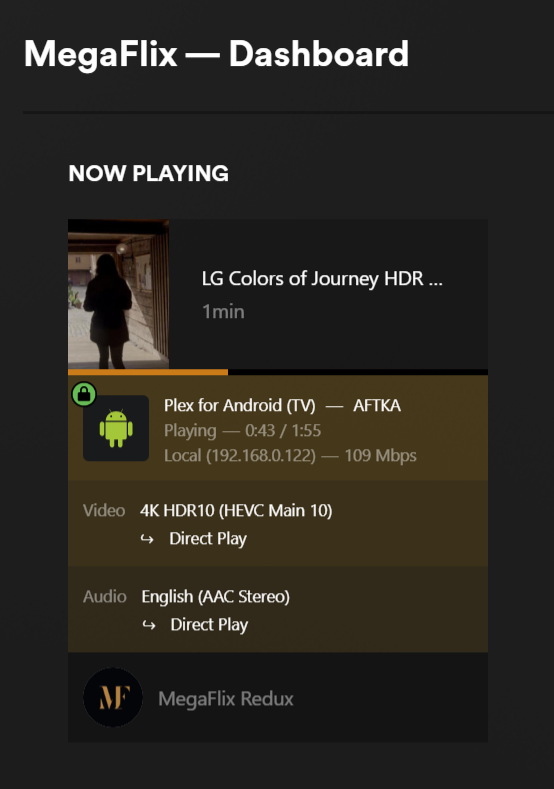
AFTMM plays fine, AFTKA plays with a stutter. I am not sure if this is what I should be looking at to determine direct play/direct stream, but this is what I found.
I believe I’ve narrowed down exactly what files are causing this issue on some devices and will be converting them. I will still be curious about why one device plays it normally and the other device does not, but I found my solution.
Is the theory here that my device’s bandwidth/speed is at issue? If so, I am skeptical. These are files that play at 3 Mbps, nothing that demanding. The stutter is caused by the file itself, not the connection. As such, without a further theory or explanation, I would rather not spend the time/effort to install iperf3 on my NAS to test this out.
Edit: I am happy to provide a sample of a stuttering video for you to test out (its a 3 min. clip from Guardians of the Galaxy), I’m just not sure what is allowed to be shared and what is not.