Server Version#: 1.26.2.5797
Player Version#: 7.0.9.7701
Plex Media Server Logs_2022-05-21_12-59-23.zip (3.4 MB)
I’m relatively new to using Plex. I had a Raspberry Pi as my server for about a month but when I ran into transcoding issues with higher quality videos I moved to an Intel NUC. Those higher quality videos on the NUC are the ones giving me problems. I’m using Roku devices with my Plex server and this issue occurs on both of the Rokus.
I’m watching some videos that are 1080p h265 and randomly the video will pause and buffer at 33% for a minute or two and then fail saying playback error due to the server not having enough bandwidth. I know that it’s not a local bandwidth problem because the server and the Roku are all on the same subnet and are either connected via an ethernet cable or 802.11ac with a very strong signal.
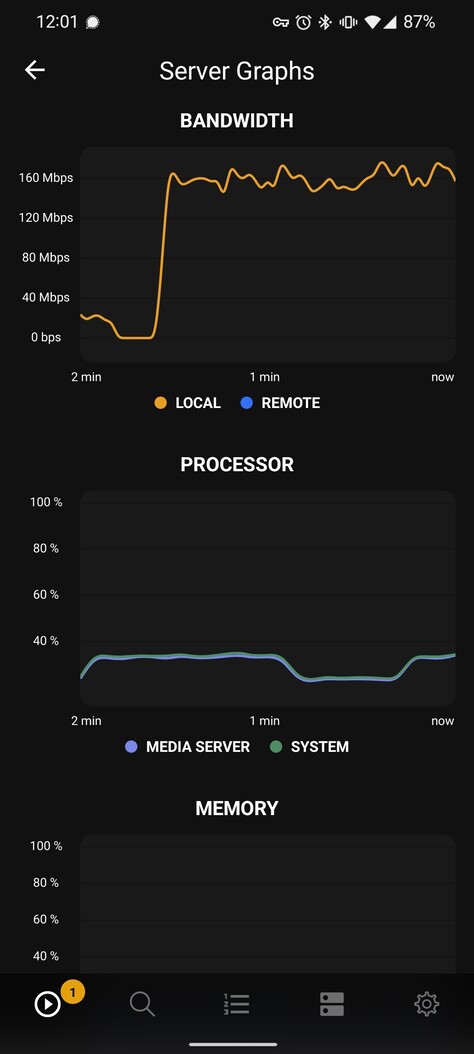
What seems to happen is that all of a sudden the bandwidth being used by the server will be pegged at between 150 and 200 mbps. I can see this with the Plex dash app (screenshot here). The server is not being used for anything else and after doing some Wireshark captures I can see that the bandwidth is directly between my server and the Roku. The traffic is encrypted though so I don’t have any insight into what is actually being transmitted. I did a capture when things were working normally and I’ll use a few hundred megabytes of bandwidth when things are working properly. However when this issue occurs my captures went up to about 5 GB within a couple of minutes. It seems like traffic is being looped and resent repeatedly so I don’t know why. Wireshark says that a TCP receive buffer fills up at some point (presumably on the Roku due to having the server flood it with all this traffic).
I’m at a loss at how to proceed. At first I thought it was only one Roku but now it’s both of them periodically. I haven’t experienced this issue on the Android app or web app but I also don’t use those apps very much, and especially not with the particular videos I’m watching on the Roku.
My server is plenty powerful for what I’m trying to do and the CPU never gets very high when I have hardware transcoding enabled. Disabling hardware transcoding also didn’t have any impact on fixing the issue, but I’m not surprised.
Does anyone have any ideas as to how to address this?
I’ve uploaded my logs and the issue most recently started to occur at 12:57pm EST and finished (gave the error) at 12:59.

