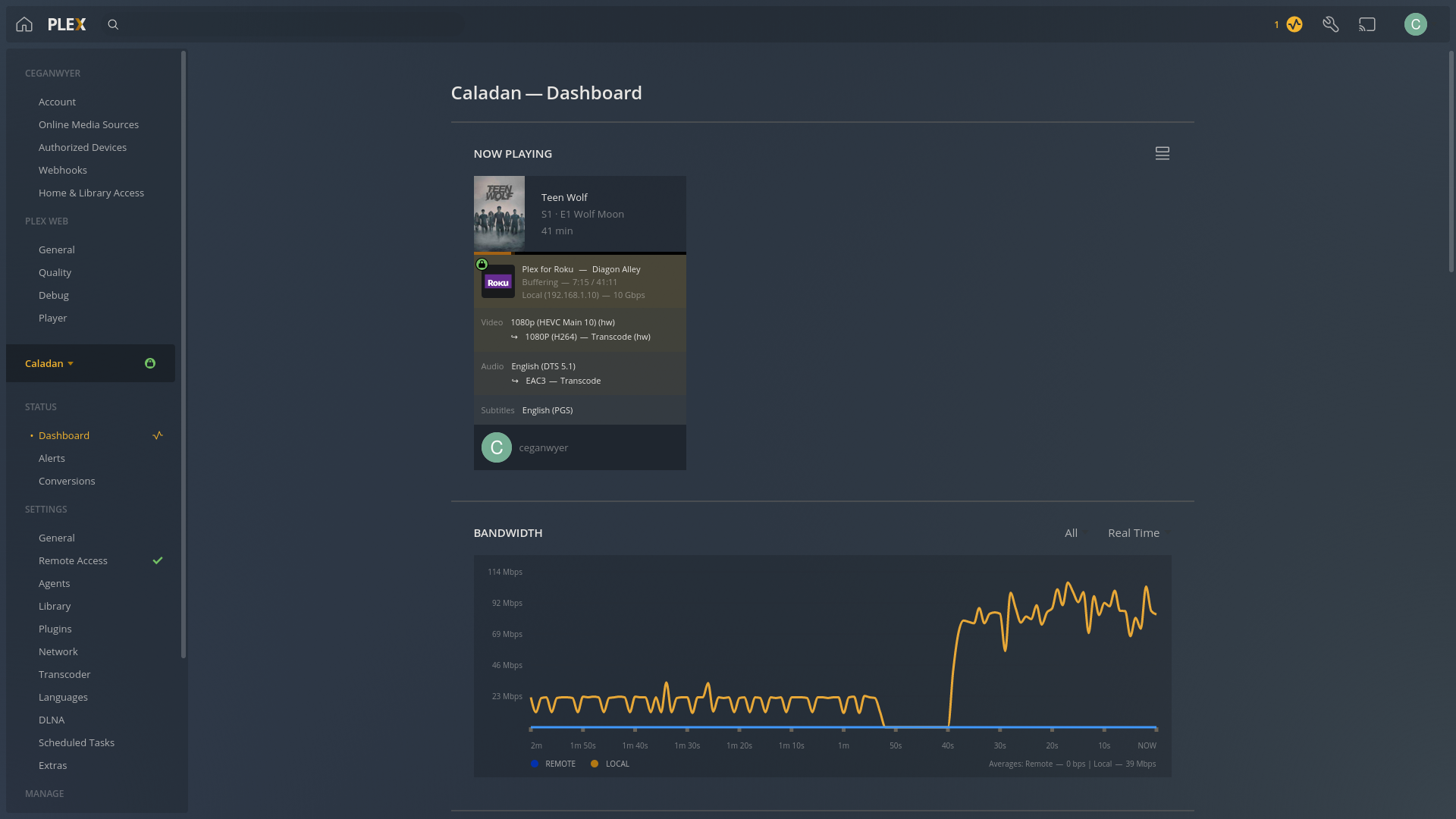
Server Version#: 1.25.9.5721 (Ubuntu 20.04)
Player Version#: 7.0.8.7673-f20307f68-Plex (Plex for Roku)
About 2 weeks ago, I’ve began running into an issue with my plex streams randomly buffering then erroring out with a message saying “the connection to the server is not fast enough”. The media will play just fine for a while (anywhere between 15-45 minutes), then it will suddenly buffer with the progress stuck at ~33%. After a minute or two of buffering, it will show the error message. I originally noticed the issue after upgrading PMS to 1.26.0.5715, but downgrading to 1.25.9.5721 did not fix the issue so I believe that was just coincidental.
This issue happens with/without transcoding (although it much more reliabily happens when transcoding) and it happens regardless of using hardware acceleration. I’ve noticed that when it does happen, the bandwidth usage will drop down to 0, then suddenly spike up to 3x-4x what it was using before. Example. With HW acceleration enabled, CPU usage never goes over 10%.
I have plex running in a Proxmox VM (Ubuntu server) with plenty of resources and iGPU passthrough. I will post an image showing the VM settings below. Nothing in the Proxmox UI looks out of the ordniary. CPU and I/O usage are all within expected levels.
The Host machine is hardwired to a Netgear Nighthawk AX6 Router, and the client which is a TCL Roku TV is connected to the 5GHz WiFi network with excellent connection. As far as I can tell, my router is functioning normally - none of my other devices have bandwidth issues so I really don’t think it’s actually a bandwidth issue like the error message says.
Before this issue began, my Plex server could play anything and everything without issue. With HW acceleration it could transcode just about anything without breaking a sweat. Now, it seems like a crapshoot whether or not it will be able to play a file all the way through without erroring out…
Troubleshooting steps I’ve tried:
Reboot the VM hosting Plex
Reboot the Host Machine running the VM
Downgrade PMS from 1.26.0.5715 to 1.25.9.5721
Disable HW transcoding
Reduce “Transcoder default throttle buffer” to 30 seconds
Installed missing intel IGP libraries as mentioned in this post (when downgrading to (1.25.9.5721 I got the same warnings saying these libraries were missing)
Setting “Internet upload speed” to 100mbps
Ensured the VM has enough drive space for transcoding, it currently has 27GB/49GB available.
Host machine specs:
CPU: Intel Core i5-10400
RAM: 32GB
2x 256GB NVMe drives
Plex VM hardware settings:

As you can see, there are plenty of resources provisioned for Plex run just fine.
Here is the log I captured after the most recent instance of this issue:
Plex Media Server.log (4.4 MB)
If it helps filter out some of the noise in the logs, 192.168.1.10 is the ip of the player and 192.168.1.9 is my PC that I was using to monitor the dashboard.
Let me know if there is any information or any other logs that I can provide to help troubleshoot this issue.
Thanks in advance!