Server Version#: 1.25.4.5468 and 1.25.4.5487
I’m hosing the Plex server on my Synology DS920+ (8GB RAM) with DSM 7.
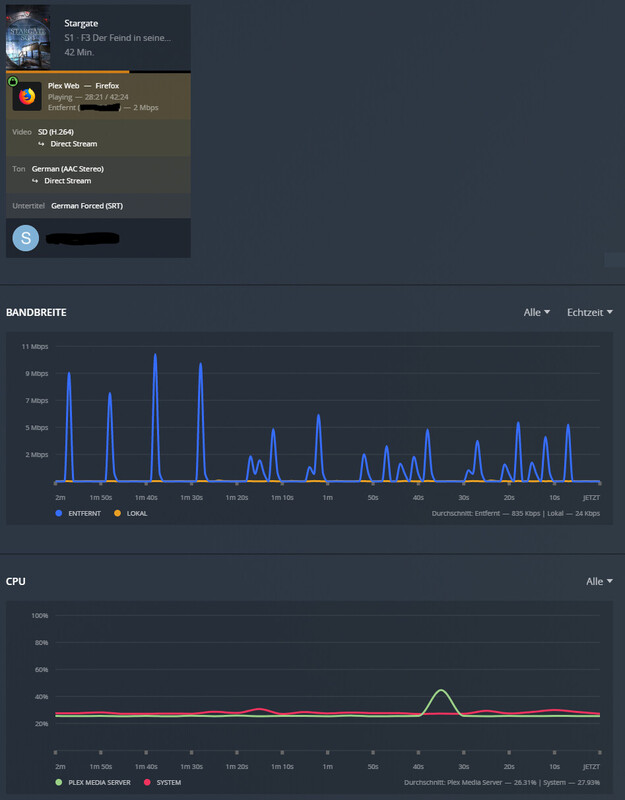
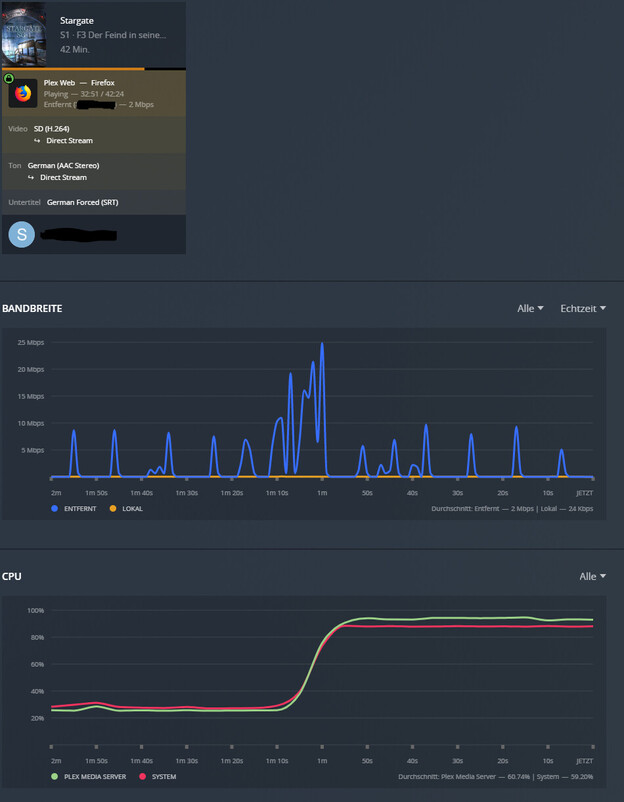
Firefox:
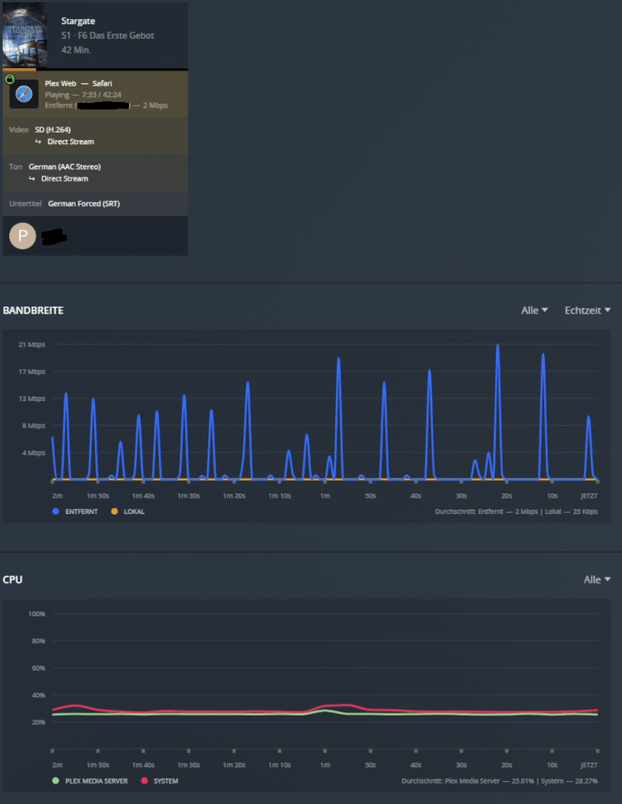
Safari:
Plex Media Server Logs_2022-01-31_23-33-42.zip (4.9 MB)
Hardware transcoding is not engaged.
Jan 31, 2022 23:11:34.350 [0x7f2ee70beb38] DEBUG - [Transcode] [Universal] Using local file path instead of URL: /volume1/Media/Serien/Stargate SG1/S01/S01E06.mkv
Jan 31, 2022 23:11:34.350 [0x7f2ee70beb38] DEBUG - [Transcode] TPU: hardware transcoding: final decoder: , final encoder:
Jan 31, 2022 23:11:34.350 [0x7f2ee70beb38] DEBUG - [Transcode/JobRunner] Job running: FFMPEG_EXTERNAL_LIBS='/var/packages/PlexMediaServer/shares/PlexMediaServer/AppData/Plex\ Media\ Server/Codecs/62cc2bc-4226-linux-x86_64/' X_PLEX_TOKEN='xxxxxxxxxxxxxxxxxxxx' '/volume1/@appstore/PlexMediaServer/Plex Transcoder' '-codec:0' 'h264' '-ss' '0' '-noaccurate_seek' '-analyzeduration' '20000000' '-probesize' '20000000' '-i' '/volume1/Media/Serien/Stargate SG1/S01/S01E06.mkv' '-map' '0:0' '-metadata:s:0' 'language=deu' '-codec:0' 'copy' '-map' '0:1' '-metadata:s:1' 'language=deu' '-codec:1' 'copy' '-f' 'dash' '-seg_duration' '5' '-dash_segment_type' 'mp4' '-init_seg_name' 'init-stream$RepresentationID$.m4s' '-media_seg_name' 'chunk-stream$RepresentationID$-$Number%05d$.m4s' '-window_size' '5' '-delete_removed' 'false' '-skip_to_segment' '1' '-time_delta' '0.0625' '-manifest_name' 'http://127.0.0.1:32400/video/:/transcode/session/spbj7z445tq4sl6wr6ldk8d8/86cd7e73-3f75-4de2-96e0-c1d6df648baa/manifest?X-Plex-Http-Pipeline=infinite' '-avoid_negative_ts' 'disabled' '-map_metadata' '-1' '-map_chapters' '-1' 'dash' '-map' '0:3' '-metadata:s:0' 'language=deu' '-codec:0' 'ass' '-f' 'segment' '-segment_format' 'ass' '-segment_time' '1' '-segment_header_filename' 'sub-header' '-segment_start_number' '0' '-segment_list' 'http://127.0.0.1:32400/video/:/transcode/session/spbj7z445tq4sl6wr6ldk8d8/86cd7e73-3f75-4de2-96e0-c1d6df648baa/manifest?stream=subtitles&X-Plex-Http-Pipeline=infinite' '-segment_list_type' 'csv' '-segment_list_size' '5' '-segment_list_separate_stream_times' '1' '-segment_format_options' 'ignore_readorder=1' '-segment_list_unfinished' '1' '-fflags' '+flush_packets' 'sub-chunk-%05d' '-start_at_zero' '-copyts' '-vsync' 'cfr' '-y' '-nostats' '-loglevel' 'quiet' '-loglevel_plex' 'error' '-progressurl' 'http://127.0.0.1:32400/video/:/transcode/session/spbj7z445tq4sl6wr6ldk8d8/86cd7e73-3f75-4de2-96e0-c1d6df648baa/progress'
SRT subtitles will not be burned in unless requested by the player.
Tanks for your fast response!
I guess you mean “Burn Subtitles”? This option is already set to automatic. Please find below the settings that are in use:
Client:
Server:
ChuckPa
February 2, 2022, 12:25am
4
Try this… “Other videos”.
Transcoding and Tonemapping (for web players and non-HDR devices) will engage
I don’t get the correlation with HDR since the content and client are not supporting HDR.
Today it took a while to reproduce the issue, but it is definitely related to the subtitles. As soon as I disable them the CPU usage will drop. Sometimes the load will also drop by its own after some time.
The wired thing is that during the time of the high load there is no subtitle visible.
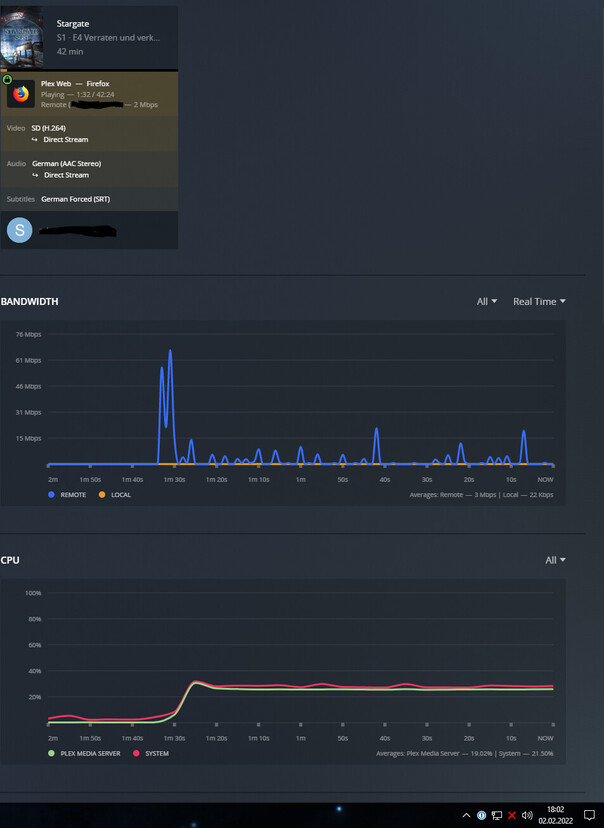
At least I can say that the load is reduced to 25% now, it looks like Plex web has been updated to version 4.74.1 and maybe it include the fix.
Plex Media Server Logs_2022-02-02_18-06-22.zip (4.4 MB)