Synology Transcoding Issues

Server Version#: 1.40.4.8679-7000
Player Version#: Chrome and Android 10.19.0.1142

During hardware transcoding of a 4K media file my stream stops every 15 seconds and starts buffering. However my synology (DS423+) is only running on 20% of the CPU capacity.

Another 4K file has the same issue.

Any way to solve this issue?

The issue occurs within my home wifi 6 network, but also when i stream on the internet. Connection is not the issue as it’s 1 gbps up and download.


<If providing server logs please do NOT turn on verbose logging, only debug logging should be enabled>

May I direct you to the update for HW subtitles ?

The issue still persist after installing 1.40.6.8820-7000.

Also turned off the subtitles, but that doesn’t solve the issue.

Found a way to solve the issue. When you set the streaming quality to “maximum” instead of “20 mbps” it solves the issue.

You also see some kind of “buffering” bump in the current CPU graph now what is missing when you check the 20 mbps transcoding graph in the previous message.

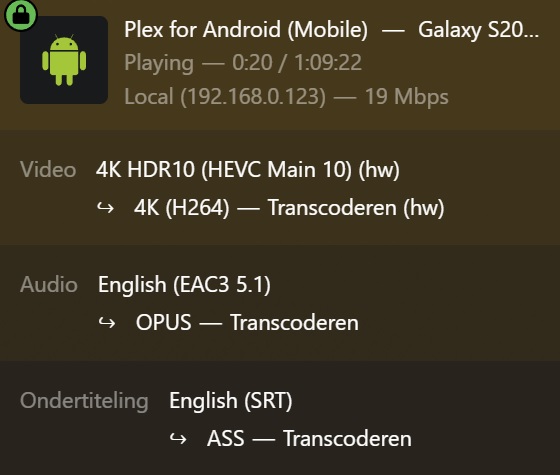
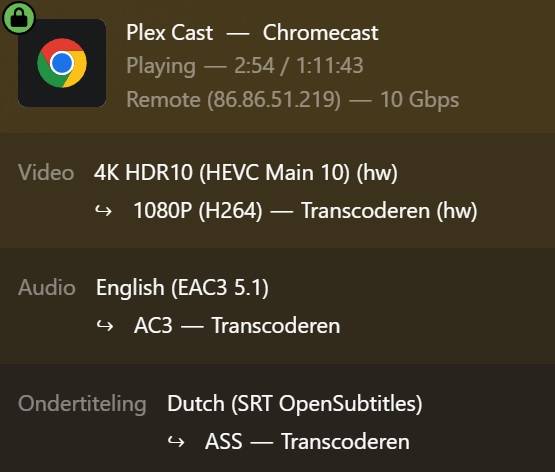
May I please have the server debug logs which capture this?

debug.txt (16.9 KB)

Those are the Player logs.

I request you do the following:

  1. Play it again (60-120 seconds)
  2. Stop Playback
  3. Settings - server - Troubleshooting (lower left of Plex/web)
  4. Download Logs
  5. It will present a ZIP file to you
  6. Save that then upload here for me to review

Here you go

Plex Media Server Logs_2024-08-07_21-37-13.zip (3.3 MB)

@nl1bzw

In your Preferences.xml,

Remove VaapiDriver="i965" it is no longer applicable.

Is your shield’s video playback quality set to original / maximum ?

There is no vaapidriver=ï965" in my preferences.xml

No it was set to 20 mbit. The issue doesn’t occur when i run it on maximum.

Any solution or is it a bug?

@nl1bzw

(sorry for delay – had a major interruption)

There were some things needing fixing.

The switching to the i965 driver on GeminiLake is as it should be.

Given the updates to the transcoder for the subtitle-burning build ,
I would give that a shot first.

Make certain to get the latest build.

HW subtitle burning is the biggest help for ApolloLake/GeminiLake models.

This topic was automatically closed 90 days after the last reply. New replies are no longer allowed.
