Hisense U6G stops loading library/streaming content image assets

Server Version#: 1.28.2.6151
Player Version#: 9.8.2.3522

Hello.

This has been an on-again, off-again issue for me. I’ll start browsing a library, scrolling down, and suddenly the client will stop loading images (posters, backgrounds, actor images). If I try to back up some of the previous images will still be there, but it’s pretty haphazard. From then on going to other areas of the app will be the same. I find exiting out of the app and going back in sometimes restores the ability for images to load, sometimes I have to reboot the TV.

This has happened before and so far my workaround was simply to sideload a previous version of the Plex Android app where the issue wasn’t occurring and hope it goes away in a newer one. Last time it was 8.26 when it started and it went on for the rest of the 8-series at least. Tonight I upgraded from the fairly stable 9.4.1 to 9.8.2 because I’ve started adding proper Edition tagging and removing the custom display names I was using to differentiate between movie cuts. Unfortunately I found I could not even get halfway through my movies library before the issue occurred,

Here I am on my main movie library. I’m checked out a couple collections from this screen, like if I was just browsing causally, but here we are. Note that I’m only down to the letter H on my library and posters have already stopped loading. That’s only a couple hundred movies here! :angry:

Also, I will mention I did a restart on the TV after the app update since several other apps updated as well. So this is freshly booted.
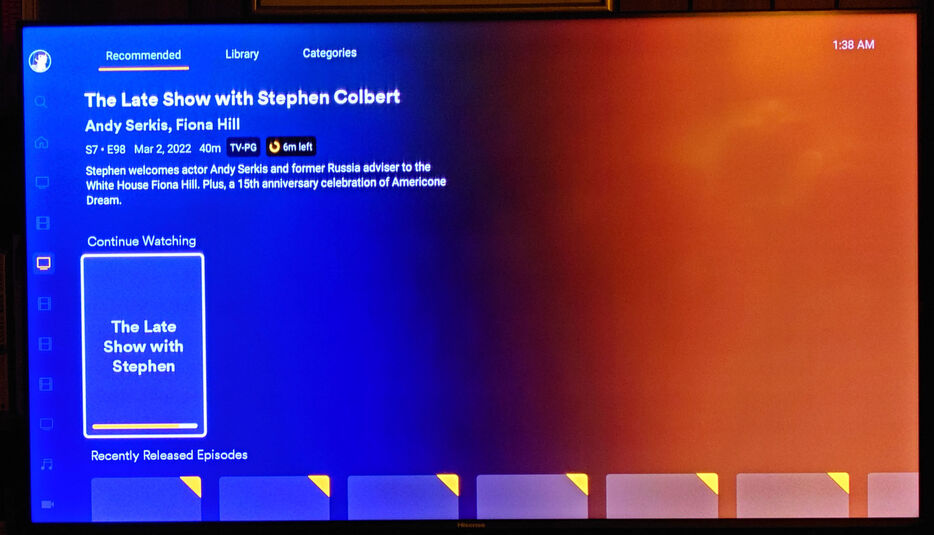
Here, I moved to the Recommended tab of my main TV library. Nothing loading since I hit that “limit” or whatever back on the Movie library.

My Home screen is now rather bland from top to bottom… :neutral_face:

I don’t think this has anything to do with my server since, as you can see, it also impacts the content from Plex’s Ad-supported streaming partners.
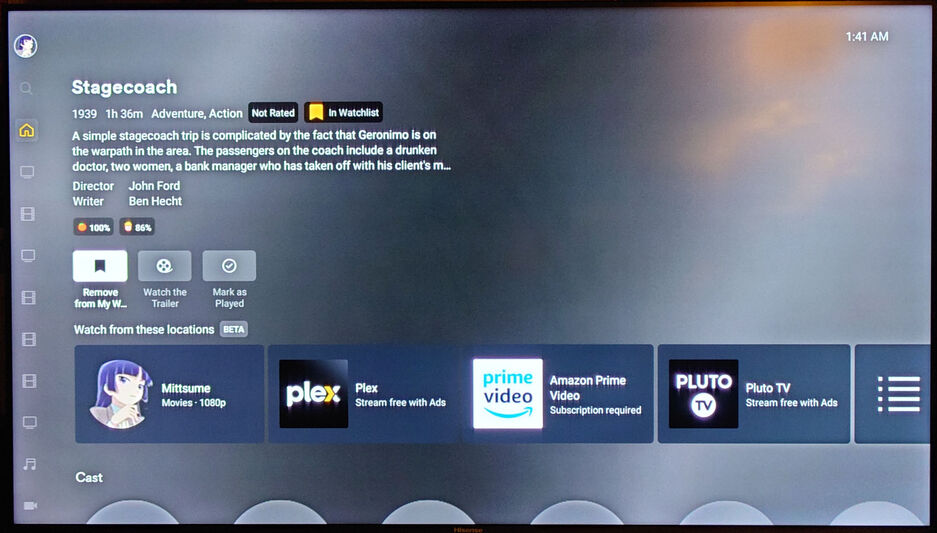
It also impacts the Watchlist – shouldn’t there be a background image here? :thinking: I would have needed to scroll down and take another picture, but you can trust me – there were no images for the actors here. :wink:

This is the only client device I seem to have this issue on. Not my Shield Pro, not my Fire Stick 4Ks. Only this Android smart TV.

Here are client logs: logs2.txt.zip (340.1 KB)

I would have posted about this back when it happened the first time (at 8.26), but there was a similar issue happening with missing actor images on the Fire Stick and I was hopeful they were caused by the same thing, but this did not turn out to be the case when the Fire Stick issue was resolved.

After I got these pictures and logs I downgraded the app again. I didn’t go all the way back to 9.4.1 and instead tried 9.6.3. The images stop loading there too, but it takes longer. I can get almost all the way down my movies library listings before it happens.

What have you set in the Extended Settings of the app for
“Fallback to unsecure connections”
and
“Prefer unsecure connections”
?

Are you aware if your router (DNS resolver) is applying “DNS rebinding protection”?

Pretty sure the app is set to only use secure connections.

Not sure about the DNS resolver on the router. But it seems like that would be odd to have that only cause problems on some client versions and not others. I can go back to 8.25.1 and the issue didn’t happen at all. Now it’s more finding a release where it happens late enough it’s not likely to occur during normal use (and prompt questions from the rest of the household of “what’s wrong with the Plex”). That’s why I was on 9.4.1 before tonight.

Wasn’t there a server setting or something for that? I’m not seeing it when I paw through the server settings now.

I just encountered the same issue with a Hisense TV yesterday. I had set it to prefer unsecure connections in the local network and subsequently lost all posters. Which means it wants to load the posters over a secure connection.
Which in turn requires DNS rebinding protection to be inactive.

Settings - Server - Network - “Secure Connections” should be set to “preferred” if you want to allow unsecure connections.

I used to set clients to “unsecured on same network” to reduce overhead for – some reason??? Maybe for when I was running Plex on Kodi off a Fire Stick. I stopped doing that awhile ago and leave them on the default “required” nowadays.

Mine’s on Preferred but I don’t think I have any clients set that way now,

It disables the additional encryption of “secure connections”, which in the local network is just unnecessary computing effort and power consumption.
Plus, on some older sets it can be the difference between playing fluidly or juddery.

Yeah, it was for the Plex plugin on Kodi, since I was doing software-based playback of certain formats and ASS subs. Not so much an issue now with the new support on the normal client.

What would I need to change on the client regarding the DNS rebinding issue? I don’t think that’s an issue with my router but I’m willing to try things here on the TV.

I had this problem as well. I just gave up and bought a shield pro.

There is nothing you can do on the TV regarding the DNS rebinding protection issue.
This can only be solved on the DNS resolver for the local network, which in a typical home network is located inside the router.

If your router doesn’t provide any settings for this, you can

  • swap the router
  • get an alternative firmware for the router (dd-wrt, open-wrt, etc.) if available for the particular hardware
  • supersede the DNS resolver inside the router with an additional DNS resolver in a separate hardware device, like Pi-hole (running on a Raspberry Pi)
    or similar

Okay, I guess I’m kinda jumping the gun here. :sweat_smile:

I really don’t think this is a DNS-related issue, considering I have four different clients that run the Plex Android app, and the other three (Shield, Fire Sticks, Android phone) don’t have any issues. Also, if that was the problem that would not explain why the severity of the problem changes depending on the version of the Plex app I’m running on the TV.

While looking for a way to test this I came across this post by sa2000. I pulled the plex.direct IP from a library item and running nslookup it is resolving to my own local LAN IP of the Plex server.

Bump.

Server Version#: 1.29.1.6316
Player Version#: 9.10.1.36024

Still seeking assistance with this issue.
I don’t have any issues on my Shield Pro, Fire Stick 4K, Android phones… Only on this TV.

Same problem here. It’s been like this for a year or so.

This same problem just developed on my Omni Fire TV.
Clearing the cache fixes it temporarily, but it just comes back.

Server Version#: 1.30.0.6486
Player Version#: 9.13.0.37280

Installed this app update today. I’m still seeing this problem where posters and other images eventually stop loading, but there was a significant improvement with this app version. I got all the way through my main Movies library, checked out a few collections, and looked at a couple individual movie pre-play screens and things were fine… Then I decided to try going through my largest TV series library after that, and it was soon after starting to scroll down through that the posters stopped. But still, loading through the entire movie library is a big step up in usability (compared to 9.8.2 where I could only get a third of the way through the same library before it quit).

Took the newest release for a spin today (9.16.1). Still seeing this issue, and also generally browsing performance felt slower than before. Might just be used to some of my other clients but I feel like it was faster loadng posters before.

Version 9.19.1

Played around on this version last night and it really worked well. I still ran into the issue where it eventually stopped loading images/posters, but it took quite a bit of browsing to do it. Overall performance loading seemed kinda sluggish compared to my other Android TV clients, but the amount of browsing I was able to do was far and away more than I have been able to do in while.

Version 9.23.0.1746

Still having this issue.

Had a family member trying to find Iron Man today on my server. They were a bit lost in the Plex Movies & TV content at the time, so I steered them back towards my own movie library, and had them use the letter row on the right to jump to the "i"s and we were greeted with this…

Ended up having them change to a Shield that happened to be hooked up and used it. No issues doing the exact same steps on the Shield. Only on the TV.

I still have this issue. It’s been like this for 2 years or so. Also HDR10+ stopped working on the last update :slight_smile:

Last week someone on Reddit posted they were having the same issue on their Amazon Omni smart TV.

Whelp, hopefully they finally fix this issue. It’s super annoying.
