I noticed that my managed users and my wife, who are a part of my Plex Home, do not have all the options that I do being a Plex Pass user. I remember she use to have all the stations and radios available to her, but since the change during the summer she does not.
When I am logged in Plexamp and then switch over to her she still has the Plex Pass symbol by her account name, but gets none of the features for us having bought a plex pass.
Is this by design now or is there something else going on?
I did two years ago and then disconnected the service in my Plex account after the trial period. She had done the same thing. Is there something else I can do to rectify this?
Enter your music library
enter the Advanced Filters
See if you get anything but “No options” for “Track Source”. If you do, filter those tracks and remove them from the library.
For the sake of thoroughness, repeat for “Album Source”.
If it’s not that, you’ll have to be a bit more specific about what exactly is missing for your managed users. Which parts of the app aren’t present? Screenshots might also help, if you can provide them
For other users in my Home they do not have the option to create a filtered playlist. There is not a playlist or “All Music” etc. There are only playlists that you can create sans filters.
Then other users in my Plex Home only have two stations: Artist Mix Builder and Album Mix Builder. Whereas in my admin account I have all the Radio Stations to choose from as well.
Smart playlists (like Fresh ) are created for you when you first sign into the app. For managed home users (i.e. not fully-fledged Plex accounts), you may need to create them manually from the filters in the library tab. For everybody else, signing out and then back in will prompt you to create them.
As for the rest (e.g. stations etc), I’m not 100% sure what’s going on there. Is it possible the users have restrictions applied, like by label or something? This can be managed in the sharing settings in Plex Web.
A useful test might be to get the shared users to look at the music library in Plex Web (app.plex.tv), and see if the relevant stations are visible there (from the library’s Recommended tab)
Ok, so I had my wife log out and back in within Plexamp and then those smart playlists appeared. Logging in and out through the web app did not reset anything (which is where we had been doing it before while I was doing some troubleshooting).
I also got the radio stations back by removing a label restriction on her account. Is there a way to get those radio stations to work no matter the label restrictions? She doesn’t like to listen randomly to heavy metal like I do so I had used a label to remove those albums from her account. Now she has those stations back (which she used a lot), but will now be subjected to hear that if it is sonically similar to something she does like to listen to (or was released in a similar decade if she chooses decade radio).
Indeed it is. Indeed. I have tried many versions of sorting and what not. The current way I do this is I sorted my music into main folders.
Music > Do Not Play
Music > Explicit
Music > Radio Friendly
Music > Stand Alone Genres > Bluegrass,Blues,Christmas,Classical,Disney,Field Recordings,Film Scores,Hawaiian,Jazz,Screamo,Spoken Word,Metal
I then have a main music library that the family uses, and that library has the folders from stand alone genres like, Disney, and Hawaiian along with the Radio Friendly stuff. I then have a separate music library that includes the Explicit stuff and then the other stand alone genres have their own libraries. Like Christmas for example. That has its own library and the fam knows to switch to that one.
The reason I do this this way is because its easy for me to manage the music this way. My family does not go into playlists. no matter what I have said or tried they just don’t go into playlists, they basically open the app, click library, and then hit library radio and let Plex do its thing. So for my sanity, I just sort the music into folders and then create libraries.
Hopefully the Devs tackle the Christmas Music Problem in 2024!
 playlist or “All Music” etc. There are only playlists that you can create sans filters.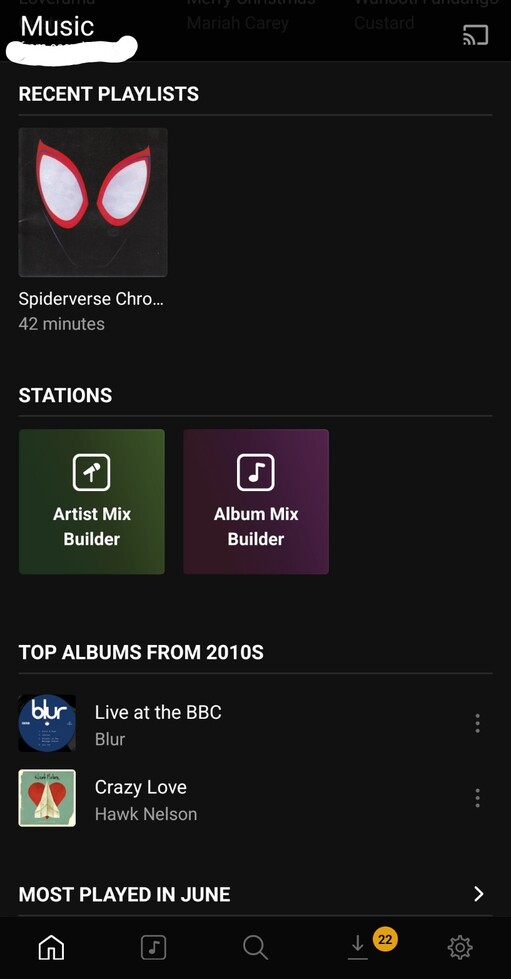

 ) are created for you when you first sign into the app. For managed home users (i.e. not fully-fledged Plex accounts), you may need to create them manually from the filters in the library tab. For everybody else, signing out and then back in will prompt you to create them.
