I’ve just upgraded to a lifetime Plex pass.
I have a my wife as a Home user.
The Pass features are not available to her!
I removed her and added her again, but it has not been fixed.
I have downloaded the latest - selecting Plex pass downloads - 1.19.3.2764-ef515a800
In particular, i’m trying to allow her to stream to Sonos, which is a Plex pass feature.
Any ideas??
Can you confirm she’s actually listed under Home Users or is her account showing under Friends?
https://app.plex.tv/desktop#!/settings/users-sharing

Since purchasing the pass, I’ve tried deleting her and added her again.
I’ve tested on her iPhone App (latest version) and also her Win 10 PC using plex web.
the Plex Pass features are not available to her.
just to clarify… so when she’s using the app on an iPhone, she’s asked to unlock the app?
I try to figure out if there’s a general disconnect or if this is about individual features that are not available on a user level.
Not sure exactly what you mean by unlock.
She signs into her app using her account info.
It shows she is in the “home” and she can see and use associated media
it shows her account status as the free version
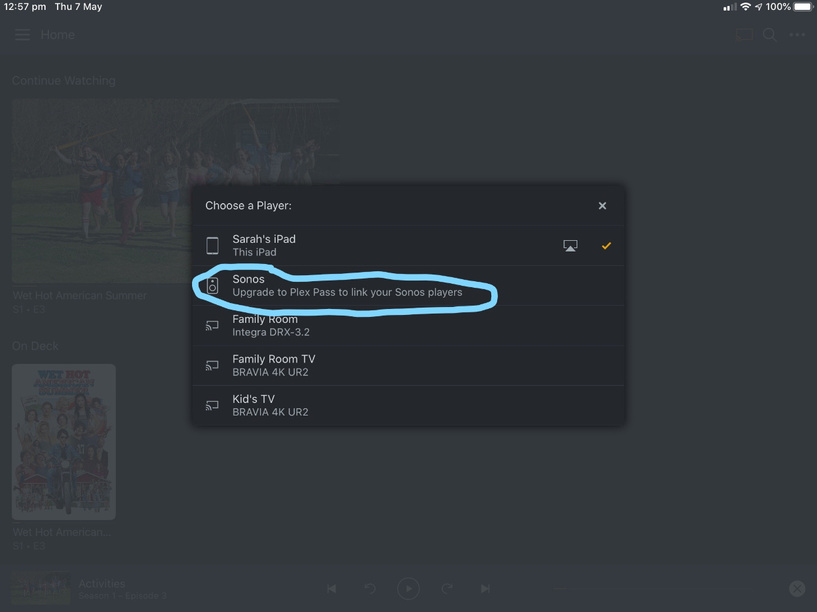
if she tries to send music one of our Sonos speakers for example, the casting menu shows “Upgrade to Plex Pass to send to sonos”… or similar.
Let me rephrase my question:
Can she play videos directly on that iPhone using the Plex app or is there some additional restrictions (e.g. the 1-minute playback limit)?
She can play back any media on the phone - both in our home Wifi and also externally on cellular.
this includes movies on our server and also from Plex Movies etc… we tested for over 2 minutes without issue.
In saying that, prior to our Plex Pass, i was streaming movies without the 1 minute restriction anyhow.

This is from my phone - and teh same with all of my other devices. I can stream directly to all of my Sonos.
This is what i was expecting for other home members when i purchased the Plex Pass
Thanks for clarifying.
I suppose that wasn’t on a mobile device – unless you had paid to activate the app on that particular Apple ID before (otherwise mobile devices are limited).
This cooks it down to an issue with the availability of your Sonos setup for streaming (not to your wife not benefiting from your Plex Pass features in general).
Considering she has a Plex account of her own… have you linked the Sonos account to her Plex account as well? I’m not sure if the Sonos app will allow multiple Plex accounts to be linked to one Sonos account…
https://support.plex.tv/articles/control-sonos-playback-with-a-plex-app/#toc-1
Hmmmm… the sole reason i upgraded to a plex pass was so the family could use it as the sole media system and push to all of our speakers…
You are correct - the Sonos system is setup under my Sonos account, and my Plex account is linked. You cannot link multiple Plex accounts - i just tried.
Also, she cannot sign in to my Sonos system.
Sorry - but I’ve been staring at “Upgrade to Plex Pass to link your Sonos Players” in the players menu for a few months now.
Its pretty frustrating to do so, only to find it won’t work for the rest of the family.
May i please cancel the Plex Pass ( of 2 days) and have a refund?
thank you.
You might want to check this out in a context where your users are managed users… this way they’re technically using your main account (individual users separated by PIN; they will still be able to have different views, status…).
If you don’t deem that an option – best contact https://www.plex.tv/contact/?option=plex-pass-billing regarding a cancellation/refund.
Thanks. Unfortunately Managed users don’t get the option either.
The only way is if they all log on using my account:(
thanks for the assistance and help troubleshooting this one.
Hi again.
Appreciate the support. I’ve cancelled teh Pass and received a refund.
I thought i’d just let you know that the functionality was not available via managed users.
I was, however, able to add my wife’s plex account into Sonos and authorise it - so i had 2 x Plex accounts authorised in my Sonos.
It still didn’t work, but tough i’d just pass back what i’d learnt FYI.
In my home, on my primary device, the main account user can cast to Sonos.
In my home, on my primary device, a managed user can NOT cast to Sonos.
Is that expected?
