DS220+ with SSD’s
DSM v7
hi, even after installing Plex Pass I keep on having trouble with playing home videos; after 10 seconds playing the videos pauses for buffering/spiral. Home Videos are on Library on NAS and played on Samsung Q8LED. How can I overcome this? I have tried different options on the Transcoding settings but I may be doing something wrong. Thanks for your advice.
Kind regards, Michel
In Settings → Transcoder + Show Advanced, do you have both Use hardware acceleration when available and Use hardware-accelerated video encoding enabled?
Monitor playback via Plex Dashboard → Now Playing + Expanded View.
Are the videos transcoding when played on the Samsung?
Include a screenshot if possible.
Example:

Hi FordGuy61,
Thanks for your response.
I have indeed selected these settings as you indicate.
Please find attached screenshots.
Thanks

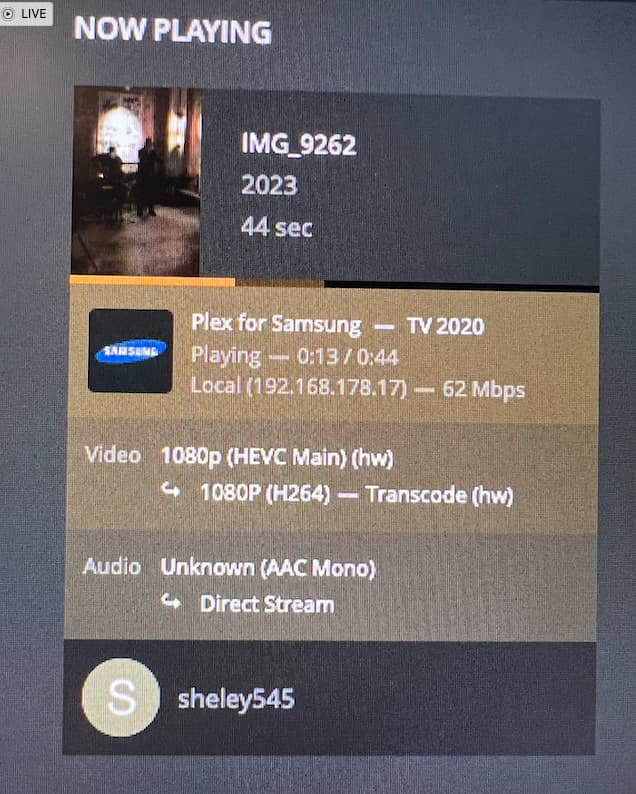
Thanks for the info.
Curious why the video is transcoding. A Samsung can play HEVC video.
Let’s see if the log files show anything.
-
In the Plex Samsung app, set it to log to server at the debug level.
-
Make sure Plex Media Server is set to debug logging.
Do not enable verbose logging.
Settings → Server_Name → General + Show Advanced
-
If you changed the server logging level, restart Plex Media Server.
-
Play the video for 15 - 20 seconds, then stop playback.
-
Wait one minute for the server to log everything, then pull the log files.
Settings → Troubleshooting -
Upload the ZIP file to the thread.
Drag it into the message window or use the upload button, .
.
The file will insert at the cursor location.

hi, thx for your support, hope the attached log file gives more clarity 
Hi, thanks again for your previous responses. I have uploaded the log files earlier. Would you be able to have a look. If not possible, no prob of course, but then I will try to find other advise. Thanks in advance and kind regards!
This topic was automatically closed 90 days after the last reply. New replies are no longer allowed.
