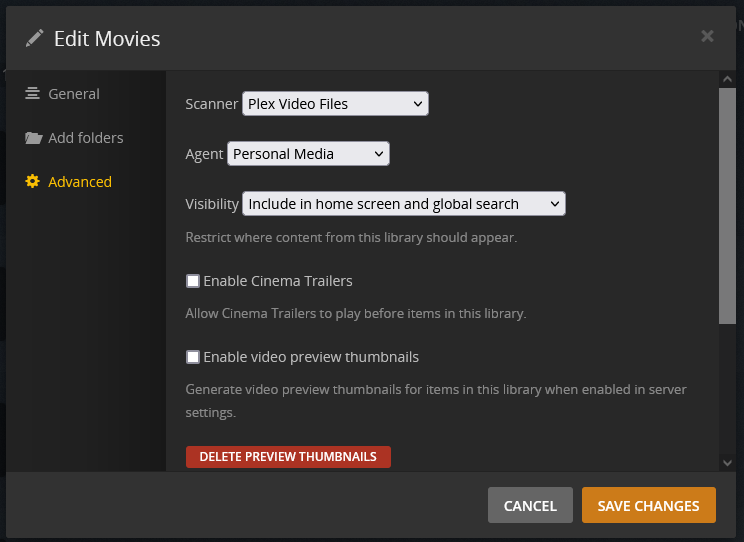
Server Version#: PlexMediaServer-1.24.4.5081-e362dc1ee (Ubuntu 20.04.1)
Player Version#: 6.9.8.7332-8ba9f346d-Plex
Hello. Thank you for Plex. I am using Plex to play media files from an Ubuntu server on my home network, to Roku devices which are also on my home network. (I am replacing a previous media server/player which is no longer supported.)
The files are in folders that I want, with file names and metadata that I want. What I want is to browse the folders and play the files. That’s it. That’s what I want.
I do not want to search the Internet for metadata. I want it to use the metadata I put in the file.
I do not want Plex to try and figure out if a file is a movie or a TV show or a bonus behind-the-scenes “extra” video for a movie. What I want is to browse the folders and play the files. That’s it. That’s what I want.
How do I tell Plex to just play the files?
I have gone through the “agents”, and prioritized the “Local Media Assets” in every category, but I do not appear to be able to de-select the “Personal Media” item. So movie synopses (which are usually wrong) keep showing up for videos which do not have a synopsis in the file metadata.
Also, MANY folders have videos in them which Plex refuses to even show – it says, “No Content. This listing appears to be empty”. The folders aren’t empty. They have mp4 files in them just like every other folder.
All I want is to play the files. How can I stop Plex from trying to be smart, and just play the files?
Thank you.