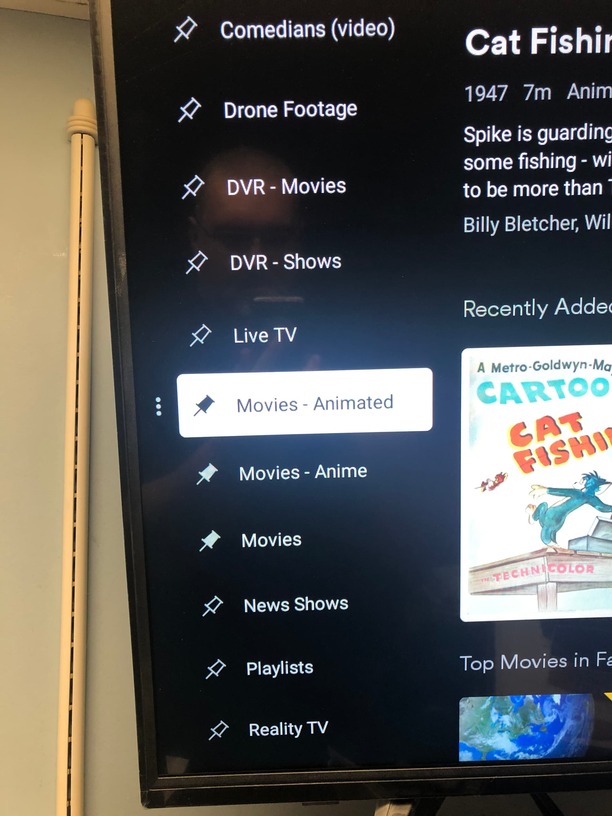
I’m not sure how else to word the title, But whenever i load Plex i always have to go down to More, Then select my server name, then i can view my own added categories IE: Movies/TV Shows etc
Is there a way so it always shows my own added categories?
That there is the most stupid UI decision the Plex team have ever made. Having to Pin your libraries so you can see them on the so called front page (home). Completely moronic.
I guess we disagree on that.
With a number of libraries, not all of them will take center stage on all players – e.g. I’m not pinning my music library on the living room TV or don’t need the family home videos to be front & center on my mobile.
What do you mean by “getting your libraries on the left home screen”?
Can you share a picture of what exactly you get to see (libraries being pinned but not showing in the sidebar)?
Is the pin icon hollow or solid? I just checked my FireTV and it shows a pin next to ALL libraries even if unpinned. It’s only there as an icon to indicate you can pin the item. You must select the triple dot to the left of the item and choose “Pin to sidebar” to actually pin them, and the pin will turn solid.
If you have no pinned libraries, it can look like the hollow pin icon indicates that it IS pinned.
Yep, those are not pinned. scroll down to the library, press left to highlight the triple dot that appears. Click OK. On the menu that appears, select “Pin to Home”.
Maybe that’s an opinion to have, but look at the screenshots. Plex’s monetized content is ‘front and center’ with no hint of their own content, which is behind at least 5 clicks on the remote. I don’t remember there being an issue that this decision resolved, even with the clutter of too many libraries you can see what you are looking for without it being behind a menu. The default home screen immediately clarifies the current priority of Plex, good or bad. I don’t think we need to pretend there’s an upside for users with their own content though.
Your opinion of Plex’s priorities is noted (I agree Plex seems to focus on this free content more than on polish and basic features), but I disagree that it was a design choice to promote their content. When you first log into a client, I remember it asking you to pick various libraries from your server to pin. If you skip this step (or something went wrong), then you are left with the default pins, which are their free offerings. Since those options are available regardless of if you own a server or not, it (kind of) makes sense for those to be visible on any new account/client.
That you (like me) detests the “free” offerings as either being under-quality compared to your own stuff (or feeling a bit self-serving on Plex’s behalf), is more of a personal opinion.
Ah thanks, As you can see in my photos three dots are not visible [Library name changes colour to orange though when i go left] which is why i didn’t know that could be done.
Hmm, maybe my FireTV (Fire built-in to a TV, not a cube/stick/pendant) is a different OS version. The triple dot appears when I highlight an item, but there also seems to be a column of space for it already allocated on the left for all items, while yours does not. So when you scroll around, you might not notice that there is a secondary menu. I seem to remember one client lets you actually select the pin itself to toggle it, which is nice as that has a lot less button presses to pin items to Home.
It’s not an opinion of priorities as much as a casual observation. “Detest” is much too strong of a word. I do own an Emby lifetime sub as well as plex and I also keep a Jellyfin server, so I don’t have the passion of being committed to Plex that some have.
I think you maybe weren’t here for an important detail though. When this started we all already had our home screens like we wanted it and Plex changed it to the way it is in the screenshots in this thread. At that point every single user either thought the server was down because the content is hidden, or they thought my own content had commercials now because they were confused.
My actual opinion is that forum complaining isn’t helping as long as we are bringing in users with our content. I’m not saying to leave but if they see that competitors are grabbing market share they will pivot back to us. The ball is in our court.
EDIT: oh I thought it was a reply to me, but I think you meant @PunkleJones
I’ll see my way out. lol