Its been years since you relapsed this and it still is so unstable. Constantly losing network connection. I get the exclamation in the triangle constantly. Fix your crap.
Fix your internet, its not a plex issue. Plex does have some issues with random crashes recently but 99% chance the issues you are complaining about are on your end, not the software’s. Do you want help troubleshooting?
Internet is perfectly fine. Happened literally after last update. 1gbps internet connection and the other 20 devices connected have had no issues. Only one is Plex. Have to restart Plex on the computer side to fix the issue. Other software connected to the same server have had no issues. Try again. BTW Plex open right now on the very computer I am writing this response on and of course it has the exclamation points with the triangle and it says “It is unavailable” and that to verify I have a network connection and yet the internet is working 100% on this computer as by your ability to read this response. Hardwired in also.
Furthermore Netflix never loses connection on this computer. Spotify never loses connection. Never lose connection with anything else at all on this computer except Plex can’t seem to maintain, but yeah it probably is my internet. That was sarcasm the last sentence inc are you couldn’t figure it out.
Hi Mike,
there must be an issue with your Plex install or your network setup for PMS.
I’m using Plex on MacOS 11.6.4, no problems.
PMS Version: 1.25.7.5604
I gather, losing network connection is for remote.
Its for remote on same wifi network and its on the local machine. Just opened Plex up on the actual computer and same issue. How can it possibly be unavailable when I am literally on the machine?
OS 12.2.1 and 1.25.6.5577
Have your reserved/made static your Server’s LAN IP address for WiFi in your router?
Is your server connected to your router by WiFi? If you can use Ethernet.
I have not and have never have. Never has this issue for years. This is also my main computer so I use it for everything. When I quit Plex and restart it works fine, at least for some amount of time.
The goofy thing about Plex is that you can have an off normal setup, and it will continue to work fine until it doesn’t. Roll through all of the things that stand between you and the system making sure all the doors are open, and permissions are set correctly. There has to be something in the chain that’s saying “No.”
I had issues like that with my newest install. In my case it was a firewall thing that popped up that I didn’t think to check. Hope you find that lightbulb moment and you solve the issue. It can be a wonderful thing when it works the way it’s supposed to.
My question, do you use Android phones in wifi network? I had the issue many moons ago of my phones pinching the servers LAN IP.
I do not. No android phones at all. Pretty much just use this remotely so to speak on a Roku box on the same network
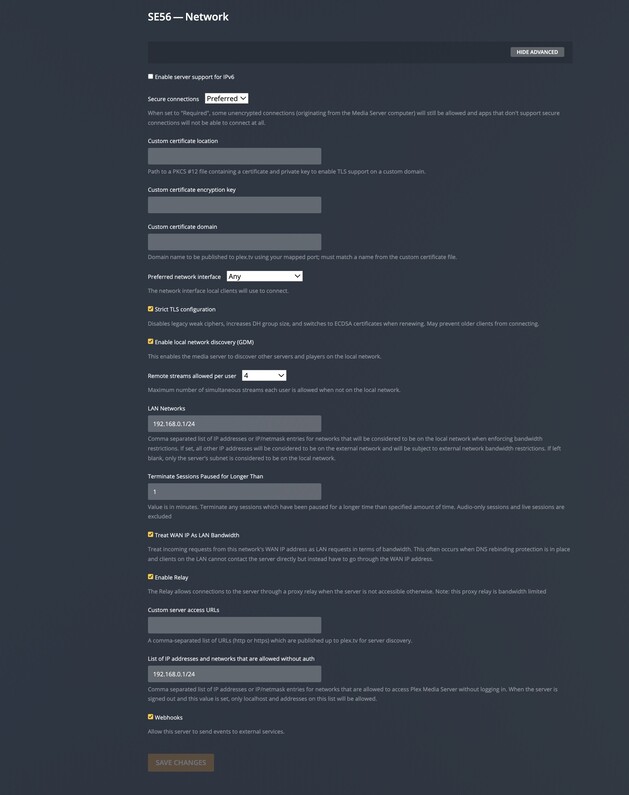


Definitely turn off IPv6. Restart everything Roku, Router, Server, switchs
Will do and will see if that works over the next 24 hours or so.
Plex is not fully compliant with IPv6.
Cheers buddy, I’m going to send a message about your online security.
