Hello, if you can help me fix this problem, I’ll happily pay you $250 USD which I’ll send instantly via Venmo or PayPal. I am not a novice with computers. I am an advanced computer user, so you will not be dealing with a frustrating fool who doesn’t know anything about computers.
I have troubleshooted this problem extensively and am now at my wit’s end. I will describe the problem completely, as odd as it sounds…
First of all, know that I purchased a brand new Mac Mini M1 with 16GB ram to serve as a media server. It is running the latest Ventura OS (13.2.1) and is connected via ethernet to my 1Gig (up/down) fiber connection through CenturyLink.
This Mac Mini (which I will call the “Media Server”) connects to the internet just fine over ethernet. I can visit any website I want without any problem and at 1Gig speed. However, as soon as I launch Plex Media Server (by clicking on the Plex Media Server icon in my Dock), not only can I NOT CONNECT to the Plex Media Server, but I lose my internet connection altogether. All of the sudden, I can’t connect to any website using Safari or Brave. All internet connections are lost.
The internet connection to this Media Server Mac Mini is lost completely until I restart the Mac. I can reproduce this problem over and over again without exception.
There are at least 7 other computers on the same network and they all connect to the internet without a problem (and can connect to each other, as well).
If you think you can solve this problem, or know how to do so, $250 USD is yours! Please help!
Look in your router for something like “Advanced security” or “Cyber Security”
I’ve seen other people having this issue and that is a likely suspect. You have to disable it, lower it’s priority or whitelist Plex I think. (don’t remember)
I can’t find any of the threads I saw before but if I do I’ll post the link
Edit:
Don’t know if this helps or not, but take a look
Has this ever worked?
Has anything changed?
Do you have port forwarding for Plex?
What port is set in Plex for remote access in the Plex Servers settings?
Plex has always worked. However, what has changed is I bought this new Mac Mini to serve solely as the Plex Server. The old Plex setup was on a different Mac Mini—a much older and slower machine.
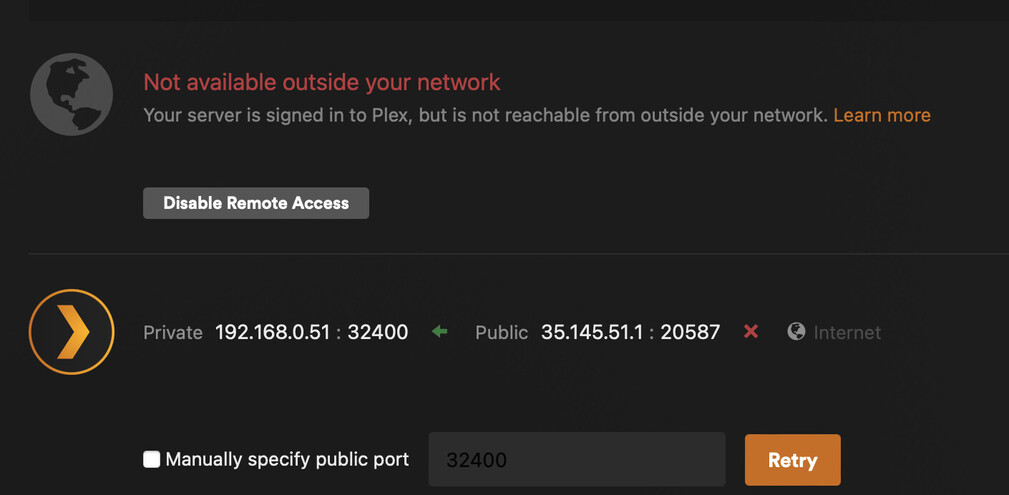
As far as the port settings, I can’t even access that because I get an error stating that Plex is not available outside the Network:
And to add to the confusion, I can connect to the internet if I connect to WiFi on the same network as the ethernet network. The internet only shuts down when I’m on Ethernet.
I don’t know what the old server used. And I haven’t tried any manually specific ports or not. I was only able to even connect to Plex Media Server because I switched to WiFi. But the ORIGINAL PROBLEM, which is the fact that my internet connection is lost after trying to connect to Plex Media Server would not be affected by that.
Thanks for trying to help. There is an “Cyber Security” link, but there is no option to whitelist Plex. And disabling Cyber Security can only be done for 24 hours maximum.
Sounds like you’ve got something blocking the server. Either locally as an App on your server or on the router… We need to figure out what it is so we can sort it.
Someone else suggested that maybe CenturyLink is using Carrier Grade NAT (CGN) and that is blocking the connection, but I just verified it using the methodology they gave me (which was essentially to check to make sure that the IP address noted in the admin panel of my modem and my address from any site like Whatismyip.com is the same). I checked and they are the same.
The weird thing is that someone it has to be connected to Plex Media Server because everything works fine until I try to launch Plex Media Server. Right now, for example, I am writing this to you connected to the Plex forum through my ethernet connection. If I launch Plex Media Server, it will not connect, and I’ll lose my internet connection system-wide (not just on Safari/Plex Media Server). I’ll then have to either restart my computer, or disconnect the ethernet and connect via WiFi.
Plex uses the 127.0.0.1 IP address to connect with your Plex Media Server (as shown in your browser’s URL field). The IP range 127.0.0.0/8 is reserved for loopbacks.
If your local network does not use the 10.0.0.0/8 or 192.168.0.0/16 ranges (reserved for private use) to connect with your router, that might cause a problem for the loopback and could possibly explain the loss of the complete internet connection.
You can retrieve your local IP address in Mac’s Network settings, of course.
Have you tried restarting the router and server at the same time? Simple as that sounds, I’m wanting see if once it gets a new DHCP fixes it initially. Once both are restarted your server should get a different local IP address. So check after restarting the devices to see if it changes.