The user experience for the Home Screen is becoming too bland. As of now it shows continue watching, recently added, my collections, then recently added tv shows. It’s been showing the same movies for a while now since my last upload. Is there a way to alternate movie categories or selections just like all of the other streaming services on the Home Screen? For example can the following be shown on the Home Screen like my Netflix account? comedies, documentaries, released in the past year, action tv, dramas, epic worlds, award winning films, suspenseful movies, etc to name a few. I just want my library to alternate so I can get a different experience and selections to choose from every time I login. I appreciate the help. Thanks.
You can do this by adding different collections to your home screen. If you go to a “collection” in your movies or tv library, you can click “visible on” > “home”.
The home screen collections can be managed (order, visibility) through settings > manage > libraries, and then using “manage recommendations” on the relevant library.
Something that a lof people find useful is using smart collections that are updated regularly with Plex Meta Manager. This will change the items in the collection depending on different paramters etc. I also use “smart_label: random” on a lot of these like “trending”, which then means the order of the items on the home screen will shuffle each time it’s refreshed or opened.
1 Like
Thank you so much. I was able to set up smart collections. I’d like them to randomly change but I didn’t fully understand this portion of your message, could you elaborate for better guidance. Thanks.
I also use “smart_label: random” on a lot of these like “trending”,
Glad to hear it’s mostly working!
Do you mean change the order of items within a collection, or actually change the collection randomly?
smart_label:random should automatically shuffle items within a collection.
The only way i know to “semi-automatically” update which collections are shown on the homescreen would be to use the “visible_home” command in plex-meta-manager. I haven’t personally played with this too much, but options are here:
- Collection/Playlist Metadata Updates — Plex Meta Manager Wiki 1.18.0 documentation
- Schedule Setting — Plex Meta Manager Wiki 1.18.0 documentation
There may be other tools on github or elsewhere that can do automatic pinning/unpinning of show on home.
I personally just manually change 1 or 2 of the pinned collections each week or two.
This is what I’m not following
smart_label:random should automatically shuffle items within a collection.
How do I go about changing it to random. I don’t know where to go to make the change. This is exactly what I’d like to change the movie titles randomly every time I login.
Thanks again!
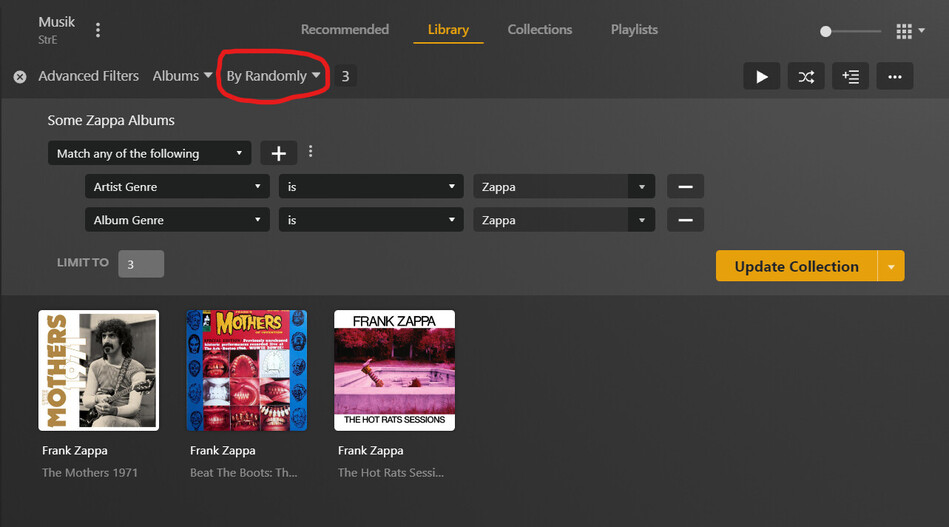
If you are asking for shuffling items within one collection
(instead of shuffling collections themselves)
you just select the ordering “by random” when creating the selection.
So far, this is only possible with a smart collection, AFAIK.
Here is one which I pinned to the Recommended page of my music library:
Yessss! Thank you so much, it’s working. Thanks everyone for your help!
This topic was automatically closed 90 days after the last reply. New replies are no longer allowed.
