He did… If you want to follow.
https://forums.thetvdb.com/viewtopic.php?f=7&t=53847
So that Ridiculousness example turned out to be a red herring. But I still have MANY (as in over 100) other series episodes with the same problem.
Hogan’s Heroes then (at least 15 or 20 of these are wrong). The title in TVDB is NOT the same as the title in Plex. I checked video meta data, and it’s all blank. Titles are not locked in Plex. I don’t see why the titles are wrong. See how it calls it HH Disk 1’
<MediaContainer size=“1” allowSync=“1” identifier=“com.plexapp.plugins.library” librarySectionID=“3” librarySectionTitle=“TV Series” librarySectionUUID=“0d9cc7c1-1278-4c66-8a0d-09c7170f25a5” mediaTagPrefix="/system/bundle/media/flags/" mediaTagVersion=“1544808062”>
<Video ratingKey=“55031” key="/library/metadata/55031" parentRatingKey=“55025” grandparentRatingKey=“12352” guid=“com.plexapp.agents.thetvdb://71635/1/6?lang=en” librarySectionTitle=“TV Series” librarySectionID=“3” librarySectionKey="/library/sections/3"type=“episode” title=“HH Disk 1” grandparentKey="/library/metadata/12352" parentKey="/library/metadata/55025" grandparentTitle=“Hogan’s Heroes” parentTitle=“Season 1” contentRating=“TV-PG” summary=“While on a sabotage caper, Hogan and Carter encounter a German general, overpower him, and smuggle him back to Stalag 13. Once there, they come up with a ploy to trick the disoriented general into revealing his troop’s attack plans.” index=“6” parentIndex=“1” rating=“6.7” viewCount=“2” lastViewedAt=“1541893870” year=“1965"thumb=”/library/metadata/55031/thumb/1551565578" art="/library/metadata/12352/art/1551565591" parentThumb="/library/metadata/55025/thumb/1551565590" grandparentThumb="/library/metadata/12352/thumb/1551565591"grandparentArt="/library/metadata/12352/art/1551565591" grandparentTheme="/library/metadata/12352/theme/1551565591" duration=“1532832” originallyAvailableAt=“1965-10-22” addedAt=“1537767055” updatedAt=“1551565578” chapterSource=“media”>
<Media videoResolution=“480” id=“88261” duration=“1532832” bitrate=“765” width=“718” height=“480” aspectRatio=“1.33” audioChannels=“2” audioCodec=“aac” videoCodec=“h264” container=“mp4” videoFrameRate=“24p” optimizedForStreaming=“1” audioProfile="lc"has64bitOffsets=“0” videoProfile=“main”>
<Part accessible=“1” exists=“1” id=“126608” key="/library/parts/126608/1524171484/file.m4v" duration=“1532832” file=“H:\TV Series Standard Complete\Hogan’s Heroes (1965)\Season 01\S01E06 - The Prisoner’s Prisoner.m4v” size=“146629066” audioProfile="lc"container=“mp4” deepAnalysisVersion=“2” has64bitOffsets=“0” optimizedForStreaming=“1” requiredBandwidths=“854,854,854,854,854,854,854,854” videoProfile=“main”>
<Stream id=“255494” streamType=“1” default=“1” codec=“h264” index=“0” bitrate=“598” anamorphic=“1” bitDepth=“8” chromaLocation=“left” chromaSubsampling=“4:2:0” colorPrimaries=“smpte170m” colorRange=“tv” colorSpace=“smpte170m” colorTrc="bt709"frameRate=“23.903” hasScalingMatrix=“0” height=“480” level=“31” pixelAspectRatio=“8:9” profile=“main” refFrames=“4” requiredBandwidths=“698,698,698,698,698,698,698,698” streamIdentifier=“1” width=“718” displayTitle=“480p (H.264)”/>
<Stream id=“255495” streamType=“2” selected=“1” default=“1” codec=“aac” index=“1” channels=“2” bitrate=“167” language=“English” languageCode=“eng” audioChannelLayout=“stereo” profile=“lc” requiredBandwidths="161,161,161,161,161,161,161,161"samplingRate=“48000” streamIdentifier=“2” displayTitle=“English (AAC Stereo)”/>
</Part>
</Media>
<Director id=“48200” filter=“director=48200” tag=“Gene Reynolds”/>
<Writer id=“48201” filter=“writer=48201” tag=“R.S. Allen”/>
<Writer id=“48202” filter=“writer=48202” tag=“Harvey Bullock”/>
<Extras size=“0”> </Extras>
</Video>
</MediaContainer>
title=“HH Disk 1”
This is definitely from embedded metadata.
Do you have the .nfo importer agents installed?
If you do, look out for .nfo files containing these titles.
That suggest you have embedded metadata. Most ripping programs will do this. Heck, I just got done with a collection and this is what was put in the title field “WWW_S1_D1.Title5.DVDRip”
Sorry, I sure didn’t mean to argue with you. The example of ‘Ridiculousness’ ended up making me look like a fool, I was just explaining what happened, to make me look a bit less of a fool.
But that’s only one example, I can give you 100 others. I just put Hogan’s Hero’s example below. I have 169 episodes, and roughly 10 to 12 have the wrong name.
All of MP4/M4V format? If so select them all and goto properties, details, and remove the metadata.
Another, perhaps more bizaare example.
Vikings, I have the entire series. But the entirety of Season 1-4 (but not 5), has the episode number in the title on Plex, but TVDB does not have it (nor has it ever, I’ve been trying to get this one corrected for months). Again, my media meta data is blank.
<Video ratingKey=“6238” key="/library/metadata/6238" parentRatingKey=“6237” grandparentRatingKey=“6162” guid=“com.plexapp.agents.thetvdb://260449/4/1?lang=en” librarySectionTitle=“TV Series” librarySectionID=“3” librarySectionKey="/library/sections/3"type=“episode” title=“S04E01 - A Good Treason” grandparentKey="/library/metadata/6162" parentKey="/library/metadata/6237" grandparentTitle=“Vikings” parentTitle=“Season 4” contentRating=“TV-MA” summary=“Entry to Valhalla eludes Ragnar, but as he lies in his sick bed in Kattegat events unfold beyond his control. Bjorn orders the arrest of Floki for Athelstan’s murder while in Paris, Rollo betrays the last of his Viking supporters to strengthen his position in the French court. In Hedeby, Kalf announces joint earldom with Lagertha, but is power sharing Kalf’s true intention and is Lagertha actually willing to share what once was hers?” index=“1” parentIndex=“4” rating=“7.6” viewCount=“1” lastViewedAt=“1541894127” year=“2016” thumb="/library/metadata/6238/thumb/1551911920"art="/library/metadata/6162/art/1551580195" parentThumb="/library/metadata/6237/thumb/1551580195" grandparentThumb="/library/metadata/6162/thumb/1551580195" grandparentArt="/library/metadata/6162/art/1551580195"grandparentTheme="/library/metadata/6162/theme/1551580195" duration=“2651401” originallyAvailableAt=“2016-02-18” addedAt=“1523022245” updatedAt=“1551911920”>
<Media videoResolution=“720” id=“50945” duration=“2651401” bitrate=“1275” width=“1280” height=“720” aspectRatio=“1.78” audioChannels=“2” audioCodec=“aac” videoCodec=“h264” container=“mp4” videoFrameRate=“24p” optimizedForStreaming=“1” audioProfile="lc"has64bitOffsets=“0” videoProfile=“main”>
<Part accessible=“1” exists=“1” id=“184548” key="/library/parts/184548/1523027748/file.m4v" duration=“2651401” file=“E:\TV Series Standard Active 2\Vikings (2013)\Season 04\S04E01 - A Good Treason.m4v” size=“422633013” audioProfile=“lc” container="mp4"has64bitOffsets=“0” optimizedForStreaming=“1” videoProfile=“main”>
<Stream id=“376158” streamType=“1” default=“1” codec=“h264” index=“0” bitrate=“1108” bitDepth=“8” chromaLocation=“left” chromaSubsampling=“4:2:0” colorPrimaries=“bt709” colorRange=“tv” colorSpace=“bt709” colorTrc=“bt709” frameRate="23.974"hasScalingMatrix=“0” height=“720” level=“31” profile=“main” refFrames=“4” streamIdentifier=“1” width=“1280” displayTitle=“720p (H.264)”/>
After you applied the reordering of metadata agents I described above, you need to ‘Refresh Metadata’.
What you are describing is almost 100% caused be embedded title tags in your files.
All m4v. I understand why you think it’s meta data. But I assure you, I already have removed it. When I rip them from disk to image, I ALWAYS remove all meta data as part of the process, so it was gone before Plex ever saw it.


Do you have the .nfo importer agents installed?
If you do, look out for .nfo files containing these titles.
Not that I don’t believe you but can i see s04e01?
Never-mind. I see Hogan’s Heroes. Thanks
Another similar (but perhaps unrelated). I have more than a 1,000 episodes of shows with no title at all. I know the stock answer is ‘that’s because it’s not matching the series to TVDB’. But, it is in fact matching the series. Mythbusters, for example. When I try to do a ‘fix match’, I can see that it matches (by itself) exactly to the TVDB series that I need. It downs all of the season posters and the series meta data ,but not a single episode name or episode meta data.
<MediaContainer size=“1” allowSync=“1” identifier=“com.plexapp.plugins.library” librarySectionID=“3” librarySectionTitle=“TV Series” librarySectionUUID=“0d9cc7c1-1278-4c66-8a0d-09c7170f25a5” mediaTagPrefix="/system/bundle/media/flags/" mediaTagVersion=“1544808062”>
<Video ratingKey=“71761” key="/library/metadata/71761" parentRatingKey=“71760” grandparentRatingKey=“71759” guid=“local://71761” librarySectionTitle=“TV Series” librarySectionID=“3” librarySectionKey="/library/sections/3" type=“episode” title=“Episode 1"grandparentKey=”/library/metadata/71759" parentKey="/library/metadata/71760" grandparentTitle=“MythBusters” parentTitle=“Season 1” contentRating=“TV-PG” summary="" index=“1” parentIndex=“1” thumb="/library/metadata/71761/thumb/1551988042"art="/library/metadata/71759/art/1551571788" grandparentThumb="/library/metadata/71759/thumb/1551571788" grandparentArt="/library/metadata/71759/art/1551571788" grandparentTheme="/library/metadata/71759/theme/1551571788" duration=“2653526” addedAt="1544300122"updatedAt=“1551988042”>
<Media videoResolution=“sd” id=“112677” duration=“2653526” bitrate=“849” width=“624” height=“384” aspectRatio=“1.66” audioChannels=“2” audioCodec=“aac” videoCodec=“h264” container=“mp4” videoFrameRate=“NTSC” optimizedForStreaming=“1” audioProfile="lc"has64bitOffsets=“0” videoProfile=“main”>
<Part accessible=“1” exists=“1” id=“155603” key="/library/parts/155603/1550167429/file.m4v" duration=“2653526” file=“H:\TV Series Standard Complete\Mythbusters (2003)\Season 01\S01E01 - Jet Assisted Chevy Pop Rocks and Soda.m4v” size="281759201"audioProfile=“lc” container=“mp4” deepAnalysisVersion=“2” has64bitOffsets=“0” optimizedForStreaming=“1” requiredBandwidths=“1061,1061,1061,1061,1061,1061,1061,1061” videoProfile=“main”>
<Stream id=“314018” streamType=“1” default=“1” codec=“h264” index=“0” bitrate=“680” bitDepth=“8” chromaLocation=“left” chromaSubsampling=“4:2:0” colorPrimaries=“smpte170m” colorRange=“tv” colorSpace=“smpte170m” colorTrc=“bt709” frameRate="29.970"hasScalingMatrix=“0” height=“384” level=“31” profile=“main” refFrames=“4” requiredBandwidths=“914,914,914,914,914,914,914,914” streamIdentifier=“1” width=“624” displayTitle=“SD (H.264)”/>
<Stream id=“314019” streamType=“2” selected=“1” default=“1” codec=“aac” index=“1” channels=“2” bitrate=“169” audioChannelLayout=“stereo” profile=“lc” requiredBandwidths=“161,161,161,161,161,161,161,161” samplingRate=“48000” streamIdentifier="2"displayTitle=“Unknown (AAC Stereo)”/>
</Part>
</Media>
<Extras size=“0”> </Extras>
</Video>
</MediaContainer>
No, it’s not.
guid=“local://71761 is proof of that.
This show is unmatched.
1 Like
guid=“local://71761”
No it’s not
LOL! You’re to fast!!
I have a similar issue with the TV series “10 items or less”. Specifically season 3. The order of the episodes does not match the TVDB. What’s funny is my little episode icons are pulled from the show, but the underlying video doesn’t match. I’ll check my files when I get home.
Hmmm.
That’s odd, where did it pull the meta data from then? I never put the series meta data, nor the season posters in there but they came from somewhere.
I’ll do the plex dance on it ,and see if that fixes it.
Very strange goings on with Plex. I don’t know how it can show ‘not matched’, YET, pull correct series meta data and correct season posters? You do realize that actually makes the problem even more bizarre.
What about the other example, such as Vikings. Why are those names different in plex from TVDB?
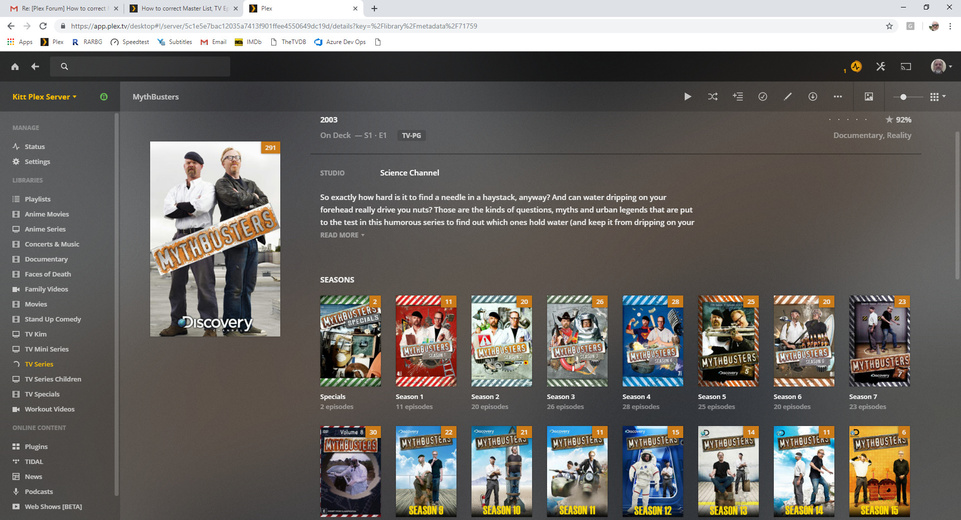
The mythbusters episodes are not matched, because TheTVDB has changed the episode numbers to 4-digit https://www.thetvdb.com/series/mythbusters
Your files and folder names are still using 2-digit numbers. So, no match.
Vikings is still affected by embedded metadata IMHO.
Take a look at your files with mp3tag
The Windows file properties dialog doesn’t even show half the relevant tags from mp4 files.
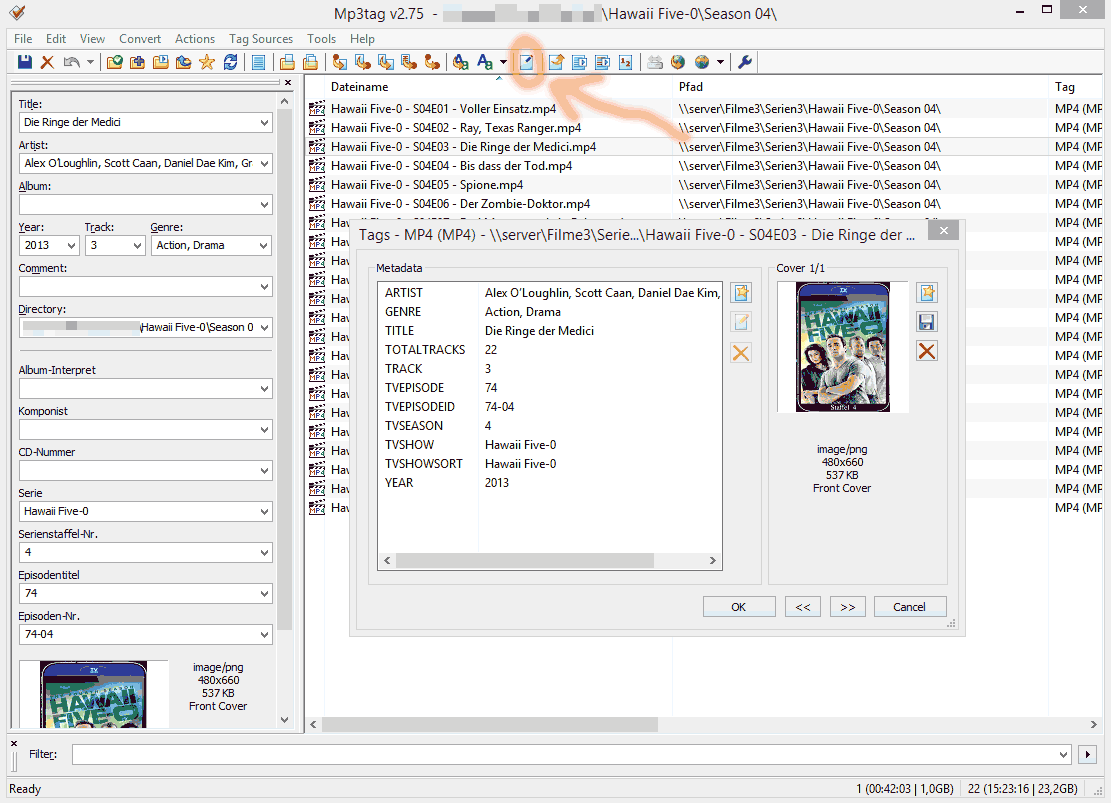
I looked at more than a dozen ‘mis named’ files. Not a single one has meta data.


As for Mythbusters, I changed the names per your suggestion, made no difference.
<Video ratingKey=“85506” key="/library/metadata/85506" parentRatingKey=“85505” grandparentRatingKey=“85194” guid=“com.plexapp.agents.thetvdb://73388/1/1?lang=en” librarySectionTitle=“TV Series” librarySectionID=“3” librarySectionKey="/library/sections/3"type=“episode” title=“Episode 1” grandparentKey="/library/metadata/85194" parentKey="/library/metadata/85505" grandparentTitle=“MythBusters” parentTitle=“Season 2003” contentRating=“TV-PG” summary="" index=“1” parentIndex=“2003” year=“2003"thumb=”/library/metadata/85506/thumb/1552025956" art="/library/metadata/85194/art/1551996768" grandparentThumb="/library/metadata/85194/thumb/1551996768" grandparentArt="/library/metadata/85194/art/1551996768"grandparentTheme="/library/metadata/85194/theme/1551996768" duration=“2653526” addedAt=“1551995720” updatedAt=“1552025956”>
<Media videoResolution=“sd” id=“134455” duration=“2653526” bitrate=“849” width=“624” height=“384” aspectRatio=“1.66” audioChannels=“2” audioCodec=“aac” videoCodec=“h264” container=“mp4” videoFrameRate=“NTSC” optimizedForStreaming=“1” audioProfile="lc"has64bitOffsets=“0” videoProfile=“main”>
<Part accessible=“1” exists=“1” id=“186645” key="/library/parts/186645/1550167429/file.m4v" duration=“2653526” file=“H:\TV Series Standard Complete\Mythbusters (2003)\Season 2003\S2003E01 - Jet Assisted Chevy Pop Rocks and Soda.m4v” size="281759201"audioProfile=“lc” container=“mp4” has64bitOffsets=“0” optimizedForStreaming=“1” videoProfile=“main”>
<Stream id=“380389” streamType=“1” default=“1” codec=“h264” index=“0” bitrate=“680” bitDepth=“8” chromaLocation=“left” chromaSubsampling=“4:2:0” colorPrimaries=“smpte170m” colorRange=“tv” colorSpace=“smpte170m” colorTrc=“bt709” frameRate="29.970"hasScalingMatrix=“0” height=“384” level=“31” profile=“main” refFrames=“4” streamIdentifier=“1” width=“624” displayTitle=“SD (H.264)”/>
And just to make sure they had no meta data:


Virus-free. www.avast.com
