Server Version#: 1.20.1.3252
Player Version#: How do I find this? Maybe add where these are in this template?
I have a remote server hosted on the cloud and I wish to turn of the <server_ip>:32400/web interface. Here are my reasons; maybe you could reduce my fear if I’m don’t know how it work:
- Anyone can see the server responses on :32400/web and it’s a Plex server this opens up an attack vector. I less information attackers have less they can do, if they don’t know that this server responds on this port they won’t know anything about the server and move on. I would like the server to stay silent.
- I never use web interface. I log in on app.plex.tv or watch through apps e.g. on iOS etc. It is only for those rare cases e.g. when setting up server, or you wish to edit sources. Even then I’m happy I use ssh tunnel to get it to my local host.
- It has no SSL certificate. When you log in it sends all info without any encryption. More possible attack vector.
So does plex have ways to get around this? Maybe they’re thought of ways so this can’t happen.
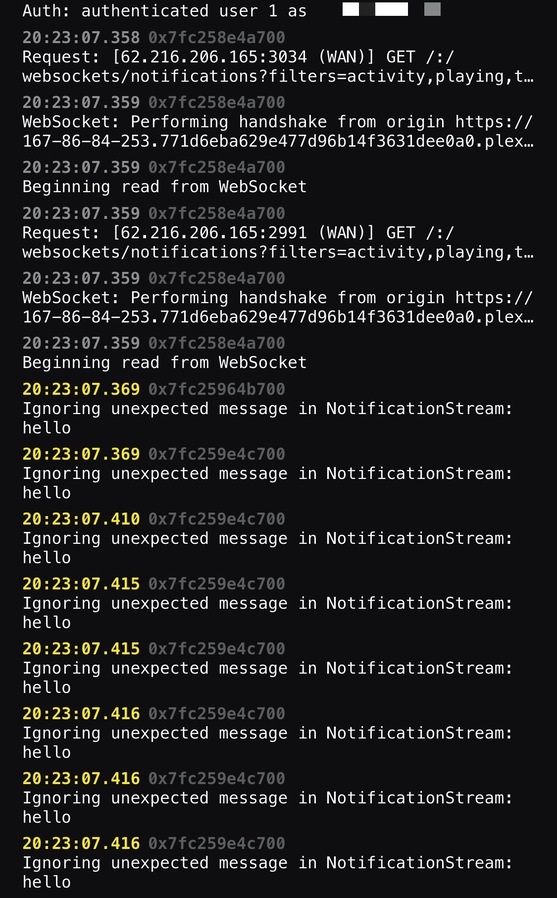
I also noticed that I get a notification with content ‘hello’ to Plex, here’s the log:
20:23:07.369 0x7fc259e4c700
Ignoring unexpected message in NotificationStream:
hello
IMG_09C60D903D84-1 2|690x1111
It doesn’t matter. All you can get in the /web subfolder is a copy of the web app which is also available publicly under https://app.plex.tv
Without any access permissions, it is useless.
Just as is the https://app.plex.tv useless to a person without access permissions.
I think it does matter. It is hosting images and js as well. Quite a lot of data is transmitted on every request. People can drain my connection by requesting those media files from my webserver.
Why is it not possible to disable hosting any html, js, and media files? It should not be required to respond to those http requests. It is certainly not used in anything related to media streaming when connecting via plex.tv or some app.
I will have to create a reverse proxy to block those requests.
That’s simply not true.
The app is loaded once, right at the beginning, into the web browser’s memory.
All subsequent actions don’t cause any traffic with your server – unless you are logged in and you have access permission to your server’s media content.
I am not worried about well behaving people.
Every single request to this url (with my domain removed):
http://mydomain.hidden:32400/web/js/chunk-2-9aec9d23ae81a4335ea6-plex-4.43.4-7bdeb4b.js
Results in 3.5MB of data transferred.
Again I am not worried about nice people. I am worried about people that can setup a script that fetches gigabytes of data from my server by simply requesting a file nobody needs. Just by finding my up address.
It would be fast to scan every single IP address on port 32400. And find those that serve plex. Then bomb them with request for the js files.
Servers hosting plex is not normally beefy or behind any ddos protection. Or even monitored.
And taking a look at the cache headers on those JS files. They are not cached in the browser. They are fetched on every request even for well behaving browsers that respect cache headers.
Edit: and who would misuse such thing? Well if I launched a competing commercial streaming platform I could make a lot of plex users unhappy by maxing out their bandwidth with request for useless .js files.
Tbh, you probably should not have a plex server hosted a public ip without either firewall and/or reverse proxy.
Plex doesn’t even let you register/sign the server in without accessing through a private ip network.
I’d attack the web app at app.plex.tv
and not the one on an individual user’s private server. That doesn’t make much sense.
I am sure app.plex.tv will use Cloudflares CDN network and DDOS protection to prevent any stuff from happening.
The problem is people hosting Plex from their basement often just do it directly without a CDN and any protection. And most importantly without monitoring of the traffic.
But I think @TeknoJunky is right. I will look into putting plex behind nginx to block the static web content hosting.
Of course everything public on my server is isolated with VLANs and firewalls. But still I am hosting static stuff that I am not interested to hosting with the plex web ui.