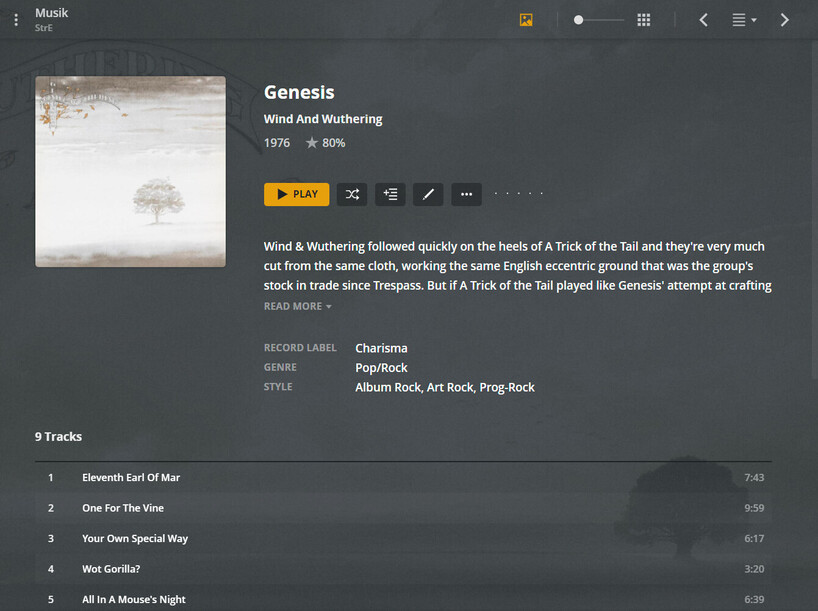
I have purchased on-line and downloaded a number of rock albums in high-resolution format. These files seem to have images embedded that show up in the background behind the poster/tile that I have created. I have gone into MP3Tag but the only image that shows up is the poster/tile that I inserted.
I realize this technique may be the provider’s way of “branding” their product. However, sincenone of my other audio files have such images it creates a bit of a visual mess when I put these tracks in a playlist . . . as in no photo/no photo/no photo/photo/no photo.
I would like to remove them, but need guidance on how to do so.
I have purchased multiple sets of rock music from 7 Digital. These sets appeal to me mostly because they are Steven Wilson remixes, not especially because they are 24/96 FLAC format. Still, they are available in 24/96 for only a few dollars more, so I get them. I suspect the images that I am seeing in my TCL Roku TV are also in the standard 16/44 format files.
These images are found in my downloaded versions of two Chicago albums, two Jethro Tull albums and two Yes albums. They are nice enough photos of the band members and are so similar in pose and background that I am inclined to think they were taken by the same photographer.
These images show up in every track from these hi-res audio sets. They show up nowhere else in my music collection. Perhaps I have not set something correctly that is telling PLEX to go out to the internet to “grab” art work. All other music sets I created many months ago.
While the photos look nice enough, my own self-generated posters/tiles sit center screen, right in front of the photo, but not covering the entire photo.
I have tried resetting Windows File Manager to allow me to see “hidden” files, such that I might see these images in the folders, but there are no images there. Somehow, either PLEX is accessing them or they are embedded in the audio file itself.
I also have a new set of 24/96 audios by Pavarotti, also from 7 Digital. They, too, have an image in the background.
But then I also have a set of five 24/96 format track by Queen that do not have these images in the background. It is all a mystery to me.
Background pictures are fetched by Plex for the artist. (But not from the audio files, they come from an online source.)
This background is then inherited by the album, unless there is one specific for the album.
Clearly, I am getting background pictures and data as shown in your screen shot above. How do I prevent PLEX from going out to “grab” this information?
Are there settings I need to adjust when I set up a new Music library that will put a halt to the “background” seeking function?