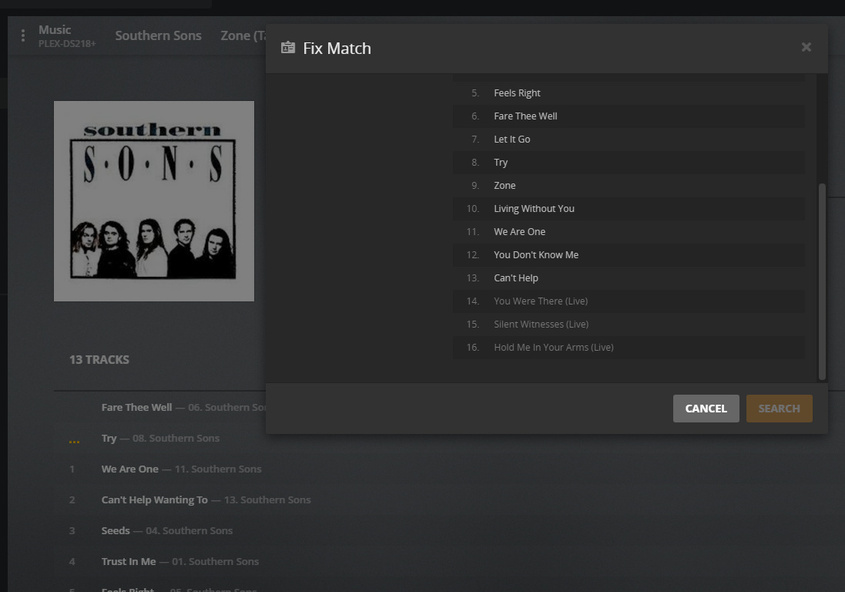
Hi, I’m having difficulty tagging an album correctly. There are several versions of this album and the order of the songs is different in each of the different versions. My version has additional tracks too.
I know this is an obvious answer, but if you’re talking just about one album, have you tried to fix the match manually?
You just have to click on the 3 dots on the wrong album and then “fix match”. There you can search the album you need, and well, if you don’t find it, maybe it’s not available on the database where plex search the information. In that case, you should use your personal metadata, changing the agent settings for that album in particular. (You can do that again with fix match, selecting “personal media artists”
I tried adding an entry on MusicBrainz and tried to “Fix Match” on Plex. However, Plex still says it has 13 tracks when it actually has 16 tracks. The tracks listing is still from the Australian version.
I think I’m one step closer. I can Search and find the album, but when I click on it, nothing happens. As you can see, the last 3 tracks are grayed out. The album still shows 13 tracks in the wrong other.
Thanks, everyone who gave your advice. I used Picard and also found the 3 tracks in “Unknown” artists. I manually edited the information and now they are all in the same album.